







Question: Tasks: 1. Using the above provided IP address and your learnings from class, configure the topology. 2. Please retain the interface names and IP
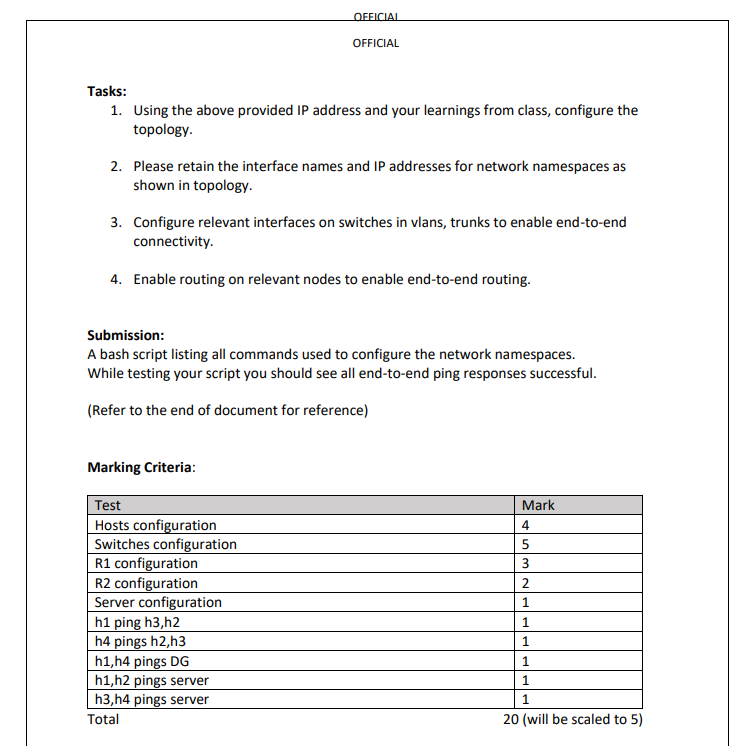
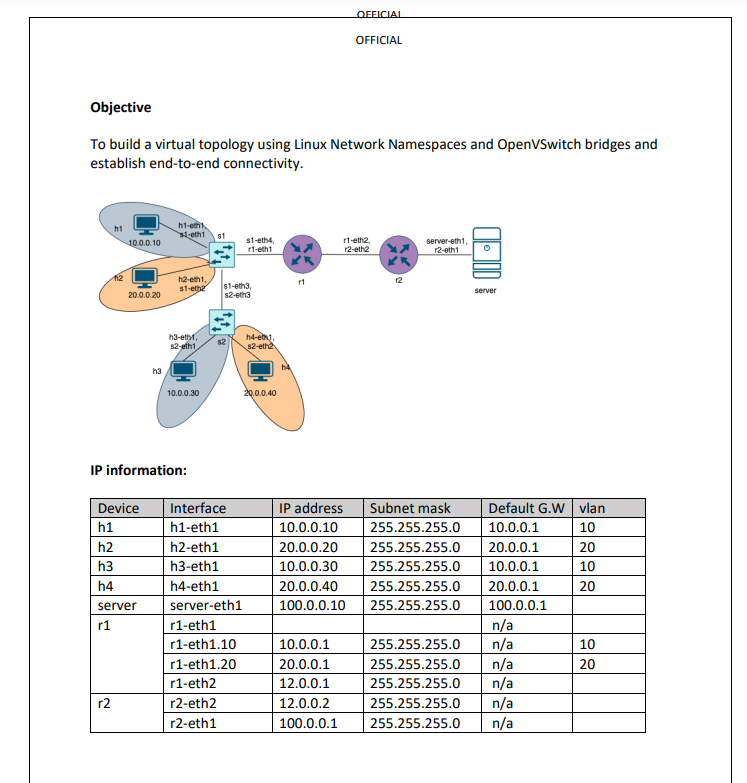
Tasks: 1. Using the above provided IP address and your learnings from class, configure the topology. 2. Please retain the interface names and IP addresses for network namespaces as shown in topology. OFFICIAL 3. Configure relevant interfaces on switches in vlans, trunks to enable end-to-end connectivity. OFFICIAL 4. Enable routing on relevant nodes to enable end-to-end routing. Marking Criteria: Submission: A bash script listing all commands used to configure the network namespaces. While testing your script you should see all end-to-end ping responses successful. (Refer to the end of document for reference) Test Hosts configuration Switches configuration R1 configuration R2 configuration Server configuration h1 ping h3,h2 h4 pings h2, h3 h1,h4 pings DG h1, h2 pings server h3,h4 pings server Total Mark 4 5 3 2 1 1 1 1 1 1 20 (will be scaled to 5) Objective To build a virtual topology using Linux Network Namespaces and OpenVSwitch bridges and establish end-to-end connectivity. h1 10.0.0.10 20.0.0.20 r2 h3 h1 h2 h3 h4 server r1 h1-eth $1-eth1 $1 h2-eth1, $1-eth2 s1-eth3, $2-eth3 h3-eth, $2-eth1 IP information: 10.0.0.30 [W] Device Interface h1-eth1 s2 s1-eth4, r1-eth1 h2-eth1 h3-eth1 h4-eth1 server-eth1 r1-eth1 r1-eth1.10 r1-eth1.20 r1-eth2 r2-eth2 r2-eth1 h4-ej, s2-eth2 20.0.0.40 r1 OFFICIAL IP address 10.0.0.10 20.0.0.20 10.0.0.30 20.0.0.40 100.0.0.10 10.0.0.1 20.0.0.1 12.0.0.1 12.0.0.2 100.0.0.1 OFFICIAL r1-eth2, r2-eth2 12 server-eth1, r2-eth1 255.255.255.0 255.255.255.0 server Subnet mask 255.255.255.0 255.255.255.0 20.0.0.1 255.255.255.0 10.0.0.1 20.0.0.1 100.0.0.1 Default G.W 10.0.0.1 n/a n/a 255.255.255.0 255.255.255.0 n/a 255.255.255.0 n/a 255.255.255.0 n/a 255.255.255.0 n/a vlan 10 20 10 20 10 20
Step by Step Solution
There are 3 Steps involved in it
To accomplish the task follow the steps below based on the provided topology and IP information The following script covers the configuration of namespaces interfaces OVS bridges VLANs routing and ens... View full answer

Get step-by-step solutions from verified subject matter experts
 Study Help