







Question: The following HTML and CSS results in this element. Edit HTML Edit CSS #photo background: green; height: 100px; width: 100px; } Write additional CSS rules
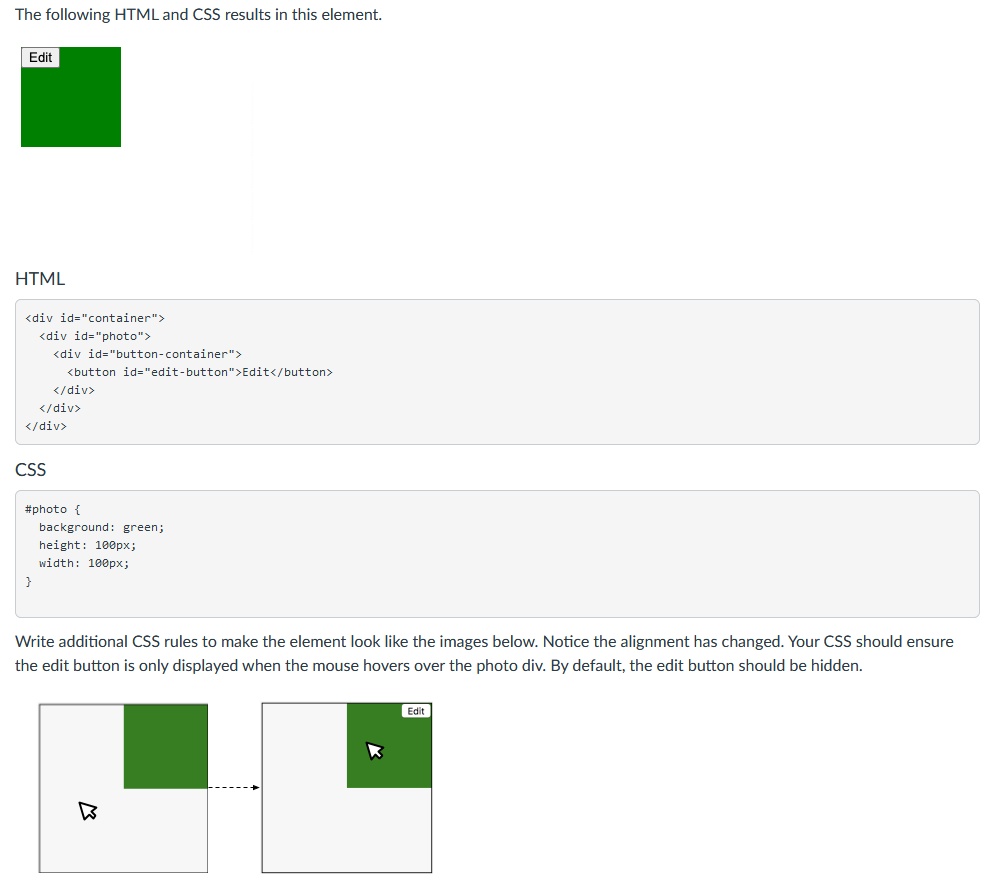
The following HTML and CSS results in this element. Edit HTML
CSS #photo background: green; height: 100px; width: 100px; } Write additional CSS rules to make the element look like the images below. Notice the alignment has changed. Your CSS should ensure the edit button is only displayed when the mouse hovers over the photo div. By default, the edit button should be hidden. Edit
Step by Step Solution
There are 3 Steps involved in it
1 Expert Approved Answer
Step: 1 Unlock

Question Has Been Solved by an Expert!
Get step-by-step solutions from verified subject matter experts
Step: 2 Unlock
Step: 3 Unlock
 Study Help