







Question: The personal details section features text boxes for input, while the favourite food question utilises checkboxes to allow users to select multiple options. The final
The personal details section features text boxes for input, while the favourite food question utilises checkboxes to allow users to select multiple options. The final question about rating employs radio buttons, restricting the user to one choice. The chosen response is translated into a number from to When the user clicks submit, the entered data should be saved to a database of your choosing.
Screen : View Survey Result
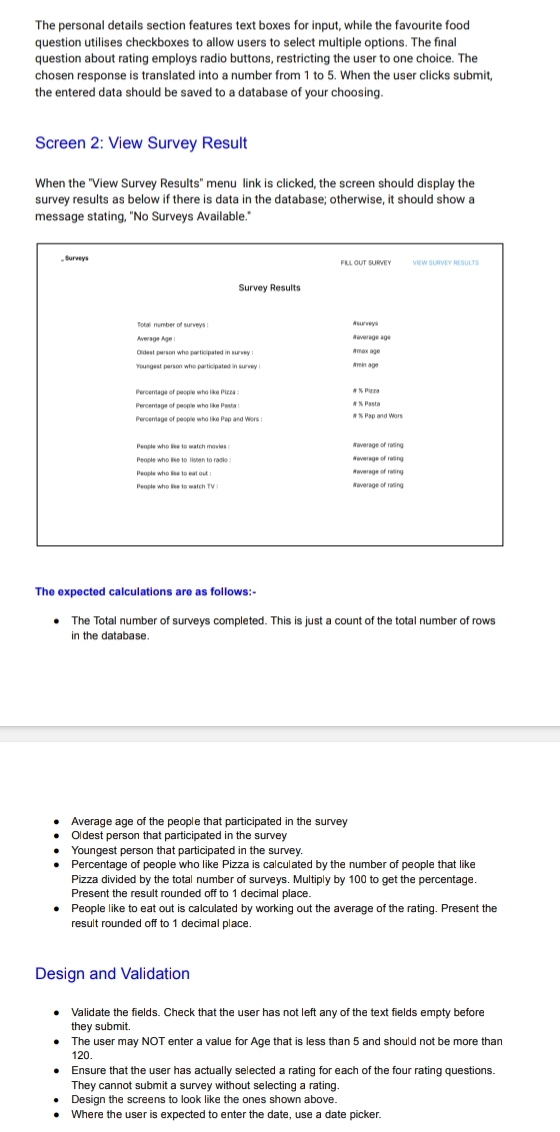
When the "View Survey Results" menu link is clicked, the screen should display the survey results as below if there is data in the database; otherwise, it should show a message stating, No Surveys Available."
Surveys
FLL OUT SUBEY
YEW GLAVEY REBULTS
Survey Results
asurrey.
aevarege age
amax age
aminag
A $ Pria
a Pasta
a X Pap and Wors
awersoe of raire
Aeversge of rasire
A avergge of raire
ateverae of roing
The expected calculations are as follows:
The Total number of surveys completed. This is just a count of the total number of rows in the database.
Average age of the people that participated in the survey
Oldest person that participated in the survey
Youngest person that participated in the survey.
Percentage of people who like Pizza is calculated by the number of people that like Pizza divided by the total number of surveys. Multiply by to get the percentage. Present the result rounded off to decimal place.
People like to eat out is calculated by working out the average of the rating. Present the result rounded off to decimal place.
Design and Validation
Validate the fields. Check that the user has not left any of the text fields empty before they submit.
The user may NOT enter a value for Age that is less than and should not be more than
Ensure that the user has actually selected a rating for each of the four rating questions.
They cannot submit a survey without selecting a rating.
Design the screens to look like the ones shown above.
Where the user is expected to enter the date, use a date picker.
Step by Step Solution
There are 3 Steps involved in it
1 Expert Approved Answer
Step: 1 Unlock

Question Has Been Solved by an Expert!
Get step-by-step solutions from verified subject matter experts
Step: 2 Unlock
Step: 3 Unlock
 Study Help