







Question: The PowerShell script must do the following. This is what I have so far. I believe something should be changed on lines 6 and 7
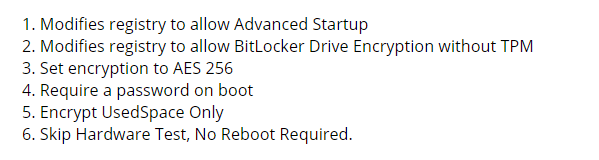
The PowerShell script must do the following.
This is what I have so far. I believe something should be changed on lines 6 and 7 so that the system can still recognize the password when prompted to re-enter the password. The way it is now it does not work correctly.
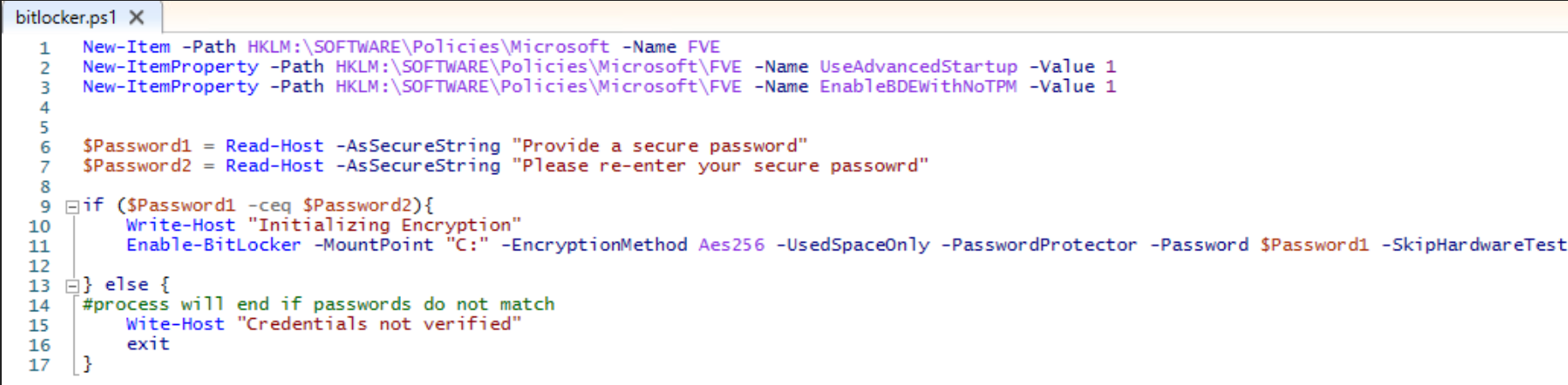
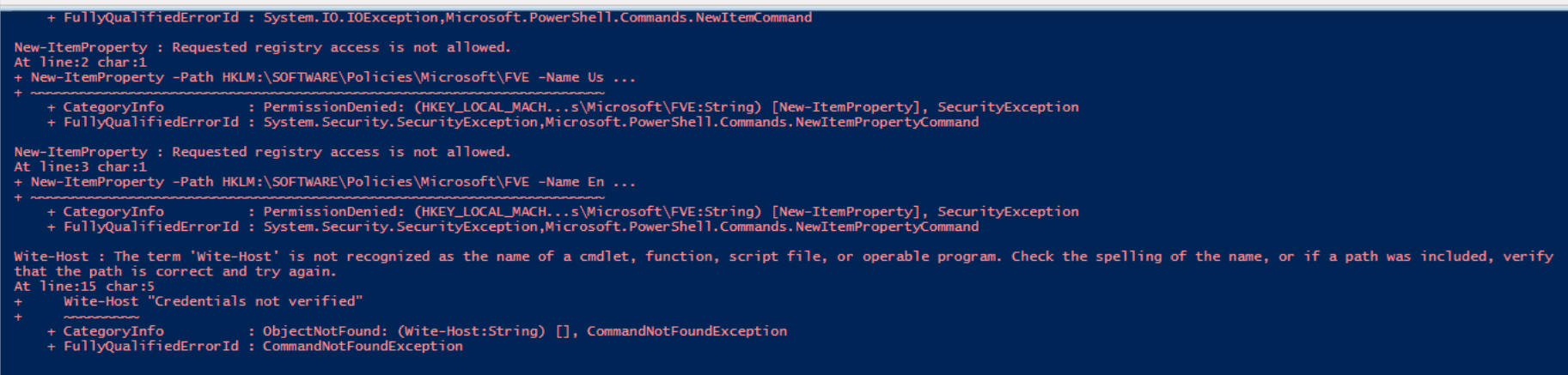
1. Modifies registry to allow Advanced Startup 2. Modifies registry to allow BitLocker Drive Encryption without TPM 3. Set encryption to AES 256 4. Require a password on boot 5. Encrypt UsedSpace Only 6. Skip Hardware Test, No Reboot Required. 2. bitlocker.ps1 x 1 New-Item -Path HKLM: SOFTWARE Policies\Microsoft -Name FVE New-ItemProperty -Path HKLM: SOFTWARE Policies\Microsoft FVE -Name UseAdvancedStartup -Value 1 3 New-ItemProperty -Path HKLM: \SOFTWARE Policies\Microsoft FVE -Name EnableBDEwithNoTPM -Value 1 4 5 6 $Password1 = Read-Host - As SecureString "Provide a secure password" 7 $Password2 = Read-Host - As SecureString "Please re-enter your secure passowrd" 8 9 Dif ($Password1 -ceq $Password) { 10 Write-Host "Initializing Encryption" 11 Enable-BitLocker -MountPoint "C" -EncryptionMethod Aes 256 - UsedSpaceonly -PasswordProtector -Password $Password1 - SkipHardwareTest 12 13 } else { #process will end if passwords do not match Wite-Host "Credentials not verified" exit } 14 15 16 17 + FullyQualifiedErrorId : System.IO.IOException, Microsoft. PowerShell.Commands. NewItemCommand New-ItemProperty : Requested registry access not allowed. At line:2 char:1 + New-ItemProperty -Path HKLM:\SOFTWARE Policies \Microsoft\FVE -Name Us ... + CategoryInfo : Permission denied: (HKEY_LOCAL_MACH...s\Microsoft\FVE:String) [New-ItemProperty], SecurityException + FullyQualifiedError Id : System. Security.SecurityException, Microsoft.PowerShell.Commands. NewItemPropertyCommand New-ItemProperty : Requested registry access is not allowed. At line:3 char:1 + New-ItemProperty -Path HKLM: \SOFTWARE\Policies\Microsoft\FVE -Name En ... + CategoryInfo : PermissionDenied: (HKEY_LOCAL_MACH...s\Microsoft\FVE:String) [New-ItemProperty], SecurityException + FullyQualifiedErrorId : System. Security.SecurityException,Microsoft.PowerShel1.Commands. NewItemPropertyCommand Wite-Host : The term 'wite-Host' is not recognized as the name of a cmdlet, function, script file, or operable program. Check the spelling of the name, or if a path was included, verify that the path is correct and try again. At line: 15 char:5 Wite-Host "Credentials not verified" + CategoryInfo : ObjectNotFound: (Wite-Host:String) [], CommandNotFoundException + FullyQualifiedErrorId : CommandNotFoundException 1. Modifies registry to allow Advanced Startup 2. Modifies registry to allow BitLocker Drive Encryption without TPM 3. Set encryption to AES 256 4. Require a password on boot 5. Encrypt UsedSpace Only 6. Skip Hardware Test, No Reboot Required. 2. bitlocker.ps1 x 1 New-Item -Path HKLM: SOFTWARE Policies\Microsoft -Name FVE New-ItemProperty -Path HKLM: SOFTWARE Policies\Microsoft FVE -Name UseAdvancedStartup -Value 1 3 New-ItemProperty -Path HKLM: \SOFTWARE Policies\Microsoft FVE -Name EnableBDEwithNoTPM -Value 1 4 5 6 $Password1 = Read-Host - As SecureString "Provide a secure password" 7 $Password2 = Read-Host - As SecureString "Please re-enter your secure passowrd" 8 9 Dif ($Password1 -ceq $Password) { 10 Write-Host "Initializing Encryption" 11 Enable-BitLocker -MountPoint "C" -EncryptionMethod Aes 256 - UsedSpaceonly -PasswordProtector -Password $Password1 - SkipHardwareTest 12 13 } else { #process will end if passwords do not match Wite-Host "Credentials not verified" exit } 14 15 16 17 + FullyQualifiedErrorId : System.IO.IOException, Microsoft. PowerShell.Commands. NewItemCommand New-ItemProperty : Requested registry access not allowed. At line:2 char:1 + New-ItemProperty -Path HKLM:\SOFTWARE Policies \Microsoft\FVE -Name Us ... + CategoryInfo : Permission denied: (HKEY_LOCAL_MACH...s\Microsoft\FVE:String) [New-ItemProperty], SecurityException + FullyQualifiedError Id : System. Security.SecurityException, Microsoft.PowerShell.Commands. NewItemPropertyCommand New-ItemProperty : Requested registry access is not allowed. At line:3 char:1 + New-ItemProperty -Path HKLM: \SOFTWARE\Policies\Microsoft\FVE -Name En ... + CategoryInfo : PermissionDenied: (HKEY_LOCAL_MACH...s\Microsoft\FVE:String) [New-ItemProperty], SecurityException + FullyQualifiedErrorId : System. Security.SecurityException,Microsoft.PowerShel1.Commands. NewItemPropertyCommand Wite-Host : The term 'wite-Host' is not recognized as the name of a cmdlet, function, script file, or operable program. Check the spelling of the name, or if a path was included, verify that the path is correct and try again. At line: 15 char:5 Wite-Host "Credentials not verified" + CategoryInfo : ObjectNotFound: (Wite-Host:String) [], CommandNotFoundException + FullyQualifiedErrorId : CommandNotFoundException
Step by Step Solution
There are 3 Steps involved in it

Get step-by-step solutions from verified subject matter experts
 Study Help