







Question: THIS CODE BELOW IS THE WORKING POINT CLASS THAT YOU START WITH, ADD TO THIS BY FOLLOWING THE INSTRUCTIONS // Point.java public class Point {
THIS CODE BELOW IS THE WORKING POINT CLASS THAT YOU START WITH, ADD TO THIS BY FOLLOWING THE INSTRUCTIONS
// Point.java
public class Point { // instance variables private int x; private int y; private int z; // default constructor to set (x,y,z) to (3,4,5) public Point() { setX(3); setY(4); setZ(5); } // parameterized constructor to set (x,y,z) to specified values public Point(int x, int y, int z) { setX(x); setY(y); setZ(z); } // setters // method to set the value of x public void setX(int x) { this.x = x; } // method to set the value of y public void setY(int y) { this.y = y; } // method to set the value of z public void setZ(int z) { this.z = z; } // getters // method to return the value of x public int getX() { return x; } // method to return the value of y public int geY() { return y; } // method to return the value of z public int getZ() { return z; } // method to return String representation of Point object public String toString() { return "("+x+", "+y+", "+z+")"; } }
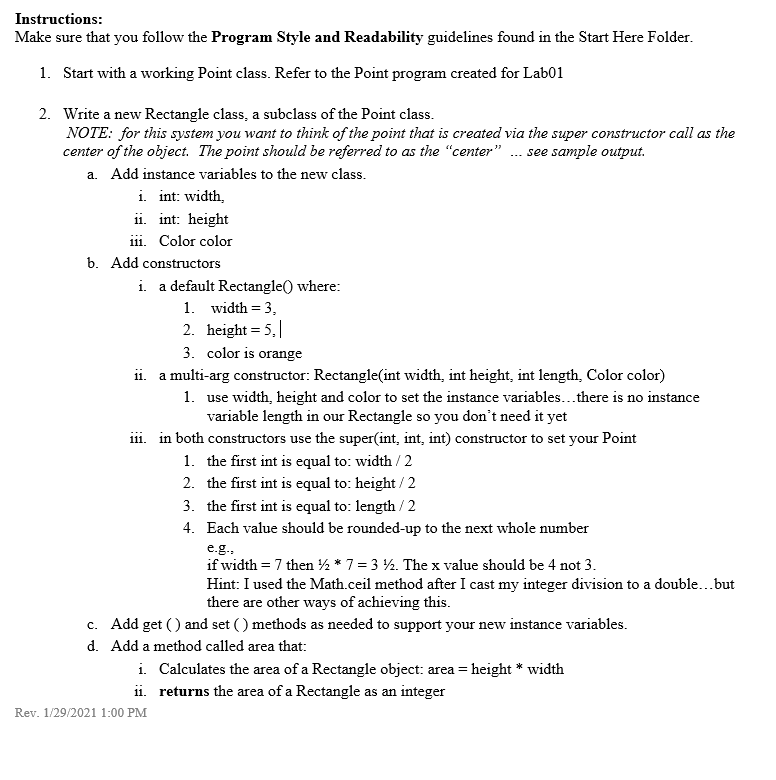
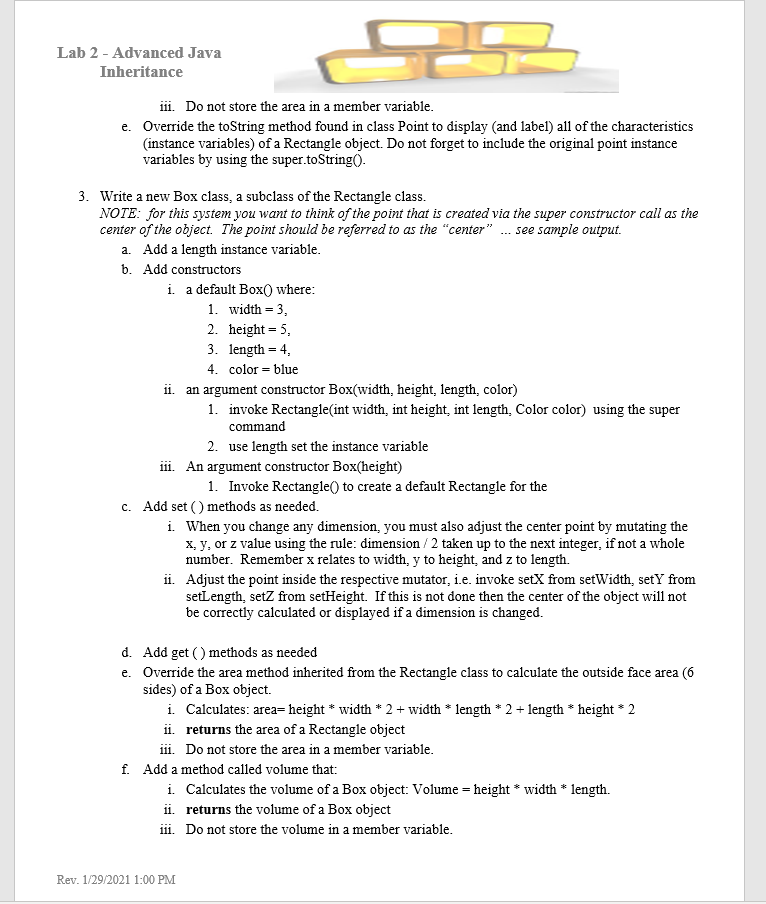
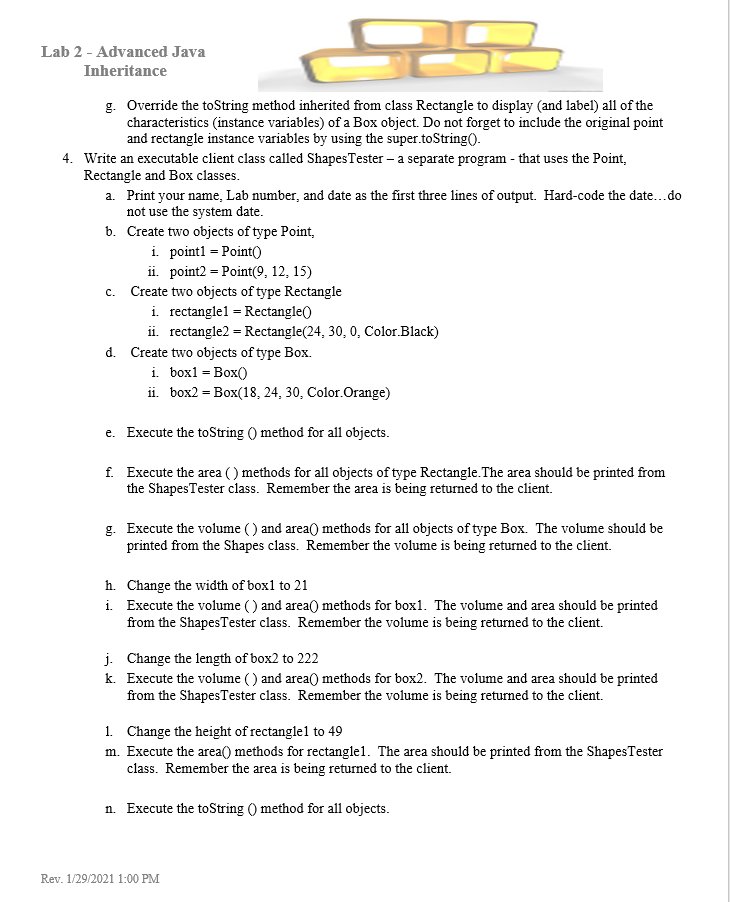
Instructions: Make sure that you follow the Program Style and Readability guidelines found in the Start Here Folder. 1. Start with a working Point class. Refer to the Point program created for Lab01 2. Write a new Rectangle class, a subclass of the Point class. NOTE: for this system you want to think of the point that is created via the super constructor call as the center of the object. The point should be referred to as the "center" ... see sample output. a. Add instance variables to the new class. i. int: width ii. int: height iii. Color color b. Add constructors i a default Rectangle() where: 1. width = 3, 2. height = 5.1 3. color is orange ii. a multi-arg constructor: Rectangle(int width, int height, int length, Color color) 1. use width, height and color to set the instance variables...there is no instance variable length in our Rectangle so you don't need it yet 111. in both constructors use the super(int, int, int) constructor to set your Point 1. the first int is equal to: width/2 2. the first int is equal to: height/2 3. the first int is equal to: length/2 4. Each value should be rounded-up to the next whole number e.g. if width = 7 then 12 * 7 = 3 42. The x value should be 4 not 3. Hint: I used the Math.ceil method after I cast my integer division to a double...but there are other ways of achieving this. c. Add get() and set () methods as needed to support your new instance variables. d. Add a method called area that: i. Calculates the area of a Rectangle object: area = height * width ii. returns the area of a Rectangle as an integer Rev. 1/29/2021 1:00 PM Lab 2 - Advanced Java Inheritance 111. Do not store the area in a member variable. e. Override the toString method found in class Point to display and label) all of the characteristics (instance variables) of a Rectangle object. Do not forget to include the original point instance variables by using the super.toString( 3. Write a new Box class, a subclass of the Rectangle class. NOTE: for this system you want to think of the point that is created via the super constructor call as the center of the object. The point should be referred to as the "center" ... see sample output. a. Add a length instance variable. b. Add constructors i. a default Box where: 1. width = 3, 2. height = 5, 3. length = 4, 4. color = blue ii. an argument constructor Box(width, height, length, color) 1. invoke Rectangle(int width, int height, int length, Color color) using the super command 2. use length set the instance variable iii. An argument constructor Box(height) 1. Invoke Rectangle() to create a default Rectangle for the c. Add set() methods as needed. i. When you change any dimension, you must also adjust the center point by mutating the x, y, or z value using the rule: dimension/2 taken up to the next integer, if not a whole number. Remember x relates to width, y to height, and z to length. ii. Adjust the point inside the respective mutator, i.e. invoke setX from setWidth, sety from setLength, setZ from setHeight. If this is not done then the center of the object will not be correctly calculated or displayed if a dimension is changed. d. Add get() methods as needed e. Override the area method inherited from the Rectangle class to calculate the outside face area (6 sides) of a Box object i. Calculates: area= height * width * 2 + width * length * 2 + length * height * 2 ii. returns the area of a Rectangle object iii. Do not store the area in a member variable. f. Add a method called volume that: i. Calculates the volume of a Box object: Volume = height * width * length. ii. returns the volume of a Box object 111. Do not store the volume in a member variable. Rev. 1/29/2021 1:00 PM Lab 2 - Advanced Java Inheritance g. Override the toString method inherited from class Rectangle to display (and label) all of the characteristics instance variables) of a Box object. Do not forget to include the original point and rectangle instance variables by using the super.toStringo. 4. Write an executable client class called Shapes Tester - a separate program - that uses the Point, Rectangle and Box classes. a. Print your name, Lab number, and date as the first three lines of output. Hard-code the date...do not use the system date. b. Create two objects of type Point, i. point1 = Point ii. point2 = Point(9, 12, 15) c. Create two objects of type Rectangle i rectangle1 = Rectangle ii. rectangle2 = Rectangle(24, 30, 0, Color.Black) d. Create two objects of type Box. i. box1 = Box ii. box2 = Box(18, 24, 30, Color Orange) e. Execute the toString method for all objects. f Execute the area () methods for all objects of type Rectangle. The area should be printed from the ShapesTester class. Remember the area is being returned to the client. g. Execute the volume () and area() methods for all objects of type Box. The volume should be printed from the Shapes class. Remember the volume is being returned to the client. h. Change the width of box1 to 21 i. Execute the volume () and area() methods for boxl. The volume and area should be printed from the Shapes Tester class. Remember the volume is being returned to the client. j. Change the length of box2 to 222 k. Execute the volume () and area() methods for box2. The volume and area should be printed from the Shapes Tester class. Remember the volume is being returned to the client. 1. Change the height of rectanglel to 49 m. Execute the area() methods for rectanglel. The area should be printed from the Shapes Tester class. Remember the area is being returned to the client. n. Execute the toString method for all objects. Rev. 1/29/2021 1:00 PM
Step by Step Solution
There are 3 Steps involved in it

Get step-by-step solutions from verified subject matter experts
 Study Help