







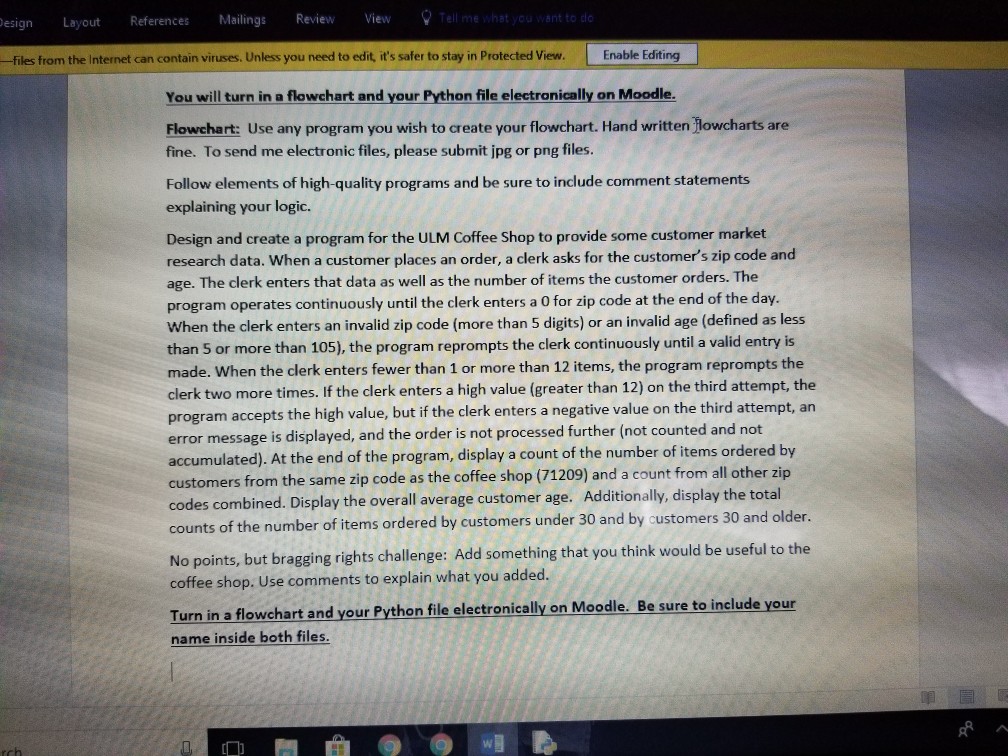
Question: This code has to be typed in Python language. How should this program look in Python for it to run smoothly? Here's the program description
This code has to be typed in Python language. How should this program look in Python for it to run smoothly? Here's the program description
num custZip
num custAge
num Items = 0
num validIt
num TotalOrder = 0
num CustAge = 0
num Items45 = 0
num ItemsOlder = 0
num ItemsInZip = 0
num ItemsInrZipss = 0
num StoreZip= 54984
string ZIP_MSG = Enter the zip code
string AGE_MSG = Enter the customers age
string ITEM_MSG = Enter number of items
testing()
while custZip not equal to 0
calc()
endwhile
print()
stop
validZipCode()
while custZip > 99999
output Please enter a valid zip code
input custZip
endwhile
return
validCustAge()
while custAge 110
output Please enter a valid customer age
input custAge
endwhile
return
validItems()
Declarations
num attempts = 0
num LIMIT = 2
validIt = 1
while(Items12)AND attempts
output Please again input number of items
input Items
attempts = attempts + 1
endwhile
if attempts = 2 AND Items
output invalid number of items was entered
output This order will not be counted
validIt = 0
endif
return
testing()
output ZIP_MSG
input custZip
return
clac()
output AGE_MSG
input custAge
output ITEM_MSG
input Items
validZipCode()
validCustAge()
validItems()
TotalOrder = TotalOrder + 1
CustAge = CustAge + custAge
if custZip = STORE_ZIP
ItemsInZip = ItemsInZip + Items
else
ItemsInrZipss = ItemsInrZipss + Items
endif
if custAge
Items30 = Items30 + Items
else
ItemsOlder = ItemsOlder + Items
endif
output ZIP_MSG
input custZip
return
Print()
Declarations
avgAge
if TotalOrder > 0 then
output items in the , STORE_ZIP, zip code =
, ItemsInZip output item in other zip codes =, ItemsInrZipss
avgAge = CustAge / TotalOrder
output The average customer age is: , avgAge
output Items30,
items were ordered by customers under 45
output ItemsOlder,
items were ordered by customers 45 and
older
endif
output End of program
return
esign Layout References Mailings Review iew -files from the Internet can contain viruses. Unless you need to edit, it's safer to stay in Protected View Enable Editing You will turn in a flowchart and your Python file electronically on Moodle Flowchart: Use any program you wish to create your flowchart. Hand written Howcharts are fine. To send me electronic files, please submit jpg or png files. Follow elements of high-quality programs and be sure to include comment statements explaining your logic. Design and create a program for the ULM Coffee Shop to provide some customer market research data. When a customer places an order, a clerk asks for the customer's zip code and age. The clerk enters that data as well as the number of items the customer orders. The program operates continuously until the clerk enters a O for zip code at the end of the day. When the clerk enters an invalid zip code (more than 5 digits) or an invalid age (defined as less than 5 or more than 105), the program reprompts the clerk continuously until a valid entry is made. When the clerk enters fewer than 1 or more than 12 items, the program reprompts the clerk two more times. If the clerk enters a high value (greater than 12) on the third attempt, the program accepts the high value, but if the clerk enters a negative value on the third attempt, an error message is displayed, and the order is not processed further (not counted and not accumulated). At the end of the program, display a count of the number of items ordered by customers from the same zip code as the coffee shop (71209) and a count from all other zip codes combined. Display the overall average customer age. Additionally, display the total counts of the number of items ordered by customers under 30 and by customers 30 and older. No points, but bragging rights challenge: Add something that you think would be useful to the coffee shop. Use comments to explain what you added Turn in a flawchart and your Python fle alectronicaly on Moodle. Be sure to include your name inside both files
Step by Step Solution
There are 3 Steps involved in it

Get step-by-step solutions from verified subject matter experts
 Study Help