







Question: This is for a visual basic class. Create a form like the one shown above and add functionality to the Calculate button that performs the
This is for a visual basic class.
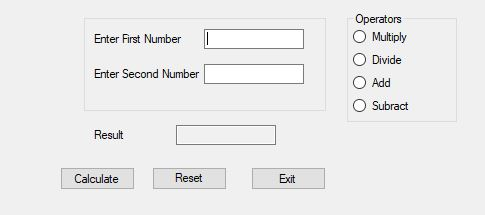
Create a form like the one shown above and add functionality to the Calculate button that performs the selected calculation between the first and second number using the operator selected in the radio button.
Create an IF statement that uses the checked value to update a string variable called txtOperator with the text shown in the respective Operators check box.
Create a Select Case statement that uses the txtOperator variable result to perform that type of calculation between the first and second number. For example if Multiply is checked then perform the following calculation: First Number * Second Number.
Add a Reset button that clears all values on the screen.
Add an Exit button that closes the application.
Operators O Multiply O Divide O Add O Subract Enter First Number Enter Second Number Result Calculate Reset Exit
Step by Step Solution
There are 3 Steps involved in it

Get step-by-step solutions from verified subject matter experts
 Study Help