







Question: this verilog code is about stopwatch module stopwatch ( input wire clk , input wire reset, input wire start, input wire stop, input wire css
this verilog code is about stopwatch
module stopwatch
input wire clk
input wire reset,
input wire start,
input wire stop,
input wire css
output reg : B
output reg : B
output reg : Bm
;
reg : sec sec min min;
reg : bestsec bestsec bestmin bestmin;
reg running;
reg : counter;
always @posedge clk or posedge reset begin
if reset begin
secb;
secb;
minb;
minb;
bestsecb;
bestsecb;
bestminb;
bestminb;
counter b;
running ;
end else if start begin
secb;
secb;
minb;
minb;
counter b;
running ;
end else if stop begin
running ;
end else if css && running begin
if min min sec secbestmin bestmin bestsec bestsec begin
bestsec sec;
bestsec sec;
bestmin min;
bestmin min;
end
end else if running begin
counter counter ;
if counter b begin clock cycles for s
counter ;
if secb begin
secb;
if secb begin
secb;
if minb begin
minb;
if minb begin
minb;
end else begin
min min;
end
end else begin
min min;
end
end else begin
sec sec;
end
end else begin
sec sec;
end
end
end
end
always @ begin
B min;
B min;
Bm sec;
Bm sec;
end
endmodule
and this is testbench
timescale ns ps
module tbstopwatch;
reg clk;
reg reset;
reg start;
reg stop;
reg css;
wire : B;
wire : B;
wire : Bm;
wire : Bm;
stopwatch uut
clkclk
resetreset
startstart
stopstop
csscss
BB
BB
BmBm
BmBm
;
always begin
# clk ~clk;
end
initial begin
clk ;
reset ;
start ;
stop ;
css ;
# reset ;
# reset ;
# start ;
# start ;
#;
# stop ;
# stop ;
# css ;
# css ;
# reset ;
# reset ;
# $finish;
end
initial begin
$monitorTime: dddd Best Time: dddd
B B Bm Bm
uut.bestmin uut.bestmin
uut.bestsec uut.bestsec;
end
endmodule
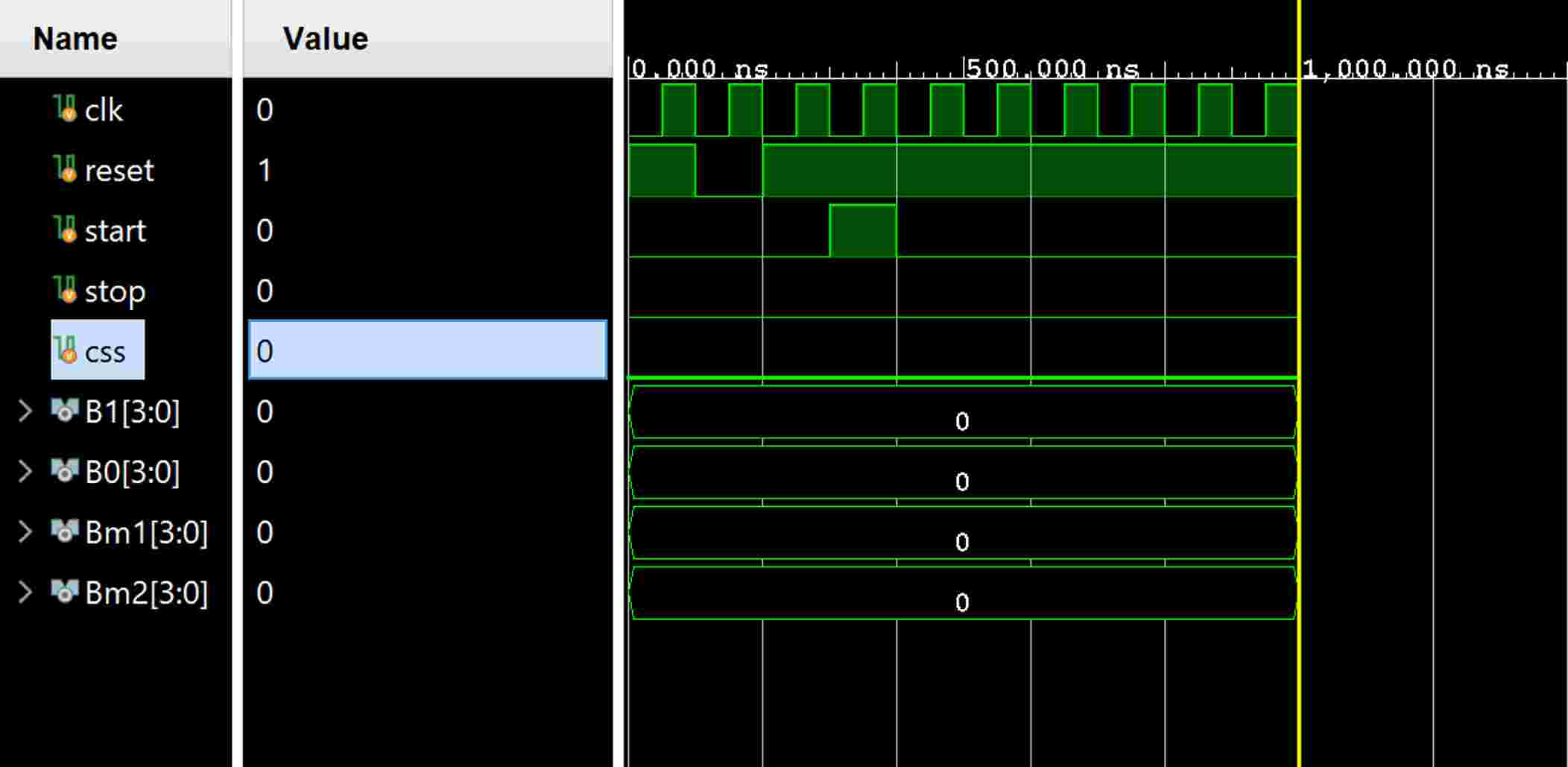
then i simulate, but waveform is like that picture
but i want waveform that when i start, bm increases
and i want to see stop and csss waves.
why stop and css are only in that picture...
please modify codes please...
Step by Step Solution
There are 3 Steps involved in it
1 Expert Approved Answer
Step: 1 Unlock

Question Has Been Solved by an Expert!
Get step-by-step solutions from verified subject matter experts
Step: 2 Unlock
Step: 3 Unlock
 Study Help