







Question: - To write a new Python program in IDLE, open a new python file window. Click File on the menu bar, then click New Launcher,
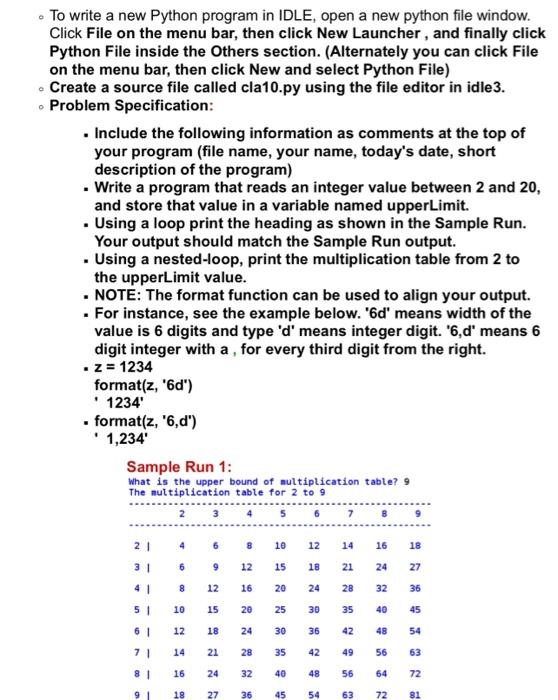
- To write a new Python program in IDLE, open a new python file window. Click File on the menu bar, then click New Launcher, and finally click Python File inside the Others section. (Alternately you can click File on the menu bar, then click New and select Python File) - Create a source file called cla10.py using the file editor in idle3. - Problem Specification: - Include the following information as comments at the top of your program (file name, your name, today's date, short description of the program) - Write a program that reads an integer value between 2 and 20 , and store that value in a variable named upperLimit. - Using a loop print the heading as shown in the Sample Run. Your output should match the Sample Run output. - Using a nested-loop, print the multiplication table from 2 to the upperLimit value. - NOTE: The format function can be used to align your output. - For instance, see the example below. ' 6d ' means width of the value is 6 digits and type ' d ' means integer digit. '6,d' means 6 digit integer with a, for every third digit from the right. z z=1234 format (z,6d) . 1234
Step by Step Solution
There are 3 Steps involved in it

Get step-by-step solutions from verified subject matter experts
 Study Help