







Question: (ues python) Import the graphics library to your python file at the top of the lab file. ? Function 1: The main function Inside the
(ues python)
Import the graphics library to your python file at the top of the lab file.
? Function 1: The main function
Inside the main function of this lab you have only one statement which is call the function CreateInterface defined below.
? Function 2: Create a windows
Write a function called CreateWindow that takes no parameters and it returns one value. Inside the function perform the following:
Create a graphical window with the title Lab 5 and width 600 and height of 600.
Set the background color of the window to white.
Show the message "Welcome to Lab 5" centered at point (300,15). Make the text with size 16 and it is with red color.
Draw a line between the points (10,20) and (590,20) with a blue color.
Return back the window you created inside the function.
? Function 3: Closing the window
Write a function called CloseWindow that receives one parameter and it returns nothing back. The function receives one parameter which is the name of a graphical window. The function let the user clicks a mouse on that window then it closes the window.
? Function 4: Create an Interface
Write a function called CreateInterface that receives no parameters and it returns nothing. The function performs the following:
Calls the function CreateWindow (created above) and store the returned value of that function.
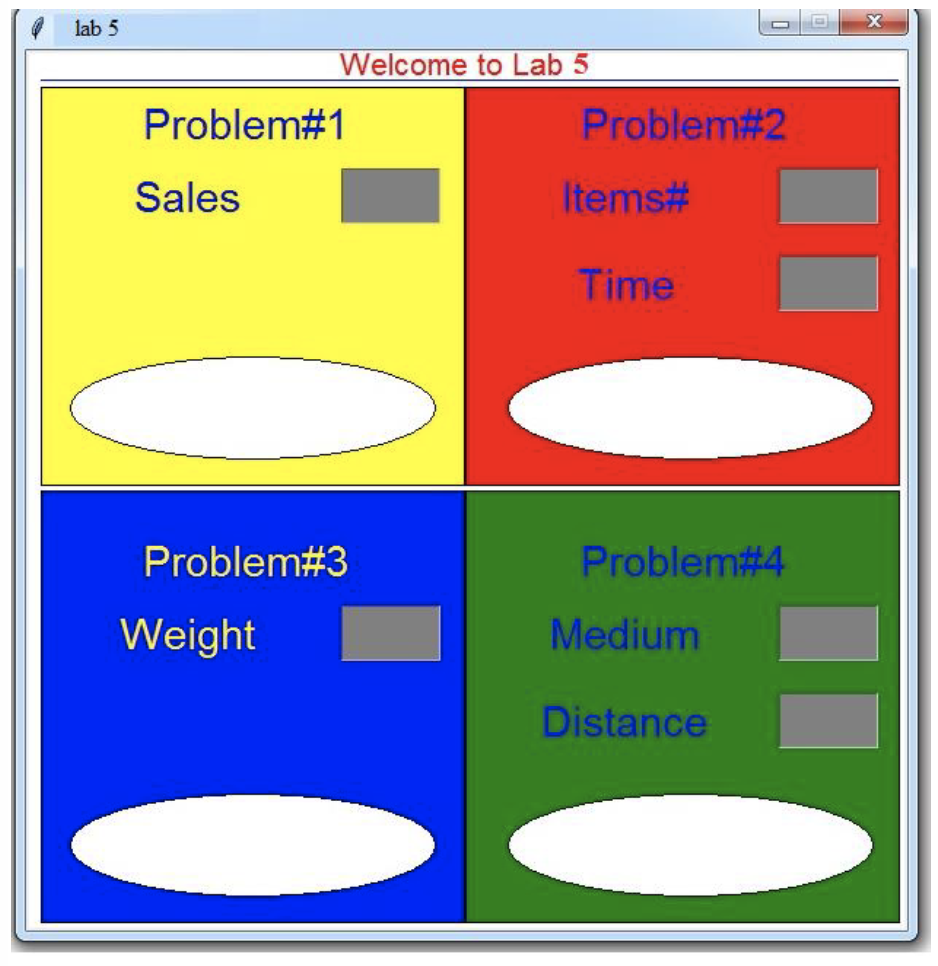
Build the interface shown next. You have to use the proper shapes (Texts, Entries, Rectangles, Ovals, and Lines) to do that. For the multiple Entries, perform only the first 3 steps we talked about in the class. Leave the last 2 steps.
Let the user fill data inside all the entries (there is no code for this step, it is going to be done in the run time)
Let the user click the mouse one time only (step 4 from the entries). Just one mouse clicks for the 6 Entries.
Extract the data that the user input inside the 6 entries and assign them into 6 different variables. (the last step of dealing with Entries.)
Call the following functions using the data you extracted in the previous step.
o CalculatingCommission
o MicrowaveRecommendedTime.
o ShippingCost.
o SoundTime.
Store the results back from the functions into different variables.
Use these variables to show the results by using Texts (dont use print). The Texts locations are located inside the white Oval of every problem. The functions the
? Call the function CloseWindow.
The CreateInterface function has to show the following interface:
? Function 5: Calculating Commission
A large company pays its salespeople on a commission basis. The salespeople each receive $200 per week plus 9% of their gross sales for that week if s/he sells more than 1000 a week, otherwise they get only $100 per week plus 10% of their gross sales for that week.
For example, a salesperson who sells $5000 worth of chemicals in a week receives $200 plus 9% of $5000, or a total of $650.
Write a function called CalculatingCommission that receives one parameter which is the salesman weekly sale and then it calculates and it returns back the amount of the commission based on the description above.
? Function 6: Calculating Recommended Microwave Time.
A microwave oven manufacturer recommends that when heating two items, add 50% to the heating time, and when heating three items double the heating time. Heating more than three items at once is not recommended.
Write a function called MicrowaveRecommendedTime that receives two parameters which represent the number of items and single-item heating time. The function calculates the recommended heating time then it returns that value back.
? Function 7: Calculating Shipping Cost
A shipping company uses the following function to calculate the cost (in dollars) of shipping based on the weight of the package (in pounds).
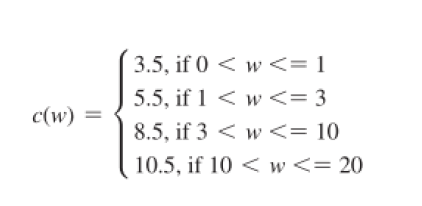
Write a function called ShippingCost that receives one integer parameter (the weight) and it returns back the shipping cost of that weight.
? Function 8: Calculating Sound Time through a medium
The following table shows the approximate speed of sound in air, water, and steel.
| Medium | Speed |
| Air | 1,100 feet per second |
| Water | 4,900 feet per second |
| Steel | 16,400 feet per second |
Define a function called SoundTime that receives two parameters and it returns back one value. The two parameters represent the medium and the distance a sound wave will travel through. The function calculates the amount of time it will take for the sound to get through the chosen medium (round the answer to 3 decimal places). The function returns back the calculated value. Again, what you are calculating is the time not the speed.
lab 5 Welcome to Lab 5 Problem#1 Sales Problem#2 Items# Time Problem#3 Problem#4 Medium Distance Weight lab 5 Welcome to Lab 5 Problem#1 Sales Problem#2 Items# Time Problem#3 Problem#4 Medium Distance Weight
Step by Step Solution
There are 3 Steps involved in it

Get step-by-step solutions from verified subject matter experts
 Study Help