







Question: undefined 4 6 3 Complete the following steps: (1) Complete the following function according to its docstring. 5 (2) Save your file after you make
 undefined
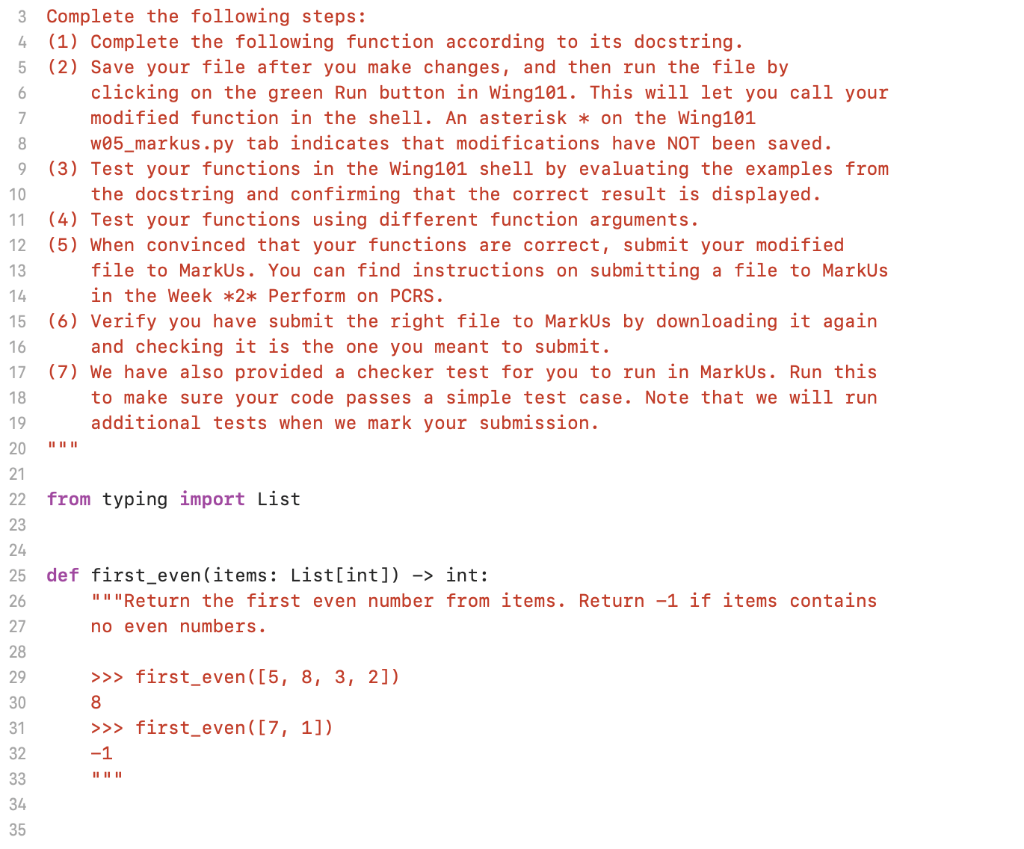
4 6 3 Complete the following steps: (1) Complete the following function according to its docstring. 5 (2) Save your file after you make changes, and then run the file by clicking on the green Run button in Wing101. This will let you call your 7 modified function in the shell. An asterisk * on the Wing101 8 w05_markus.py tab indicates that modifications have NOT been saved. 9 (3) Test your functions in the Wing101 shell by evaluating the examples from 10 the docstring and confirming that the correct result is displayed. 11 (4) Test your functions using different function arguments. 12 (5) When convinced that your functions are correct, submit your modified 13 file to Markus. You can find instructions on submitting a file to Markus 14 in the Week *2* Perform on PCRS. 15 (6) Verify you have submit the right file to Markus by downloading it again 16 and checking it is the one you meant to submit. 17 (7) We have also provided a checker test for you to run in Markus. Run this 18 to make sure your code passes a simple test case. Note that we will run 19 additional tests when we mark your submission. 20 21 22 from typing import List 23 24 25 26 27 def first_even (items: List[int]) -> int: III "Return the first even number from items. Return -1 if items contains no even numbers. 28 29 30 31 32 33 34 35 >>> first_even([5, 8, 3, 2]) 8 >>> first_even([7, 1]) -1
Step by Step Solution
There are 3 Steps involved in it

Get step-by-step solutions from verified subject matter experts
 Study Help