







Question: Use a Logisim ROM to implement the State Table. Configure the ROM for the minimum Address and Data Bit Widths that can be used for
Use a Logisim ROM to implement the State Table. Configure the ROM for the minimum Address and Data Bit Widths that can be used for this lab (as per your answers to the questions above). Program the contents of the ROM appropriately. Use a Logisim Register component (label it Current State) as the memory element to hold the Current State value during operation. Configure the Current State Register appropriately, and connect its outputs as the ROM address inputs. Use the output from the Toggle Switch design presented in the Logisim Guide for SYSC 3006 as the clock input to the Current State Register, and configure the Register to be falling edge sensitive. Direct the ROM Data outputs through a splitter. Configure the splitter to have the minimum possible number of wires to successfully implement the lab. Split the wires containing the Next State encoding into a bundle and feed this bundle back to the Current State Register data inputs. Split the remaining wires out individually. Connect each individual wire output from the splitter to an individual LED. Label the LEDs O2 O1 and O0 so they correspond with the Lab1 State Table. Log the Output LED values 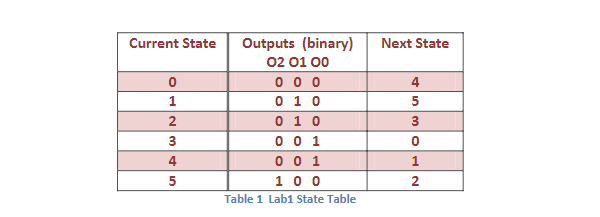
Next State Current State Outputs (binary) 02 01 00 0 1 010 2 0 1 0 3 oo 1 4 001 5 1 0 0 Table 1 Labi State Table 4 5 3 3 0 1 2 5
Step by Step Solution
There are 3 Steps involved in it

Get step-by-step solutions from verified subject matter experts
 Study Help