







Question: use python Complete and test the following code, accerding to the given comments. The code should use input from the user to create myList, the
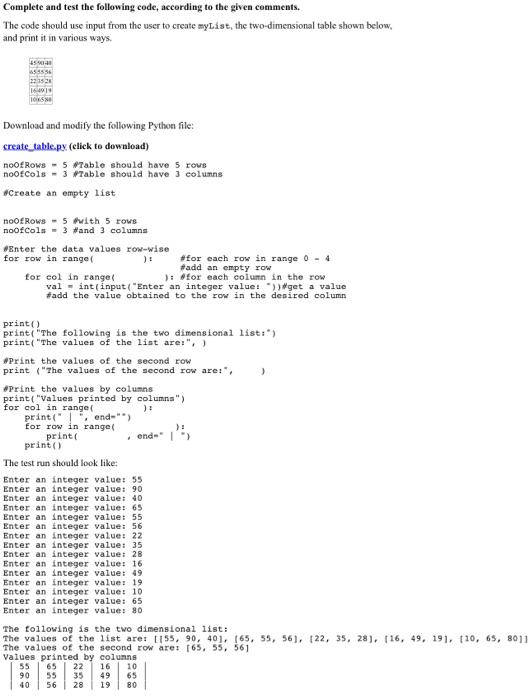
Complete and test the following code, accerding to the given comments. The code should use input from the user to create myList, the two-dimensional table shown below, and print it in various ways. Download and modify the following Python file: create table.py (click to downlead) noofRows =5 Aable should have 5 rows noofCols =3 Table should have 3 colunns freate an empty 118t noofRows = 5 mith 5 rows noofCola =3 Hand 3 columne oznter the data values row-wise for row in range( for each row in range 0=4 for eol in range( ): for each column in the row val = int(input("Enter an integer value: ")) *get a value fadd the value obtained to the row in the denired column print() print("The following is the two dimensional 1ist:") print, "The valuen of the lint are:", ) Print the values of the second row print ("The values of the gecond row ares, , ) eprint the values by colume print( "Valuea printed by columna") for col in rangef print ("), end-"*) for row in rangel , ende* 3, print () The lest run should look like: Enter an integer value: 55 Enter an integer value: 90 Enter an integer value: 40 Enter an integer value: 65 Enter an integer value: 55 Enter an integer value: 56 Enter an integer value: 22 Enter an integer value: 35 Enter an integer value: 28 Enter an integer value: 16 Enter an integer value: 49 Enter an integer value: 19 Enter an integer value: 10 Enter an inteqer value: 65 Enter an integer value: 80 The following is the two dimensional list: The values of the 1 ist are: [155,90,40],[65,55,56],[22,35,28],[16,49) The values of the second row arei [65,55,56] Valuea nrinted bv enlumna
Step by Step Solution
There are 3 Steps involved in it

Get step-by-step solutions from verified subject matter experts
 Study Help