







Question: Use the following information and create a Student List database file. Create a new blank database file and name it as a StudentList and save
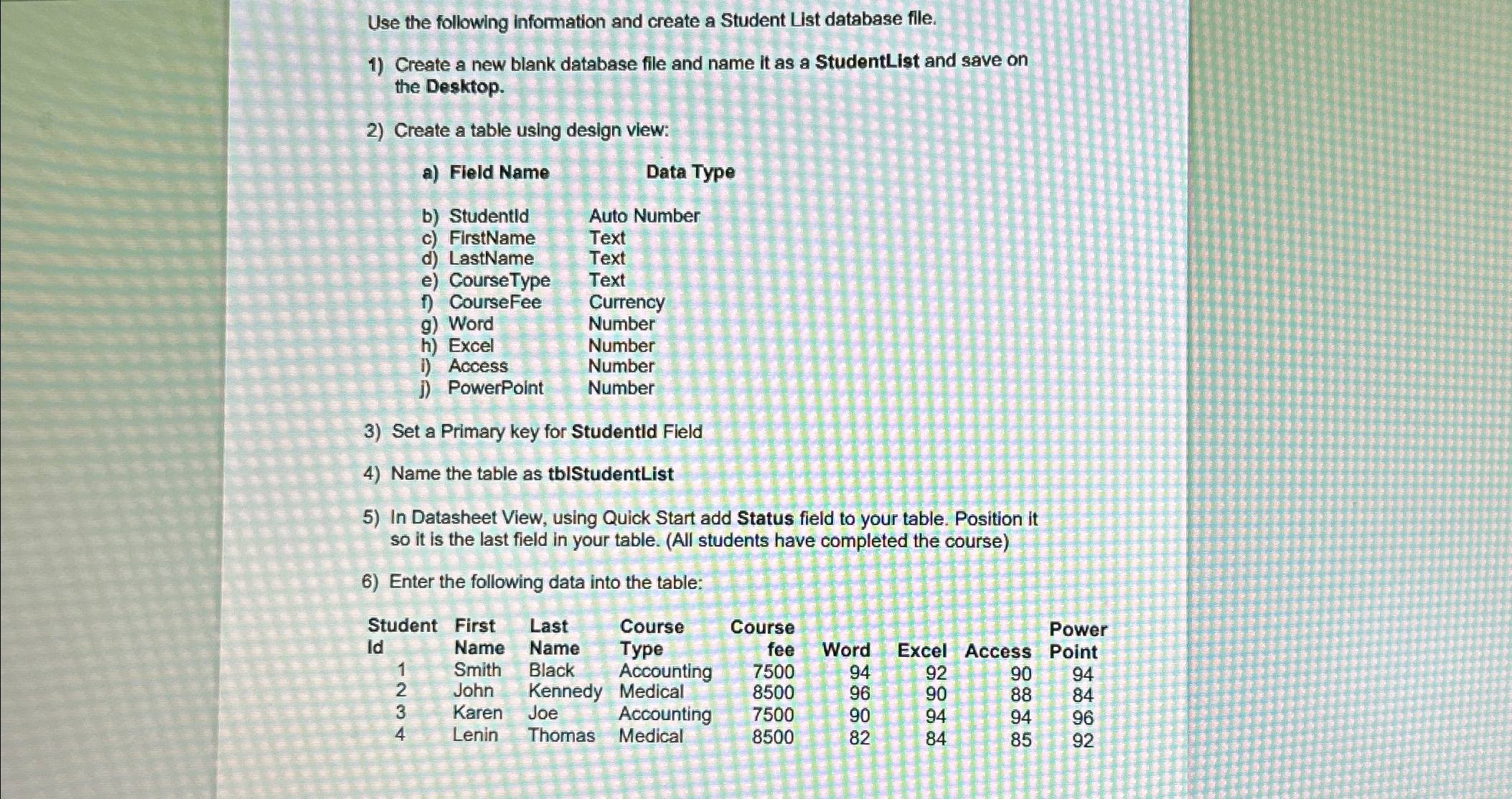
Use the following information and create a Student List database file.
Create a new blank database file and name it as a StudentList and save on the Desktop.
Create a table using design view:
a Field Name
Data Type
b Studentld
Auto Number
c FirstName
Text
d LastName
Text
e CourseType
Text
f CourseFee
g Word
Currency
h Excel
Number
i Access
Number
J PowerPoint
Number
Number
Set a Primary key for Studentld Field
Name the table as tblStudentList
In Datasheet View, using Quick Start add Status field to your table. Position it so it is the last field in your table. All students have completed the course
Enter the following data into the table:
tableStudentFirst,Last,Course,Course,,,,PowerIdName,Name,Type,fee,Word,Excel,Access,PointSmith,Black,Accounting,John,Kennedy,Medical,Karen,Joe,Accounting,Lenin,Thomas,Medical,
Step by Step Solution
There are 3 Steps involved in it
1 Expert Approved Answer
Step: 1 Unlock

Question Has Been Solved by an Expert!
Get step-by-step solutions from verified subject matter experts
Step: 2 Unlock
Step: 3 Unlock
 Study Help