







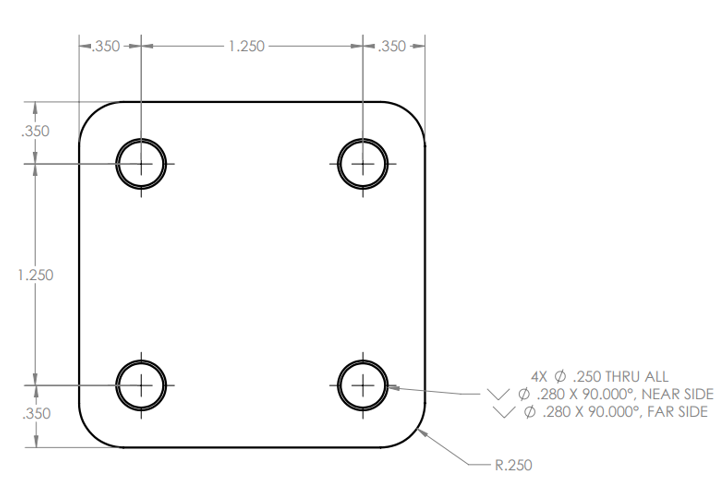
Question: Use this part drawing to create a G - code part program. Note: After completing the 4 th radius, lead out of the part with
Use this part drawing to create a Gcode part program. Note: After completing the th radius, lead out of the part with an additional G down the length of the part and away from the part. Then make an additional move to cancel cutter compensation.
Note: Tool that is used is a end mill Haas PN
Fill out the GCode table for this assignment below. To the right of your GCode, record the function of every word.
N M T End Mill;
N G G G X Y M S ;
N G H Z;
N M;
N G Z F
N
N
N
N
N
N
N
N
N
N
N
N G G Z M;
N M;
N G Z;
N G X Y;
N M;
Assignment end questions: Please Answer
How does the controller know which way to apply cutter compensation?
What movement or feature defines the compensation direction?
In which movement did you cancel cutter compensation? Why?
Is it possible to use the identical GCode for a roughing profile operation with a roughing end mill and a finishing operation with a finishing end mill What feature of cutter compensation would allow that to happen?
Step by Step Solution
There are 3 Steps involved in it
1 Expert Approved Answer
Step: 1 Unlock

Question Has Been Solved by an Expert!
Get step-by-step solutions from verified subject matter experts
Step: 2 Unlock
Step: 3 Unlock
 Study Help