







Question: Using d3.v3.min.js (https://d3js.org/d3.v3.min.js) to create index.html. The following should be written in HTML: 1. Generate and plot 50 objects: 25 circles and 25 upward-pointing equilateral
Using d3.v3.min.js (https://d3js.org/d3.v3.min.js) to create index.html. The following should be written in HTML:
1. Generate and plot 50 objects: 25 circles and 25 upward-pointing equilateral triangles. Each objects X and Y coordinates should be a random integer between 0 and 100 inclusively (i.e., [0, 100]). An objects X and Y coordinates should be independently computed. Each objects size will be a value between 5 and 50 inclusively (i.e., [5, 50]). You should use the symbol.size() function of d3 to adjust the size of the object. Use the objects X coordinate to determine the size of the object. You should use a linear scale for the size, to map the domain of X values to the range of [5,50]. Objects with larger x coordinate values should have larger sizes. This link (https://github.com/d3/d3-3.x-api-reference/blob/master/SVG-Shapes.md#symbol_size) explains how size is interpreted by symbol.size(). You may want to look at this example (http://bl.ocks.org/kiranml1/6972900) for the usage of symbol.size() function.
2. The plot must have visible X and Y axes whose range of values linearly scale according to the coordinates of the generated objects. The ticks on these axes should adjust automatically based on the randomly generated scatterplot objects.
3. Your full name (in upper case) should appear above the scatterplot.
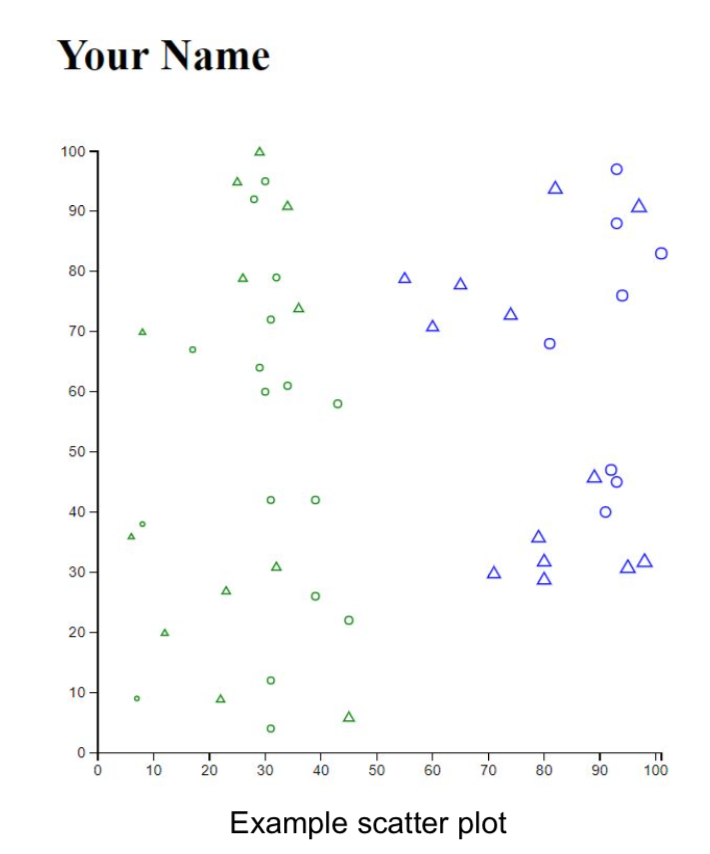
Your Name 100 80 70 60 50 40 30 20 10 10 20 50 60 70 80 90 100 Example scatter plot Your Name 100 80 70 60 50 40 30 20 10 10 20 50 60 70 80 90 100 Example scatter plot
Step by Step Solution
There are 3 Steps involved in it

Get step-by-step solutions from verified subject matter experts
 Study Help