







Question: Using Excel, build a decimal to 8-bit binary converter. Do not use any Excel functions except for IF. Please DO NOT use any Excel functions
Using Excel, build a decimal to 8-bit binary converter. Do not use any Excel functions except for IF. Please DO NOT use any Excel functions except for IF. Use of ANY Excel function other than IF results in a 0% grade. I want same has shown below.
bit 0 ::=IF(A30,MOD(A3,2),0)
bit 1 ::=IF(A30,INT((MOD((A3/2),2))),0)
bit 2 :: =IF(A30,INT((MOD((A3/2/2),2))),0)
bit 3 :: =IF(A30,INT((MOD((A3/2/2/2),2))),0)
bit 4 :: =IF(A30,INT((MOD((A3/2/2/2/2),2))),0)
bit 5 :: =IF(A30,INT((MOD((A3/2/2/2/2/2),2))),0)
bit 6 :: =IF(A30,INT((MOD((A3/2/2/2/2/2/2),2))),0)
bit 7 ::=IF(A30,INT((MOD((A3/2/2/2/2/2/2/2),2))),0)
I want it one as above but only with IF function.
YOU CAN ONLY USE IF Function.
YOU CANNOT USE INT OR MOD Function.
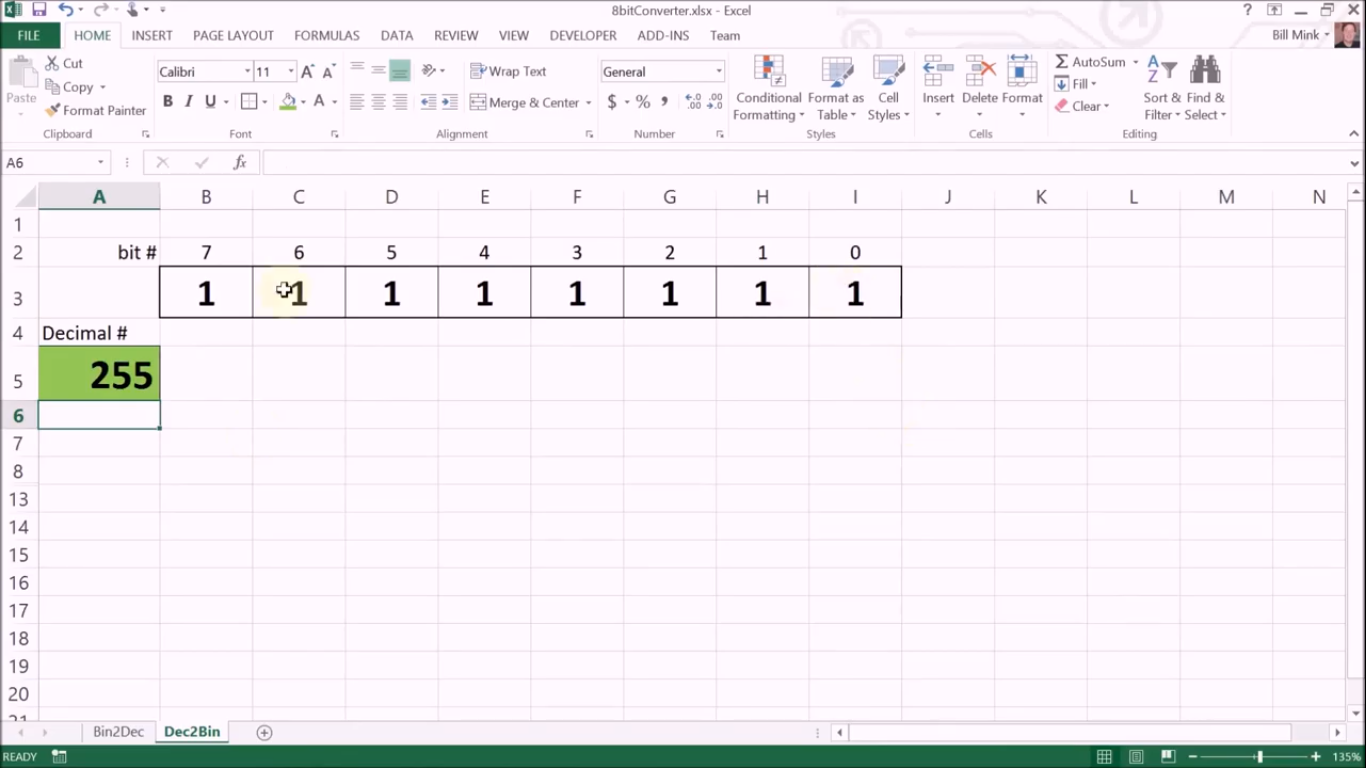
8bitConverter.xlsx - Excel FILE HOME INSERT PAGE LAYOUT FORMULAS DATA REVIEW VIEW DEVELOPER ADD-INS Team Bill Mink AutoSum- General * Cut Copy Paste Format Painter Clipboard Calibri - 11-AA 2- Wrap Text BI U. 9.A. Merge & Center - $ - % Insert Delete Format Clear 0.00 Conditional Format as Cell Formatting Table Styles Styles Sort & Find & Filter - Select- Editing Font . Alignment Number . Cells A6 X fr A B D E F G H 1 K L M N 1 2 bit # 7 6 5 4 3 2 1 0 3 1 +1 1 1 1 1 1 1 1 4 Decimal # 255 5 6 7 8 13 14 15 16 17 18 19 20 21 Bin2 Dec Dec2 Bin READY 11 135% 8bitConverter.xlsx - Excel FILE HOME INSERT PAGE LAYOUT FORMULAS DATA REVIEW VIEW DEVELOPER ADD-INS Team Bill Mink AutoSum- General * Cut Copy Paste Format Painter Clipboard Calibri - 11-AA 2- Wrap Text BI U. 9.A. Merge & Center - $ - % Insert Delete Format Clear 0.00 Conditional Format as Cell Formatting Table Styles Styles Sort & Find & Filter - Select- Editing Font . Alignment Number . Cells A6 X fr A B D E F G H 1 K L M N 1 2 bit # 7 6 5 4 3 2 1 0 3 1 +1 1 1 1 1 1 1 1 4 Decimal # 255 5 6 7 8 13 14 15 16 17 18 19 20 21 Bin2 Dec Dec2 Bin READY 11 135%
Step by Step Solution
There are 3 Steps involved in it

Get step-by-step solutions from verified subject matter experts
 Study Help