







Question: Using java, please implement the following GUI application. You need to create a class called DemoFrame that inherits from JFrame. This DemoFrame contains the following
Using java, please implement the following GUI application. You need to create a class called DemoFrame that inherits from JFrame. This DemoFrame contains the following GUI components:
1) a combo box showing the names of the shapes to draw,
2) a group of radio buttons indicating the choices of colors used for drawing, and
3) a drawing panel where the specified shapes are drawn with the specified color.
The functionalities of the GUI components are described as follows.
(1)The DemoFrame has a size of (500, 300).
(2)The combo box comprises of three items, Triangle, Square and Custom pentagon. - When users select Triangle, a triangle with the three vertices of (50, 100), (100, 200), (150, 100) is displayed in the drawing panel. The triangle is filled with the color specified by the radio buttons in (3). - When users select Square, a square with the four vertices of (50, 100), (50, 200), (150, 200), (150, 100) is displayed in the drawing panel. The square is filled with the color specified by the radio buttons in (3). - When users select Custom Pentagon, the drawing panel is cleared. Once the users indicate the five vertices of the pentagon by mouse-clicks in the drawing panel, a custom pentagon is drawn accordingly in the drawing panel. The pentagon is filled with the color specified by the radio buttons in (3).
(3)The radio button group comprises of three buttons, Red, Blue and Green. When users change the selection of the buttons, the shape displayed in the drawing panel will change its color accordingly. (4)The drawing panel (occupying the left half part of DemoFrame, with the background color being white) displays the specified shape (via the combo box) in the specified color (via the radio button). When Custom Pentagon is selected in the combo box, users can specify the vertex positions of the pentagon by mouse-clicks in the drawing panel. Once five vertices have been specified, a pentagon is drawn and filled with the specified color. More than five mouse-clicks will lead to a new pentagon to be drawn. Mouse-clicks outside of the drawing panel are not considered.
Hints: (1) You can use GridLayout to arrange the layout of the GUI components. You can create a container (JPanel) to organize the combo box and radio buttons and add the container to DemoFrame.
(2) You can use the fillPolygon() method in java.awt.Graphics package to draw the triangle, the square and the pentagon. You need to provide the x-coordinates and y-coordinates of the vertices of these shapes to fillPolygon() method. The image below shows the look-and-feel of the application.
The look and feel should look something like:
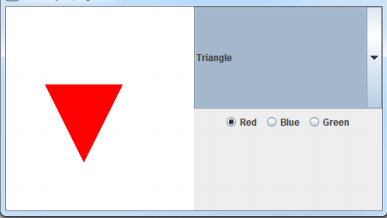
Triangle Red O Blue O Green
Step by Step Solution
There are 3 Steps involved in it
To implement the DemoFrame class in Java well use the Swing framework Heres how you can set up your GUI application StepbyStep Implementation 1 Import Necessary Packages java import javaxswing import ... View full answer

Get step-by-step solutions from verified subject matter experts
 Study Help