







Question: Using Linux and the picture below. 1.ENTER ON BLACKBOARD Will the following command execute successfully or will it produce an error message? Assume that the
Using Linux and the picture below.
1.ENTER ON BLACKBOARD Will the following command execute successfully or will it produce an error message? Assume that the current working directory is ~jlucas
cp /etc/passwd /home/faculty/smitra
2. ENTER ON BLACKBOARD Will the following command execute successfully or will it produce an error message? Assume that the current working directory is ~jlucas
cp /etc/passwd /home/faculty/smitra/passwords
3. ENTER ON BLACKBOARD Will the following command execute successfully or will it produce an error message? Assume that the current working directory is ~jlucas
cp /etc/passwd /home/faculty/trao/csc209
4. ENTER ON BLACKBOARD Will the following command execute successfully or will it produce an error message? Assume that the current working directory is ~jlucas
cp /etc/passwd ~alice/csc209/passwords
5.ENTER ON BLACKBOARD Will the following command execute successfully or will it produce an error message? Assume that the current working directory is ~jlucas
cp ~trao /usr
6.ENTER ON BLACKBOARD Will the following command execute successfully or will it produce an error message? Assume that the current working directory is ~jlucas
cp -R ~jlucas ../../
7.ENTER ON BLACKBOARD Will the following command execute successfully or will it produce an error message? Assume that the current working directory is ~jlucas
mv bear.jpg /student/alice/myPhoto.jpg
8.ENTER ON BLACKBOARD Will the following command execute successfully or will it produce an error message? Assume that the current working directory is ~jlucas
mv bear.jpg bin/hello
9. ENTER ON BLACKBOARD Will the following command execute successfully or will it produce an error message? Assume that the current working directory is ~jlucas
mv bear.jpg /var
10. ENTER ON BLACKBOARD Will the following command execute successfully or will it produce an error message? Assume that the current working directory is ~jlucas
rmdir ~bob
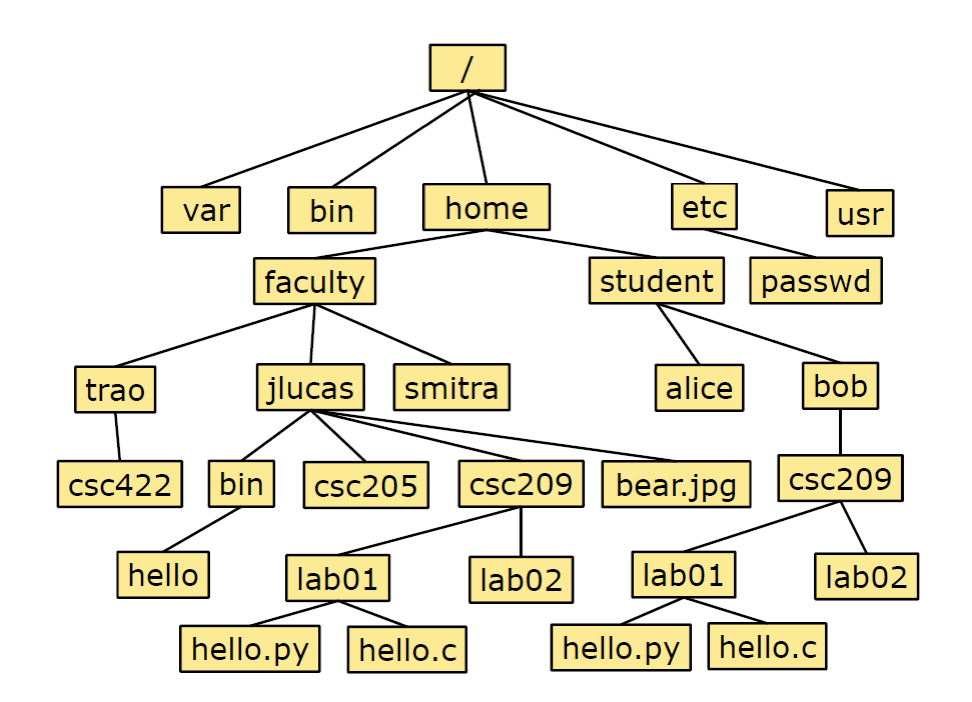
var bin home etc usr faculty student passwd trao jlucas smitra alice bob CSC422 bin CSC205 CSC209 bear.jpg CSC209 hello lab01 lab02 lab01 lab02 hello.py hello.c hello.py hello.c
Step by Step Solution
There are 3 Steps involved in it

Get step-by-step solutions from verified subject matter experts
 Study Help