







Question: Using Netbeans (Java) Create a Java project using the following name convention (Your first name followed by your student ID) : e.g. Nora44xxxxxxx Type In
Using Netbeans (Java)
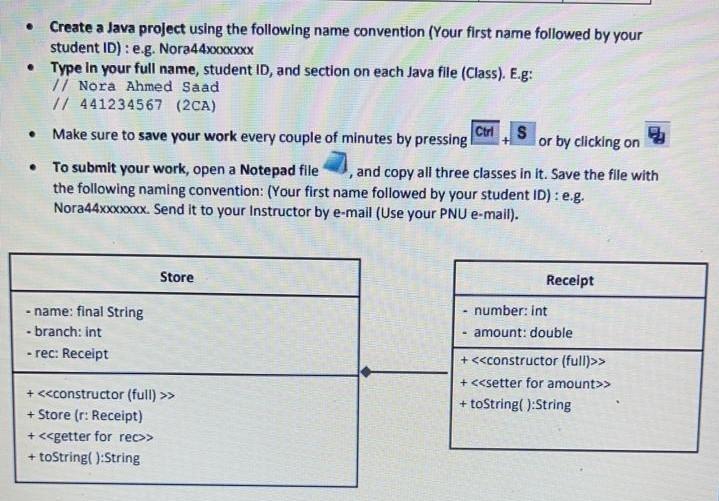
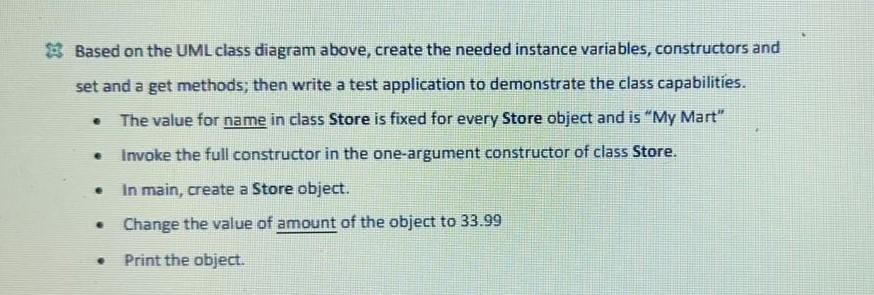
Create a Java project using the following name convention (Your first name followed by your student ID) : e.g. Nora44xxxxxxx Type In your full name, student ID, and section on each Java file (Class). E.g: 7/ Nora Ahmed Saad // 441234567 (2CA) Ctrl Make sure to save your work every couple of minutes by pressing S or by clicking on To submit your work, open a Notepad file and copy all three classes in it. Save the file with the following naming convention: (Your first name followed by your student ID) : e.g. Nora44xxxxxxx. Send it to your Instructor by e-mail (Use your PNU e-mail). Store Receipt -name: final String - branch: int - rec: Receipt number: Int amount: double + > + > + toString():String + > + Store (r: Receipt) + > + toString():String Based on the UML class diagram above, create the needed instance variables, constructors and set and a get methods; then write a test application to demonstrate the class capabilities. The value for name in class Store is fixed for every Store object and is "My Mart" Invoke the full constructor in the one-argument constructor of class Store. e e In main, create a Store object. Change the value of amount of the object to 33.99 . Print the object
Step by Step Solution
There are 3 Steps involved in it

Get step-by-step solutions from verified subject matter experts
 Study Help