// Serializable Account class for storing records as objects.
import java.io.Serializable;
public class Account implements Serializable
{
public static final long serialVersionUID = 1L;
private int account;
private String firstName;
private String lastName;
private double balance;
// initializes an Account with default values
public Account()
{
this(0, "", "", 0.0); // call other constructor
}
// initializes an Account with provided values
public Account(int account, String firstName,
String lastName, double balance)
{
this.account = account;
this.firstName = firstName;
this.lastName = lastName;
this.balance = balance;
}
// set account number
public void setAccount(int acct)
{
this.account = account;
}
// get account number
public int getAccount()
{
return account;
}
// set first name
public void setFirstName(String firstName)
{
this.firstName = firstName;
}
// get first name
public String getFirstName()
{
return firstName;
}
// set last name
public void setLastName(String lastName)
{
this.lastName = lastName;
}
// get last name
public String getLastName()
{
return lastName;
}
// set balance
public void setBalance(double balance)
{
this.balance = balance;
}
// get balance
public double getBalance()
{
return balance;
}
} // end class AccountRecordSerializable
// Create data to put into an account file and a transactions file.
import java.io.IOException;
import java.io.FileOutputStream;
import java.io.ObjectOutputStream;
public class CreateData
{
private static ObjectOutputStream outOldMaster, outTransaction;
public static void main(String[] args)
{
try
{
try
{
// file streams for output files
outOldMaster = new ObjectOutputStream(
new FileOutputStream("oldmast.ser"));
outTransaction = new ObjectOutputStream(
new FileOutputStream("trans.ser"));
}
catch (IOException io)
{
System.err.println("Error opening the file.");
}
try
{
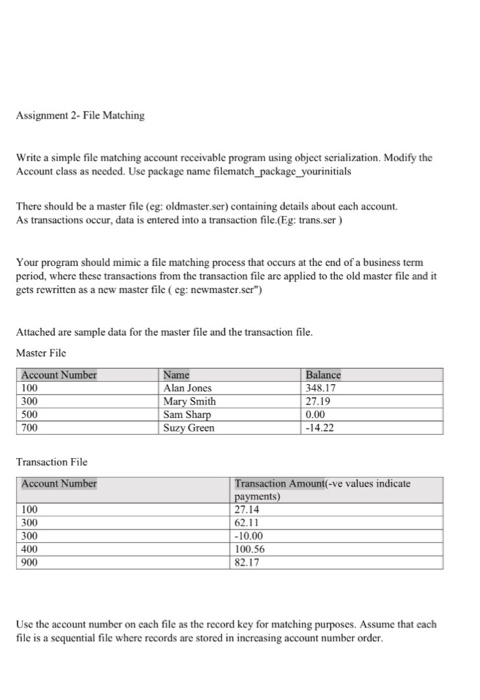
outOldMaster.writeObject(new AccountRecordSerializable(
100, "Alan", "Jones", 348.17));
outOldMaster.writeObject(new AccountRecordSerializable(
300, "Mary", "Smith", 27.19));
outOldMaster.writeObject(new AccountRecordSerializable(
500, "Sam", "Sharp", 0.00));
outOldMaster.writeObject(new AccountRecordSerializable(
700, "Suzy", "Green", -14.22));
outTransaction.writeObject(
new TransactionRecord(100, 27.14));
outTransaction.writeObject(
new TransactionRecord(300, 62.11));
outTransaction.writeObject(
new TransactionRecord(300, -10.00));
outTransaction.writeObject(
new TransactionRecord(400, 100.56));
outTransaction.writeObject(
new TransactionRecord(900, 82.17));
}
catch (IOException io)
{
System.out.println("Error writing to the files.");
System.exit(1);
}
}
finally // close the files
{
try
{
if (outTransaction != null)
outTransaction.close();
if (outOldMaster != null)
outOldMaster.close();
}
catch (IOException io)
{
System.err.println("Error closing the files.");
System.exit(1);
}
}
}
} // end class CreateData









 Study Help