







Question: Using the insertion sort in java, for example , the array of integers has {99,37,17,5,12,33}, how to print each iteration of the insertion as shown
Using the insertion sort in java, for example , the array of integers has {99,37,17,5,12,33}, how to print each iteration of the insertion as shown in the picture below
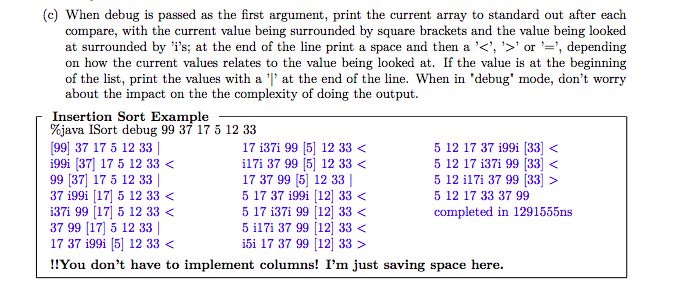
So far I have this ,
public static int[] sort(int arr[])
{ int n = arr.length; for (int i=1; i=0 && arr[j] > key) { arr[j+1] = arr[j]; j = j-1; } arr[j+1] = key; } return arr; } //print array of size n public static void printArrayInAssortedOrder(int arr[]) { int n = arr.length; for (int i=0; i}
public static void main(String args[]) { int arr[] = {32, 111, 13, 3, 6}; sort(arr); printArrayInAssortedOrder(arr);} }
(c) When debug is passed as the first argument, print the current array to standard out after each compare, with the current value being surrounded by square brackets and the value being looked at surrounded by 'i's; at the end of the line print a space and then a ''or , depending on how the current values relates to the value being looked at. If the value is at the beginning of the list, print the values with a '' at the end of the line. When in 'debug' mode, don't worry about the impact on the the complexity of doing the output. Insertion Sort Example %java !Sort debug 99 37 17 5 12 33 99 37 17 5 12 33 | i99i 37) 17 5 12 33 5 12 17 37 199i [33 5 12 17 33 37 99 completed in 1291555ns
Step by Step Solution
There are 3 Steps involved in it

Get step-by-step solutions from verified subject matter experts
 Study Help