







Question: Visual Workshop Open IL _ EX _ 4 - 5 . xlsx from the location where you store your Data Files, then save it as
Visual Workshop
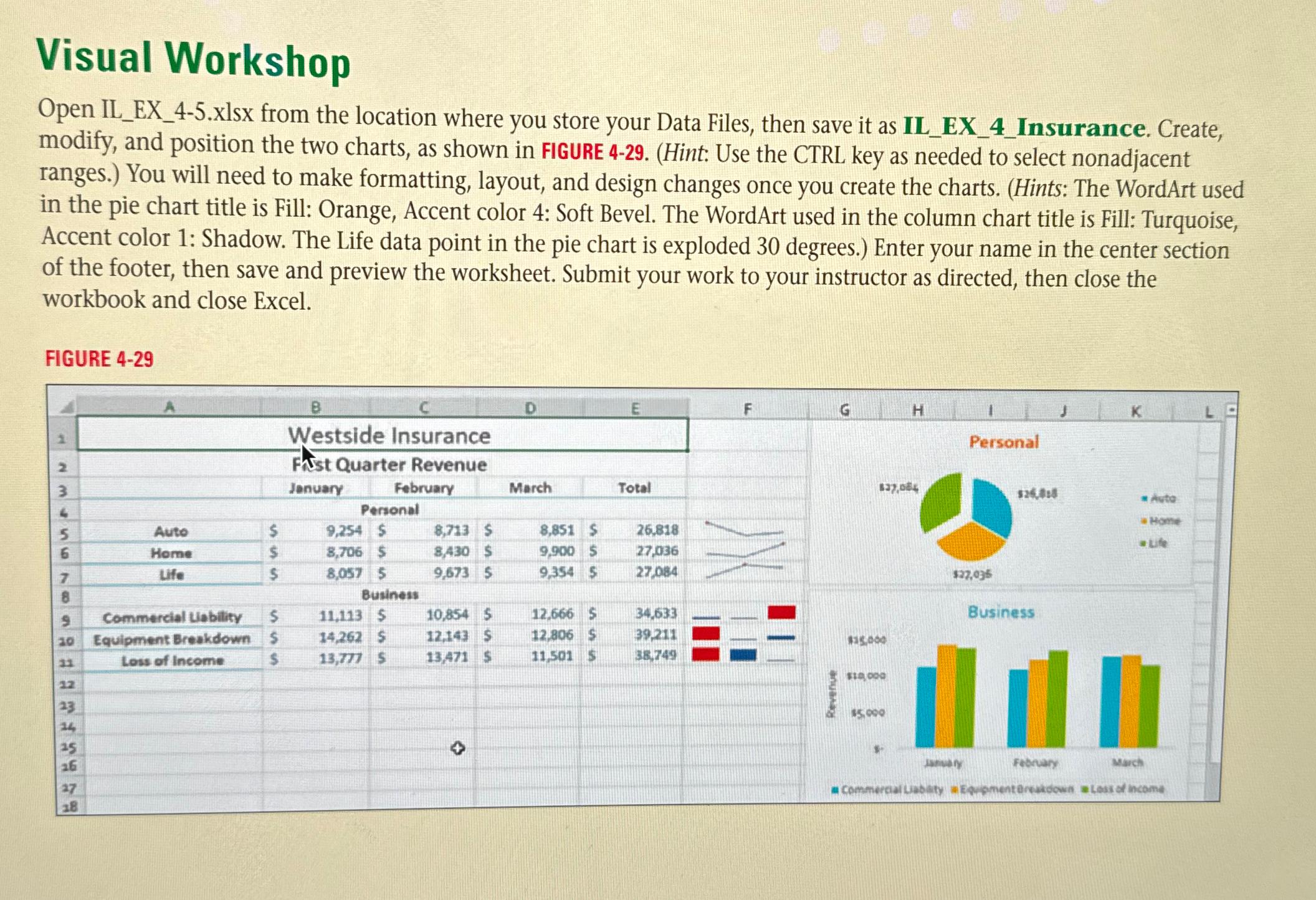
Open ILEXxlsx from the location where you store your Data Files, then save it as ILEXInsurance. Create, modify, and position the two charts, as shown in FIGURE Hint: Use the CTRL key as needed to select nonadjacent ranges. You will need to make formatting, layout, and design changes once you create the charts. Hints: The WordArt used in the pie chart title is Fill: Orange, Accent color : Soft Bevel. The WordArt used in the column chart title is Fill: Turquoise, Accent color : Shadow. The Life data point in the pie chart is exploded degrees. Enter your name in the center section of the footer, then save and preview the worksheet. Submit your work to your instructor as directed, then close the workbook and close Excel.
FIGURE
Step by Step Solution
There are 3 Steps involved in it
1 Expert Approved Answer
Step: 1 Unlock

Question Has Been Solved by an Expert!
Get step-by-step solutions from verified subject matter experts
Step: 2 Unlock
Step: 3 Unlock
 Study Help