







Question: *We need to write a code using Javascript or html. When we run the program the output will be the first picture. We need to
*We need to write a code using Javascript or html. When we run the program the output will be the first picture. We need to enter the curent GPA, curent hours and we need to be able to add 10 courses at once so we can select the credit hours from 0 to 10. The expected grade you take it from the timetable down. After we click on Calculate GPA, the result will appear in the lines down as Total credit of this semester, Semester GPA and Commulative GPA. And a reset fields button to clear everything.
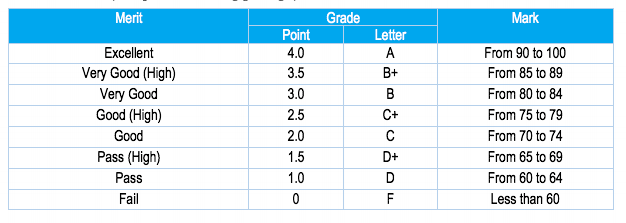
This GPA Calculator calculates the GPA (in points) as follows: A = 4 points, B+ = 3.5, B = 3, C+ = 2.5, C = 2, D+ = 1.5, D = 1, F = 0
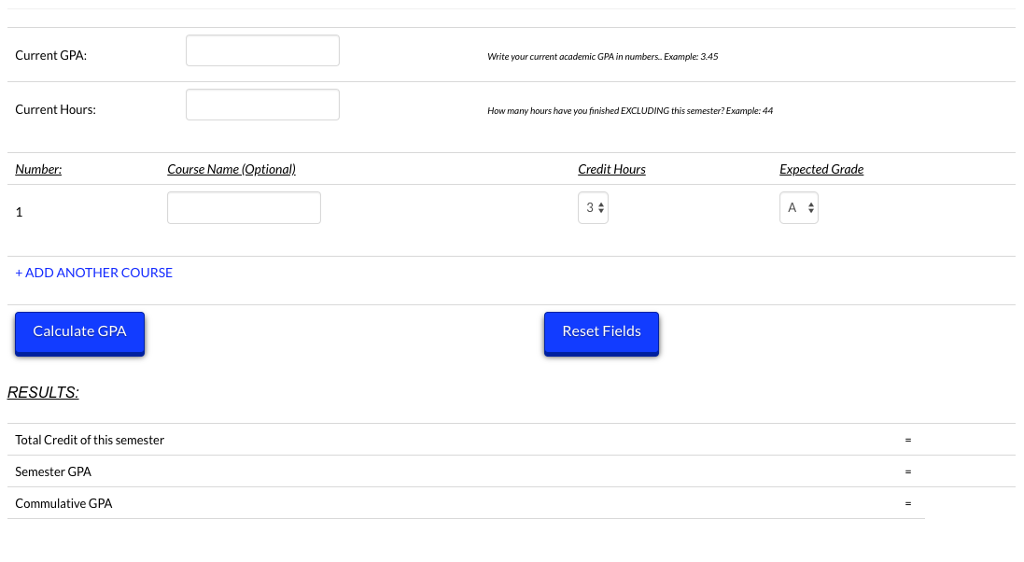
develop a GPA Calculator App (using Javascript) to manage the student grades for each course. As shown in Table 1, every letter grade has a corresponding grade point, which constitutes the basis for calculating the GPA
Step by Step Solution
There are 3 Steps involved in it

Get step-by-step solutions from verified subject matter experts
 Study Help