



Question: what are the formulas for the spreadsheet? This is an individual assignment, and you should create this spreadsheet on your own. Keep in mind that
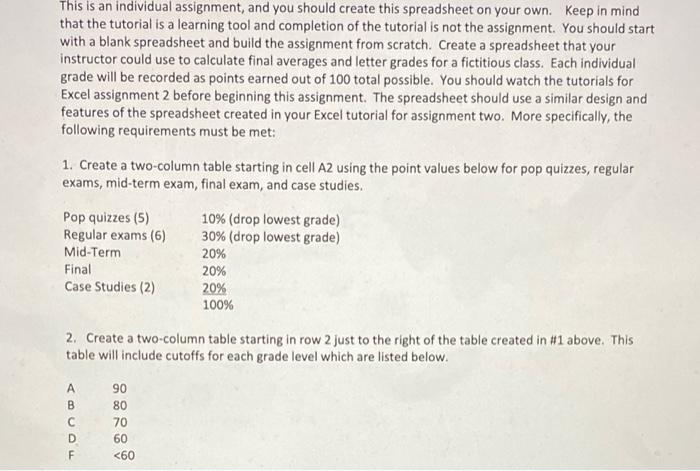
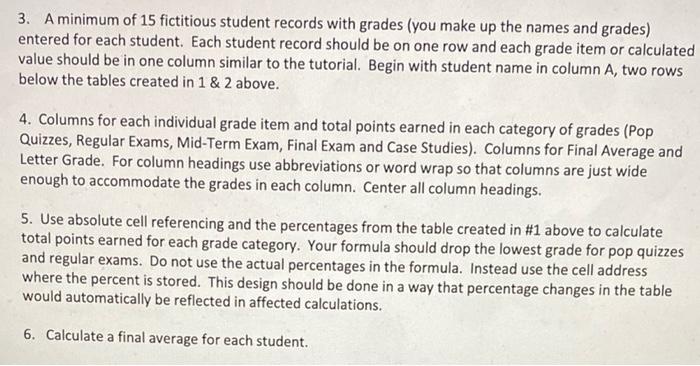
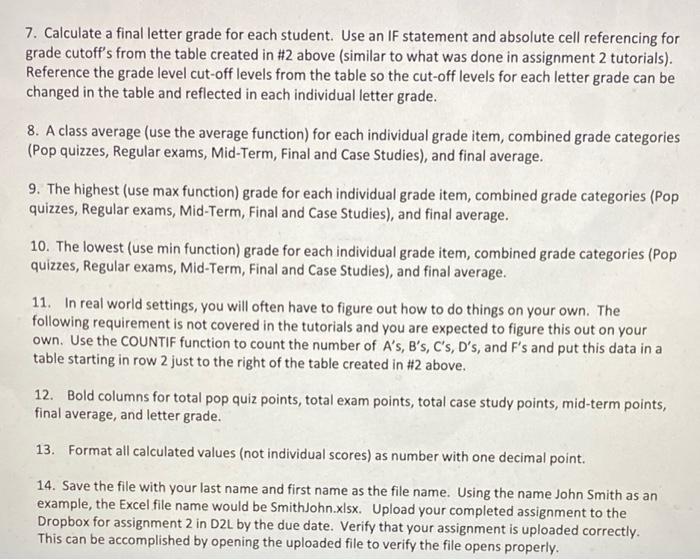
This is an individual assignment, and you should create this spreadsheet on your own. Keep in mind that the tutorial is a learning tool and completion of the tutorial is not the assignment. You should start with a blank spreadsheet and build the assignment from scratch. Create a spreadsheet that your instructor could use to calculate final averages and letter grades for a fictitious class. Each individual grade will be recorded as points earned out of 100 total possible. You should watch the tutorials for Excel assignment 2 before beginning this assignment. The spreadsheet should use a similar design and features of the spreadsheet created in your Excel tutorial for assignment two. More specifically, the following requirements must be met: 1. Create a two-column table starting in cell A2 using the point values below for pop quizzes, regular exams, mid-term exam, final exam, and case studies. Pop quizzes (5) Regular exams (6) Mid-Term Final Case Studies (2) 10% (drop lowest grade) 30% (drop lowest grade) 20% 20% 20% 100% 2. Create a two-column table starting in row 2 just to the right of the table created in #1 above. This table will include cutoffs for each grade level which are listed below. - 90 80 70 60
Step by Step Solution
There are 3 Steps involved in it

Get step-by-step solutions from verified subject matter experts