







Question: When you type text in a cell, the text will appear to continue to the right as far as it can until there is another
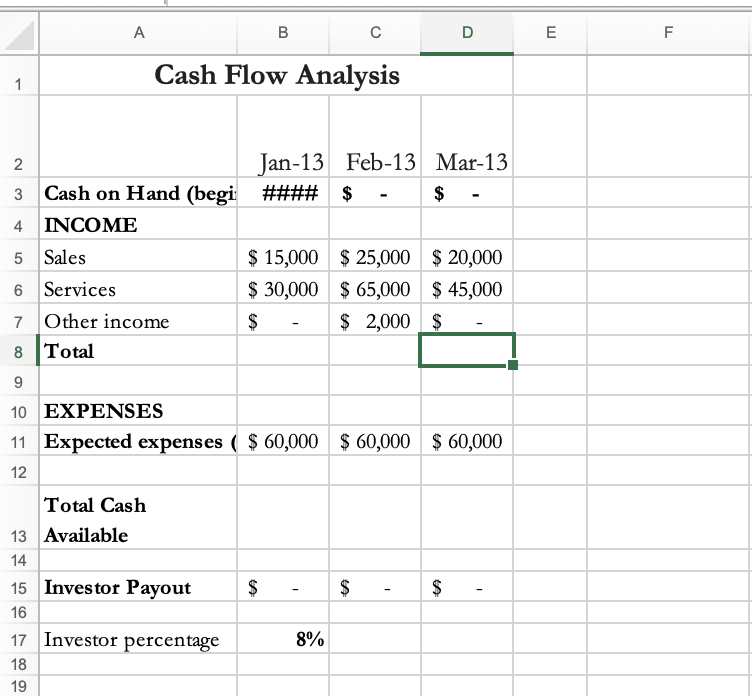
| When you type text in a cell, the text will appear to continue to the right as far as it can until there is another cell that contains data (see Cell A3). At that point, the text will appear to be cut off. You could increase the width of the cell to show all the text, but do you really want the entire column to be that wide? If your worksheet includes cells with more text than will comfortably fit in the cell, you should use the wrap feature. When wrap text is enabled for a cell, the text in the cell will automatically wrap to multiple lines, just as a paragraph would. Try it with cell A3. | |||||||
| For cells B2 TO D2, rotate the text at 450 angle counterclockwise. | |||||||
please include formulas, thanks
A B D E F Cash Flow Analysis 1 2. 2 Jan-13 Feb-13 Mar-13 3 Cash on Hand (begi #### $ - $ 4 INCOME 5 Sales $ 15,000 $25,000 $20,000 6 Services $ 30,000 $ 65,000 $ 45,000 7 Other income $ $ 2,000 $ 8 Total 9 10 EXPENSES 11 Expected expenses ( $ 60,000 $60,000 $ 60,000 12 Total Cash 13 Available 14 15 Investor Payout $ $ $ 16 17 Investor percentage 8% 18 19 A B D E F Cash Flow Analysis 1 2. 2 Jan-13 Feb-13 Mar-13 3 Cash on Hand (begi #### $ - $ 4 INCOME 5 Sales $ 15,000 $25,000 $20,000 6 Services $ 30,000 $ 65,000 $ 45,000 7 Other income $ $ 2,000 $ 8 Total 9 10 EXPENSES 11 Expected expenses ( $ 60,000 $60,000 $ 60,000 12 Total Cash 13 Available 14 15 Investor Payout $ $ $ 16 17 Investor percentage 8% 18 19
Step by Step Solution
There are 3 Steps involved in it

Get step-by-step solutions from verified subject matter experts
 Study Help