







Question: With reference to Figure 3 (see above), write a formula that can be used to calculate the value in cell F18. When writing the formula
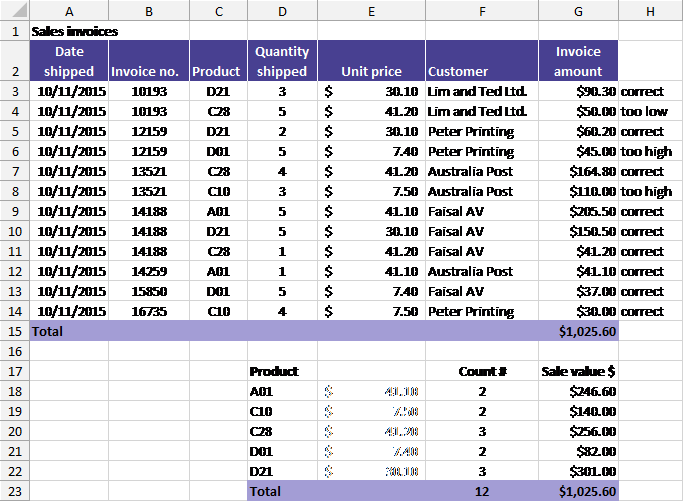
- With reference to Figure 3 (see above), write a formula that can be used to calculate the value in cell F18. When writing the formula that should appear in cell F18, design the formula so that it can be copied to cells F19:F22 without modification. (4 marks)
- Write a formula that can be placed in cell H3 to test whether the amount invoiced for each item corresponds to the formula quantity shipped x unit price, and which returns a value of either too low, correct, or too high to indicate respectively whether the invoice amount value is too low, correct, or too high. (7 marks)
B E F G H 5 4 A B D 1 Sales invoices Date Quantity 2 shipped Invoice no. Product shipped 3 10/11/2015 10193 D21 3 4 10/11/2015 10193 5 5 10/11/2015 121159 D21 2 6 10/11/2015 17159 D01 5 7 10/11/2015 13521 28 4 8 10/11/2015 13521 010 3 9 10/11/2015 14188 Ali 5 10 10/11/2015 14188 D21 5 11 10/11/2015 14188 1 12 10/11/2015 14259 AM 1 13 10/11/2015 15850 DOT 5 14 10/11/2015 1625 C10 4 15 Total 16 17 Product 18 Afi 19 010 20 28 21 D01 22 D21 23 Total Unit price Customer $ 30.10 Lim and Ted Ltd. $ 41.20 Lim and Ted Ltd. $ 30.10 Peter Printing $ 7.40 Peter Printing $ 41.20 Australia Post $ 7.50 Australia Post $ 41.10 Faisal AV $ 30.10 Faisal AV $ 41.20 Faisal AV $ 41.10 Australia Post $ 7.40 Faisal AV $ 7.50 Peter Printing Invoice amount $90.30 correct $50.00 too low $60.20 correct $45.00 too high $164.80 correct $110.00 too high $265.50 correct $150.50 correct $41.20 correct $41.10 correct $37.00 correct $30.00 correct $1,025.60 Count 4.1.2018 NNMNM Salle value $ $246.60 $140.00 $256.00 $82.00 $301.00 $1,025.60 40008 12
Step by Step Solution
There are 3 Steps involved in it

Get step-by-step solutions from verified subject matter experts
 Study Help