







Question: Would like some help solving this problem in Excel step by step. especially in what ti put in the Objective box in Excel Solver. As
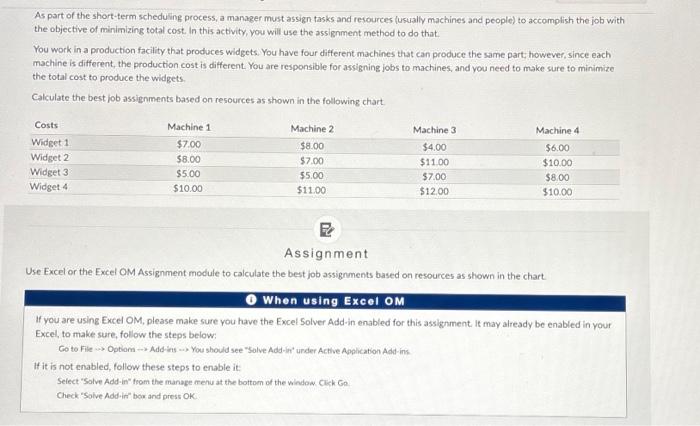
As part of the short-term scheduling process, a manager must assign tasks and resources (usually machines and people) to accomplish the job with the objective of minimizing total cost. In this activity, you will use the assignment method to do that. You work in a production facility that produces widgets. You have four different machines that can produce the same part; however, since each machine is different, the production cost is different. You are responsible for assigning jobs to machines, and you need to make sure to minimize the total cost to produce the widgets. Calculate the best job assignments based on resources as shown in the following chart. Assignment Use Excel or the Excel OM Assignment module to calculate the best job assignments based on resources as shown in the chart. O When using Excel OM If you are using Excel OM, please make sure you have the Excel Solver Add-in enabled for this assignment it may already be enabled in your Excel, to make sure, follow the steps below: Co to File Optiom Add-ins .) You should see "Solve Add-int' under Active Apphication Add-ins If it is not enabled, follow these steps to enable it: Select "Solve Add-in" from the manage renu at the bottom of the window Clich Go. Check "Solve Addris" bor and press OK
Step by Step Solution
There are 3 Steps involved in it

Get step-by-step solutions from verified subject matter experts
 Study Help