







Question: Write a C# Window Forms application. 1. When the form opens, you should already have initialized an array called array. The values in the array
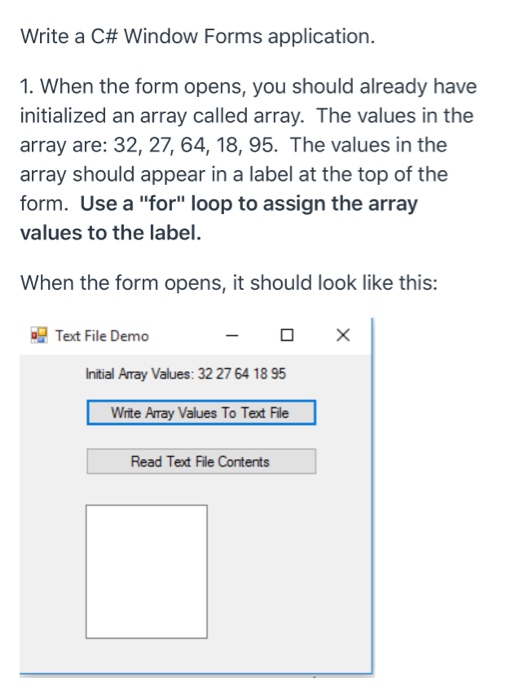
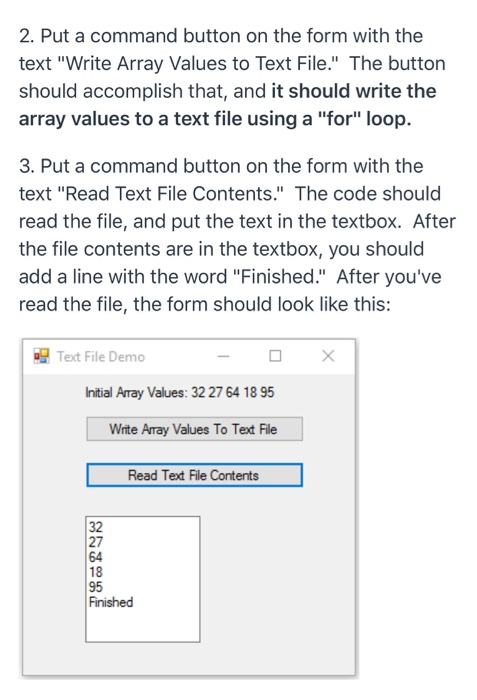
Write a C# Window Forms application. 1. When the form opens, you should already have initialized an array called array. The values in the array are: 32, 27, 64, 18, 95. The values in the array should appear in a label at the top of the form. Use a "for" loop to assign the array values to the label. When the form opens, it should look like this: Text File Demo - O X Initial Array Values: 32 27 64 18 95 Write Array Values To Text File Read Text File Contents 2. Put a command button on the form with the text "Write Array Values to Text File." The button should accomplish that, and it should write the array values to a text file using a "for" loop. 3. Put a command button on the form with the text "Read Text File Contents." The code should read the file, and put the text in the textbox. After the file contents are in the textbox, you should add a line with the word "Finished." After you've read the file, the form should look like this: Text File Demo - D X Initial Array Values: 32 27 64 1895 Write Array Values To Text File Read Text File Contents Finished
Step by Step Solution
There are 3 Steps involved in it

Get step-by-step solutions from verified subject matter experts
 Study Help