







Question: Write a Matlab or Mathematica code (or any other software) to calculate the element stiffness matrix of a Constant Strain Triangular (CST) element (in both
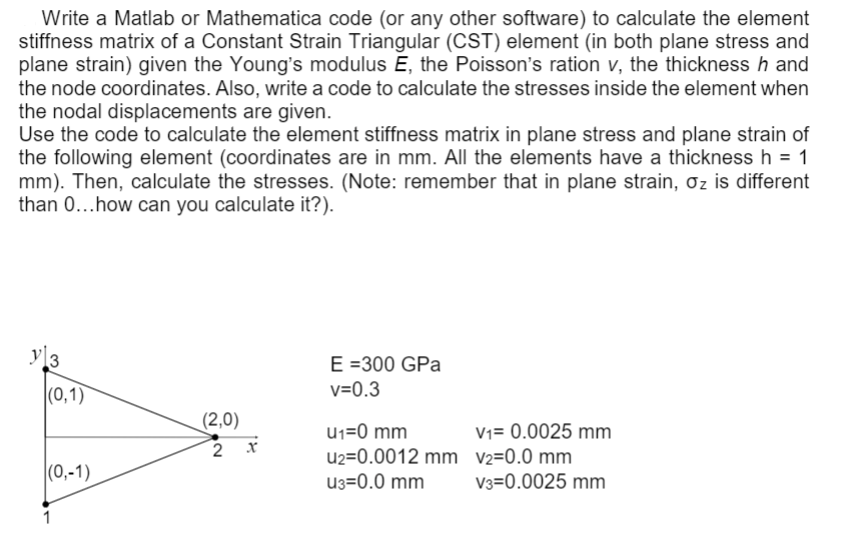
Write a Matlab or Mathematica code (or any other software) to calculate the element stiffness matrix of a Constant Strain Triangular (CST) element (in both plane stress and plane strain) given the Young's modulus E, the Poisson's ration v, the thickness h and the node coordinates. Also, write a code to calculate the stresses inside the element when the nodal displacements are given. Use the code to calculate the element stiffness matrix in plane stress and plane strain of the following element (coordinates are in mm. All the elements have a thickness h = 1 mm). Then, calculate the stresses. (Note: remember that in plane strain, Oz is different than 0...how can you calculate it?). y 3 E =300 GPa v=0.3 (0,1) (2,0) x N U1=0 mm V1= 0.0025 mm U2=0.0012 mm V2=0.0 mm U3=0.0 mm V3=0.0025 mm (0,-1) 1 Write a Matlab or Mathematica code (or any other software) to calculate the element stiffness matrix of a Constant Strain Triangular (CST) element (in both plane stress and plane strain) given the Young's modulus E, the Poisson's ration v, the thickness h and the node coordinates. Also, write a code to calculate the stresses inside the element when the nodal displacements are given. Use the code to calculate the element stiffness matrix in plane stress and plane strain of the following element (coordinates are in mm. All the elements have a thickness h = 1 mm). Then, calculate the stresses. (Note: remember that in plane strain, Oz is different than 0...how can you calculate it?). y 3 E =300 GPa v=0.3 (0,1) (2,0) x N U1=0 mm V1= 0.0025 mm U2=0.0012 mm V2=0.0 mm U3=0.0 mm V3=0.0025 mm (0,-1) 1
Step by Step Solution
There are 3 Steps involved in it

Get step-by-step solutions from verified subject matter experts
 Study Help