







Question: Write a MATLAB script to: 1- take three 5-element vectors from keyboard entry. Note that each of the vectors must have exactly 5 elements (For
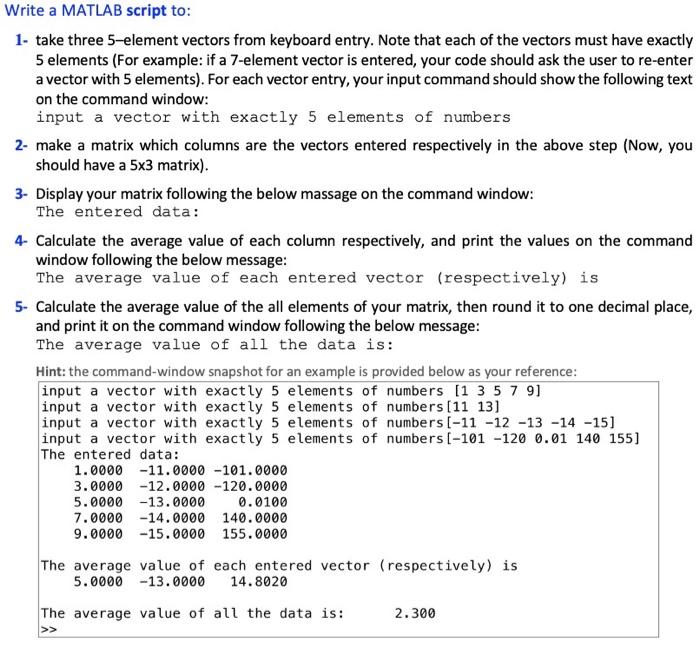
Write a MATLAB script to: 1- take three 5-element vectors from keyboard entry. Note that each of the vectors must have exactly 5 elements (For example: if a 7-element vector is entered, your code should ask the user to re-enter a vector with 5 elements). For each vector entry, your input command should show the following text on the command window: input a vector with exactly 5 elements of numbers 2- make a matrix which columns are the vectors entered respectively in the above step (Now, you should have a 5x3 matrix). 3- Display your matrix following the below massage on the command window: The entered data: 4- Calculate the average value of each column respectively, and print the values on the command window following the below message: The average value of each entered vector (respectively) is 5- Calculate the average value of the all elements of your matrix, then round it to one decimal place, and print it on the command window following the below message: The average value of all the data is: Hint: the command-window snapshot for an example is provided below as your reference: input a vector with exactly 5 elements of numbers (1 3 5 7 9] input a vector with exactly 5 elements of numbers (11 13] input a vector with exactly 5 elements of numbers [-11 -12 -13 -14 -15] input a vector with exactly 5 elements of numbers [-101 -120 0.01 140 155] The entered data: 1.0000 -11.0000 -101.0000 3.0000 -12.0000 -120.0000 5.0000 -13.0000 0.0100 7.0000 -14.0000 140.0000 9.0000 -15.0000 155.0000 The average value of each entered vector (respectively) is 5.0000 -13.0000 14.8020 The average value of all the data is: 2.300 >>
Step by Step Solution
There are 3 Steps involved in it

Get step-by-step solutions from verified subject matter experts
 Study Help