







Question: Write Code In Visual Basic The Focus of this assignment is to create a Function that will log file and also read / display the
Write Code In Visual Basic
The Focus of this assignment is to create a Function that will log file and also read / display the log file. We are going to build this functionality into a module, so we can reuse it.
Color on the form
Put your name at the top of the form.
Comments on all subroutines (dont forget the module).
Create a module that will be your toolbox going forward. Name it with your Initials followed by Module. Mine would be JHGModule.
Create a public function in the module that will add a record into the end of the log file.
You need to pass in the message that is going to be displayed
You need to pass in the log file name
You could pass in an indicator to indicate if the log event has some special purpose
Create another public function that will delete the log file
Create another function that will read the log text and return it so it can be placed in the rich text box. DONT STORE IT FROM INSIDE THE MODULE! You need to return it from the function and display it from there.
Make sure the program does not crash if the log file is not there!
On your main form, allow the user to enter a radius, press a button, and calculate the area. Display the result with two decimal places.
Log events in your application.
All log events should include a date and time stamp, a tab, and then an appropriate message.
Insert a log event when the application starts (you make up your message).
Insert a log event when the user calculates an Area. Give the radius and area in the log
Inset a log event when the user displays the log (make up your message)
Insert a log event when you exit (make up your message)
When you exit, add some sort of separator in the log (like a blank line, or dashes )
Have a button to display the log in a rich text box.
Have a button to clear the log.
Dont crash
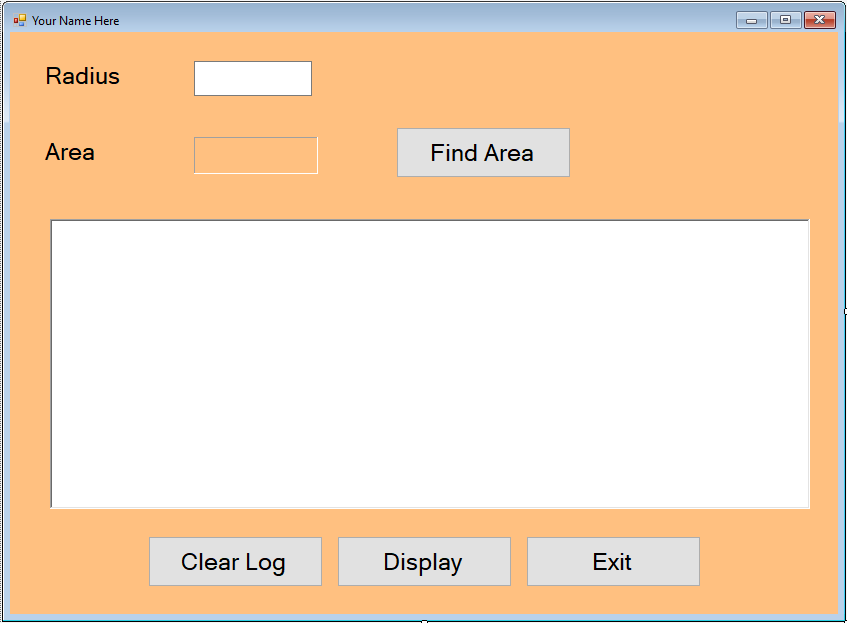
Your Name Here Radius Area Find Area Clear Log Display Exit
Step by Step Solution
There are 3 Steps involved in it

Get step-by-step solutions from verified subject matter experts
 Study Help