







Question: you have to format the linux bash script output to look like powershell output Hi guys, I need bash scripting expert help. #Linux #Powershell #Bash
you have to format the linux bash script output to look like powershell output
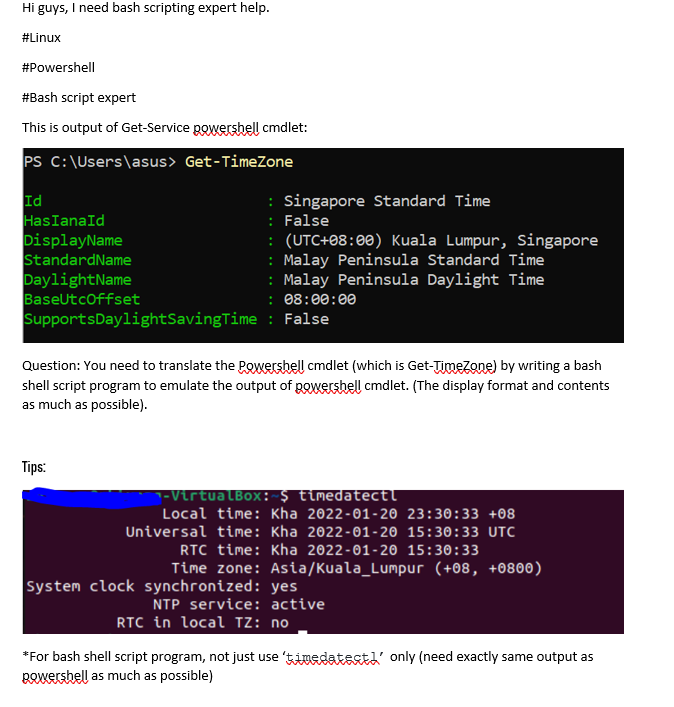
Hi guys, I need bash scripting expert help. #Linux #Powershell #Bash script expert This is output of Get-Service powershell cmdlet: PS C:\Users\asus> Get-TimeZone Id : Singapore Standard Time HasIanald : False DisplayName : (UTC+08:00) Kuala Lumpur, Singapore StandardName : Malay Peninsula Standard Time DaylightName : Malay Peninsula Daylight Time BaseUt coffset : 08:00:00 SupportsDaylightSavingTime : False Question: You need to translate the powershell cmdlet (which is Get-TimeZone) by writing a bash shell script program to emulate the output of powershell cmdlet. (The display format and contents as much as possible). Tips: - VirtualBox: $ timedatect! Local time: Kha 2022-01-20 23:30:33 +08 Universal time: Kha 2022-01-20 15:30:33 UTC RTC time: Kha 2022-01-20 15:30:33 Time zone: Asia/Kuala_Lumpur (+08, +0800) system clock synchronized: yes NTP service: active RTC in local Tz: no *For bash shell script program, not just use 'timedatestd' only (need exactly same output as Bowershell as much as possible)
Step by Step Solution
There are 3 Steps involved in it

Get step-by-step solutions from verified subject matter experts
 Study Help