







Question: you have to format the linux bash script output to look like powershell output Hi guys, I need bash scripting expert help. #Linux #Powershell #Bash
you have to format the linux bash script output to look like powershell output 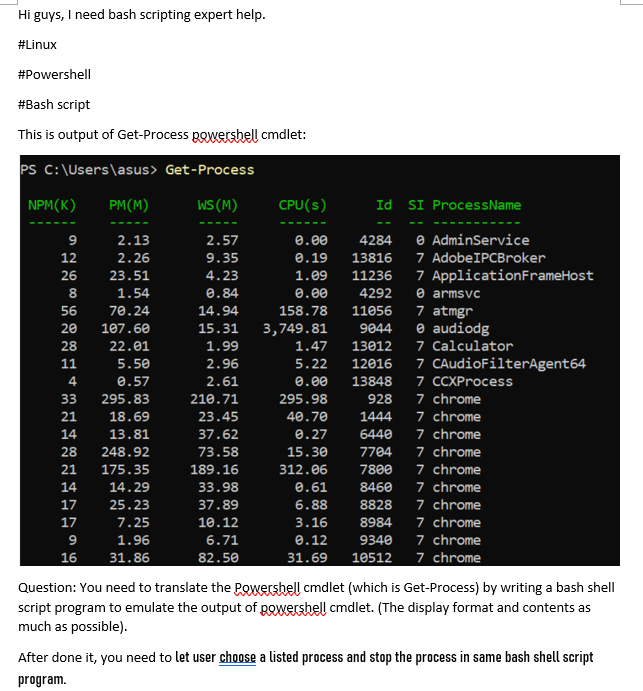
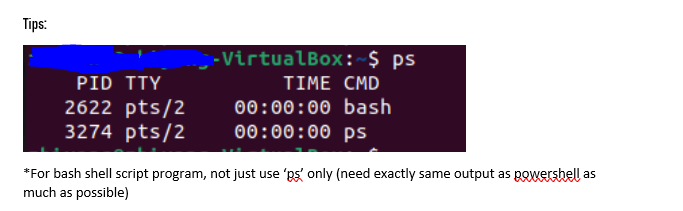
Hi guys, I need bash scripting expert help. #Linux #Powershell #Bash script This is output of Get-Process powershell cmdlet: PS C:\Users\asus> Get-Process NPM(K) PM(M) WS(M) CPU(s) Id SI ProcessName 12 9 2.13 2.57 0.00 4284 AdminService 2.26 9.35 0.19 13816 7 Adobe IPCBroker 26 23.51 4.23 1.09 11236 7 ApplicationFrameHost 8 1.54 0.84 0.00 4292 @ armsvc 56 70.24 14.94 158.78 11056 7 atmgr 20 107.60 15.31 3,749.81 9844 audiodg 28 22.01 1.99 1.47 13012 7 Calculator 11 5.50 2.96 5.22 12016 7 CAudioFilterAgent64 4 0.57 2.61 0.00 13848 7 CCXProcess 33 295.83 210.71 295.98 928 7 chrome 21 18.69 23.45 40.70 1444 7 chrome 14 13.81 37.62 @.27 6440 7 chrome 28 248.92 73.58 15.30 7704 7 chrome 21 175.35 189.16 312.06 7800 7 chrome 14 14.29 33.98 0.61 8460 7 chrome 17 25.23 37.89 6.88 8828 7 chrome 17 7.25 10.12 3.16 8984 7 chrome 9 1.96 6.71 @.12 9340 7 chrome 16 31.86 82.50 31.69 10512 7 chrome Question: You need to translate the powershell cmdlet (which is Get-Process) by writing a bash shell script program to emulate the output of powershell cmdlet. (The display format and contents as much as possible). After done it, you need to let user choose a listed process and stop the process in same bash shell script program. Tips: PID TTY 2622 pts/2 3274 pts/2 -VirtualBox: $ ps TIME CMD 00:00:00 bash 00:00:00 ps *For bash shell script program, not just use 'ps' only (need exactly same output as powershell as much as possible)
Step by Step Solution
There are 3 Steps involved in it

Get step-by-step solutions from verified subject matter experts
 Study Help