







Question: You need to develop a simple Management Information System for Hotel Reservation System that consists of a simple database (a text file). The system manages
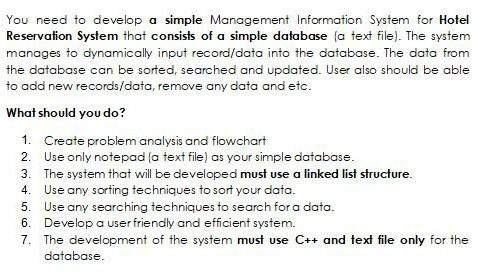
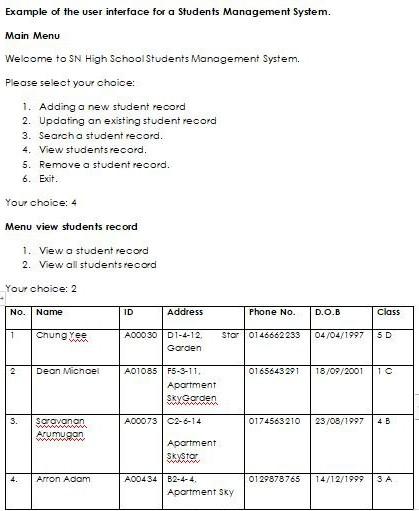
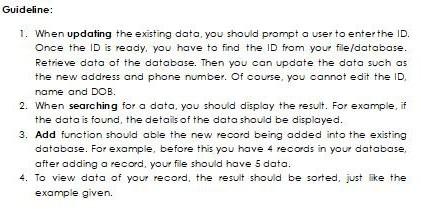
You need to develop a simple Management Information System for Hotel Reservation System that consists of a simple database (a text file). The system manages to dynamically input record/data into the database. The data from the database can be sorted searched and updated. User also should be able to add new records/data, remove any data and etc. What should you do? 1. Create problem analysis and flowchart 2. Use only notepad (a text file) as your simple database. 3. The system that will be developed must use a linked list structure. 4. Use any sorting techniques to sort your data. Use any searching techniques to search for a data. 6. Develop a user friendly and efficient system. 7. The development of the system must use C++ and text file only for the 5. database Example of the user interface for a students Management System. Main Menu Welcome to SN High School Students Management System. Please select your choice: 1. Adding a new student record 2. Updating an existing student record 3. Search a student record. 4. View students record, 5. Remove a student record. 6. Exit. Your choice: 4 Menu view students record 1. View a student record 2. View all studentsrecord Your choice: 2 No. Name ID Address Phone No. D.O.B class 1 Chng Ta Stor 0146662233 04/04/1997 SD WW A00030 D1-4-12 Gorden 2 Dean Michoel 0165643291 18/09/2001 A01085 F5-3-11, Apartment Skyerden WWWW S. A00073 02-6-14 0174563210 23/08/1997 4B Saravanan Arumugon Apartment Skystar 4. Aron Adam 0129878765 14/12/1999 SA A00434 B2-4-4. Apartment Sky Guideline: 1. When updating the existing date, you should prompt a user to enter the ID. Once the ID is ready, you have to find the ID from your file/database. Retrieve data of the database. Then you can update the data such as the new address and phone number. Of course, you cannot edit the ID name and DOB. 2. When searching for a data, you should display the result. For example, it the data is found, the details of the data should be displayed. 3. Add function should able the new record being added into the existing database. For example, before this you have 4 records in your database, after adding a record, your file should have 5 data. 4. To view data of your record, the result should be sorted, just like the example given
Step by Step Solution
There are 3 Steps involved in it

Get step-by-step solutions from verified subject matter experts
 Study Help