New Semester
Started
Get
50% OFF
Study Help!
--h --m --s
Claim Now
Question Answers
Textbooks
Find textbooks, questions and answers
Oops, something went wrong!
Change your search query and then try again
S
Books
FREE
Study Help
Expert Questions
Accounting
General Management
Mathematics
Finance
Organizational Behaviour
Law
Physics
Operating System
Management Leadership
Sociology
Programming
Marketing
Database
Computer Network
Economics
Textbooks Solutions
Accounting
Managerial Accounting
Management Leadership
Cost Accounting
Statistics
Business Law
Corporate Finance
Finance
Economics
Auditing
Tutors
Online Tutors
Find a Tutor
Hire a Tutor
Become a Tutor
AI Tutor
AI Study Planner
NEW
Sell Books
Search
Search
Sign In
Register
study help
computer science
programming microsoft visual basic
Programming With Microsoft Visual Basic 2017 8th Edition Diane Zak - Solutions
When entered in the appropriate event procedure, which of the following statements cancels the key pressed by the user?a. e.Handled = Trueb. e.Handled = Falsec. e.KeyCancel = Trued. e.KeyCancel = False
When entering data in a text box, each key the user presses invokes the text box’s_____________________ event.a. Focusb. Keyc. KeyFocusd. KeyPress
Which of the following events occurs when a check box is clicked?a. Changedb. Checkedc. CheckedChangedd. None of the above.
Which of the following If clauses will evaluate to True when the Bonus check box is selected?a. If chkBonus.Check = True Thenb. If chkBonus.Checked Thenc. If chkBonus.Checked = True Thend. Both b and c.
If a radio button is selected, its _____________________ property contains the Boolean value True.a. Checkedb. Onc. Selectedd. Selection
A form contains six check boxes. Three of the check boxes are located in a group box. How many of the check boxes on the form can be selected at the same time?a. Oneb. Twoc. Threed. Six
It is customary in Windows applications to designate a default check box.a. True b. False
Which capitalization should be used for the text appearing in check boxes and radio buttons? a. Sentence capitalization b. Book title capitalization c. Either book title capitalization or sentence capitalization d. None of the above.
If a check box is not selected, what value is contained in its Checked property?a. Trueb. Uncheckedc. Falsed. Unselected
What is the minimum number of radio buttons in a group?a. Oneb. Twoc. Threed. There is no minimum number of radio buttons.
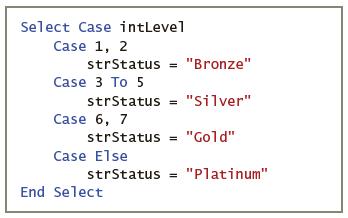
What will the code in Figure 4-55 assign to the strStatus variable when the intLevel variable contains the number 1?a. Bronzeb. Goldc. Platinumd. Silver Select Case intLevel Case 1, 2 strStatus = "Bronze" Case 3 To 5 strStatus = "Silver" Case 6, 7 strStatus "Gold" Case Else strStatus "Platinum" End
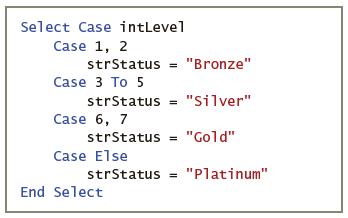
What will the code in Figure 4-55 assign to the strStatus variable when the intLevel variable contains the number 7?a. Bronzeb. Goldc. Platinumd. Silver Select Case intLevel Case 1, 2 strStatus = "Bronze" Case 3 To 5 strStatus = "Silver" Case 6, 7 strStatus "Gold" Case Else strStatus "Platinum" End
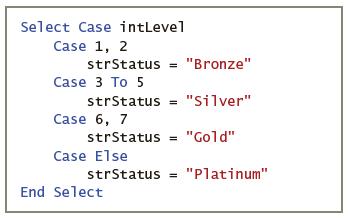
What will the code in Figure 4-55 assign to the strStatus variable when the intLevel variable contains the number 8?a. Bronzeb. Goldc. Platinumd. Silver Select Case intLevel Case 1, 2 strStatus = "Bronze" Case 3 To 5 strStatus = "Silver" Case 6, 7 strStatus "Gold" Case Else strStatus "Platinum" End
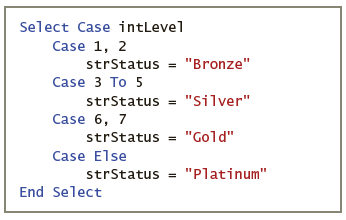
What will the code in Figure 4-55 assign to the strStatus variable when the intLevel variable contains the number 4?a. Bronzeb. Goldc. Platinumd. Silver Select Case intLevel Case 1, 2 = "Bronze" strStatus Case 3 To 5 strStatus = "Silver" Case 6, 7 strStatus = "Gold" Case Else strStatus = "Platinum"
Which of the following Case clauses is valid in a Select Case statement whose selectorExpression is an Integer variable named intAge?a. Case Is > 21b. Case 21, 65c. Case 1 To 10d. All of the above.
Where can a nested selection structure appear?a. Only in an outer selection structure’s false pathb. Only in an outer selection structure’s true pathc. In either of an outer selection structure’s pathsd. Only in another nested selection structure’s true or false paths
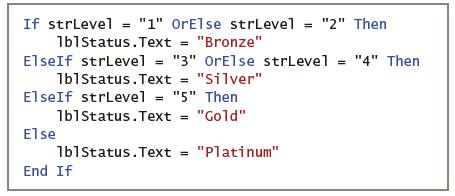
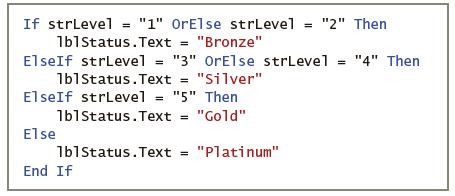
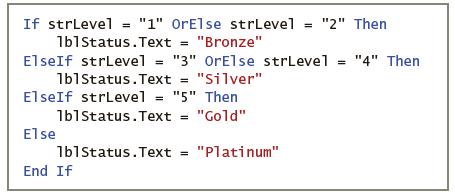
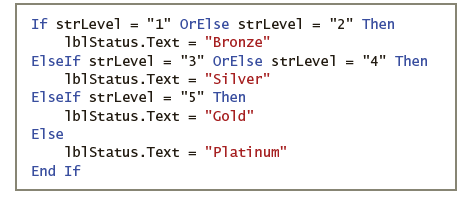
What will the code in Figure 4-54 assign to the lblStatus control when the strLevel variable contains the string “3”?a. Bronzeb. Goldc. Platinumd. Silver If strLevel = "1" OrElse strLevel "2" Then %3D 1b1Status.Text = "Bronze" ElseIf strlevel = "3" OrElse strLevel = "4" Then 1b1status.Text
What will the code in Figure 4-54 assign to the lblStatus control when the strLevel variable contains the string “10”?a. Bronzeb. Goldc. Platinumd. Silver If strLevel = "1" OrElse strLevel "2" Then %3D 1b1Status.Text = "Bronze" ElseIf strlevel = "3" OrElse strLevel = "4" Then 1b1status.Text
What will the code in Figure 4-54 assign to the lblStatus control when the strLevel variable contains the string “5”?a. Bronzeb. Goldc. Platinumd. Silver If strLevel = "1" OrElse strLevel "2" Then %3D 1b1Status.Text = "Bronze" ElseIf strlevel = "3" OrElse strLevel = "4" Then 1b1status.Text
What will the code in Figure 4-54 assign to the lblStatus control when the strLevel variable contains the string “2”?a. Bronzeb. Goldc. Platinumd. Silver "2" Then If strLevel = "1" OrElse strLevel 1b1status.Text = "Bronze" ElseIf strLevel = "3" OrElse strLevel = "4" Then 1blstatus.Text =
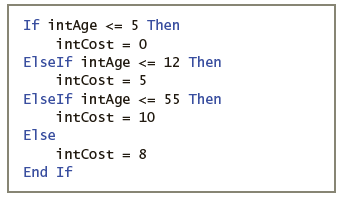
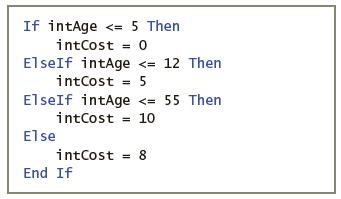
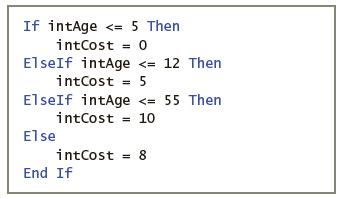
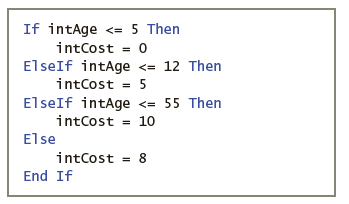
What will the code in Figure 4-53 assign to the intCost variable when the intAge variable contains the number 33?a. 0b. 5c. 8d. 10 If intAge
What will the code in Figure 4-53 assign to the intCost variable when the intAge variable contains the number 12?a. 0b. 5c. 8d. 10 If intAge
What will the code in Figure 4-53 assign to the intCost variable when the intAge variable contains the number 2?a. 0b. 5c. 8d. 10 If intAge
What will the code in Figure 4-53 assign to the intCost variable when the intAge variable contains the number 65?a. 0b. 5c. 8d. 10 If intAge
Evaluate the following expression: 5 * 4 > 6 ˆ 2 AndAlso True OrElse False.a. True b. False
Evaluate the following expression: 5 * 7 > 6 ˆ 2.a. True b. False
Evaluate the following expression: 7 + 3 * 2 > 6 * 3 AndAlso True.a. True b. False
Evaluate the following expression: 8 <= 4 + 6 AndAlso 5 > 6 OrElse 4 < 7.a. True b. False
Evaluate the following expression: 6 + 3 > 7 AndAlso 11 < 2 * 5.a. True b. False
Evaluate the following expression: 13 > 12 OrElse 6 < 5.a. True b. False
Which of the following If clauses compares the string contained in the txtId control with the abbreviation for the state of Georgia?a. If ToUpper(txtId.Text.Trim) = "GA" Thenb. If txtId.Text.Trim.ToUpper = "GA" Thenc. If txtId.Text.ToLower.Trim = "ga" Thend. Both b and c.
Which of the following compound conditions determines whether the value in the intOrdered variable is outside the range of 0 through 25?a. intOrdered < 0 OrElse intOrdered > 25b. intOrdered > 0 AndAlso intOrdered < 25c. intOrdered <= 0 OrElse intOrdered >= 25d. intOrdered < 0
Open the VB2017\Chap03\FixIt Solution\FixIt Solution.sln file. The application should calculate and display the area of a rectangular floor (in square feet) and the total cost of tiling the floor. Open the Code Editor window and correct the errors in the code. Save the solution and then start and
In this exercise, you will complete the Sales application that you created in Exercise 8 in Chapter 2.a. Use Windows to copy the Sales Solution folder from the VB2017\Chap02 folder to the VB2017\Chap03 folder. Open the Sales Solution.sln file contained in the VB2017\Chap03\Sales Solution folder.
In this exercise, you will complete the Grade Percentages application that you created in Exercise 7 in Chapter 2.a. Use Windows to copy the Grade Solution folder from the VB2017\Chap02 folder to the VB2017\Chap03 folder. Open the Grade Solution.sln file contained in the VB2017\Chap03\Grade
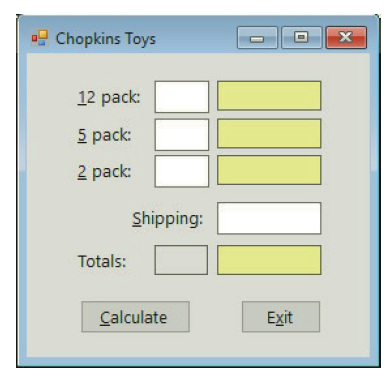
In this exercise, you modify the Chopkins Toys application from Exercise 11. Use Windows to make a copy of the Chopkins Solution folder. Rename the copy Modified Chopkins Solution. Open the Chopkins Solution.sln file contained in the Modified Chopkins Solution folder. Modify the interface as shown
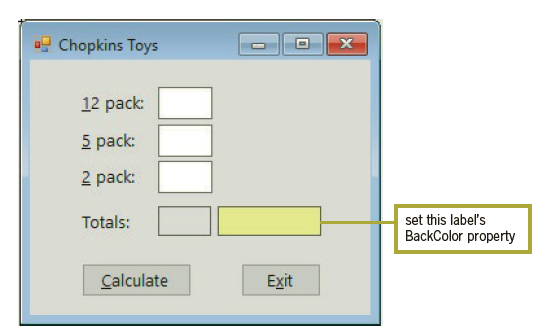
Create a Windows Forms application. Use the following names for the project and solution, respectively: Chopkins Project and Chopkins Solution. Save the application in the VB2017\Chap03 folder. Change the form file’s name to Main Form.vb. Change the form’s name to frmMain. Create the interface
In this exercise, you will complete the Kramden Inc. application that you created in Exercise 6 in Chapter 2.a. Use Windows to copy the Kramden Solution folder from the VB2017\Chap02 folder to the VB2017\Chap03 folder. Open the Kramden Solution.sln file contained in the VB2017\Chap03\Kramden
In this exercise, you will complete the Raises and New Salaries application that you created in Exercise 5 in Chapter 2.a. Use Windows to copy the Salary Solution folder from the VB2017\Chap02 folder to the VB2017\Chap03 folder. Open the Salary Solution.sln file contained in the
In this exercise, you will complete the Rectangle Area application that you created in Exercise 4 in Chapter 2.a. Use Windows to copy the Area Solution folder from the VB2017\Chap02 folder to the VB2017\Chap03 folder. Open the Area Solution.sln file contained in the VB2017\Chap03\Area Solution
In this exercise, you modify the Enrollment application from Exercise 6. Use Windows to make a copy of the Enrolled Solution folder. Rename the folder Modified Enrolled Solution. Open the Enrolled Solution.sln file contained in the VB2017\Chap03\Modified Enrolled Solution folder. Code the
Open the Enrolled Solution.sln file contained in the VB2017\Chap03\Enrolled Solution folder. The application provides a text box and a button for updating the total number of enrollees. Code the application using a class-level variable. Be sure to code the text box’s TextChanged and Enter event
Open the Orders Solution.sln file contained in the VB2017\Chap03\Orders Solution folder. The interface provides a button for adding the number ordered to the total ordered, and a button for subtracting the number ordered from the total ordered. Code the application using a class-level variable. Be
In this exercise, you will complete the Property Tax application that you created in Exercise 3 in Chapter 2.a. Use Windows to copy the Tax Solution folder from the VB2017\Chap02 folder to the VB2017\Chap03 folder. Open the Tax Solution.sln file contained in the VB2017\ Chap03\Tax Solution folder.
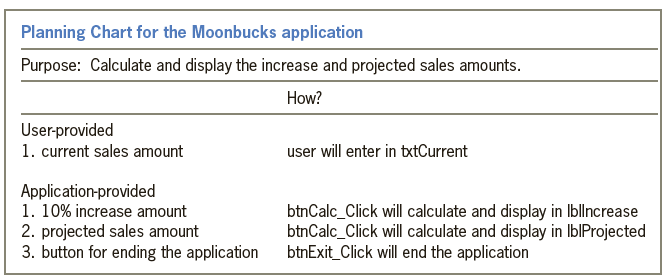
In this exercise, you will complete the Moonbucks application that you created in Exercise 2 in Chapter 2.a. Use Windows to copy the Moonbucks Solution folder from the VB2017\Chap02 folder to the VB2017\Chap03 folder. Open the Moonbucks Solution.sln file contained in the VB2017\Chap03\Moonbucks
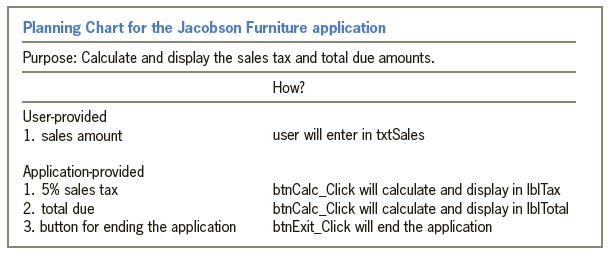
In this exercise, you will complete the Jacobson Furniture application from Chapter 2’s Apply the Concepts lesson. The application’s Planning Chart is shown in Figure 3-35. a. Use either a flowchart or pseudocode to plan the btnCalc_Click procedure, which should calculate and display both
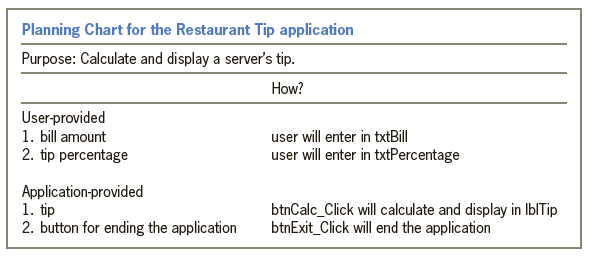
In this exercise, you will complete the Restaurant Tip application from Chapter 2’s Focus on the Concepts lesson. The application’s Planning Chart is shown in Figure 3-34. a. Use either a flowchart or pseudocode to plan the btnCalc_Click procedure, which should calculate and display a
Most of the memory locations declared in an application should be class-level variables.a. True b. False
Which of the following statements declares a procedure-level variable that is removed from the computer’s memory when the procedure ends?a. Const intCounter As Integerb. Dim intCounter As Integerc. Local intCounter As Integerd. Static intCounter As Integer
If the decPay variable contains the number 1200.76, which of the following statements displays the number as 1,200.76?a. lblPay.Text = decPay.ToString("N2")b. lblPay.Text = decPay.ToString("F2")c. lblPay.Text = decPay.ToString("D2")d. lblPay.Text = decPay.ToString("C2")
A static variable has the same _____________________ as a procedure-level variable but the same _____________________ as a class-level variable.a. Lifetime, scope b. Scope, lifetime
Which of the following statements prevents data loss due to implicit type conversions?a. Option Convert Offb. Option Explicit Onc. Option Implicit Offd. Option Strict On
If Option Strict is set to On, which of the following statements assigns the sum of two Integer variables to the Text property of the lblTotal control?a. lblTotal.Text = (intN1 + intN2).ToStringb. lblTotal.Text = intN1.ToString + intN2.ToStringc. lblTotal.Text = intN1 + intN2.ToStringd.
Which of the following declares a named constant having the Double data type?a. Const dblRATE As Double = 0.09b. Const dblRATE As Doublec. Constant dblRATE = 0.09d. Both a and b.
If Option Strict is set to On, which of the following statements will assign the contents of the txtSales control to a Double variable named dblSales?a. dblSales = txtSales.Textb. dblSales = txtSales.Text.Convert.ToDoublec. Double.TryParse(txtSales.Text, dblSales)d. TryParse.Double(txtSales.Text,
When entered in the txtName_Enter procedure, which of the following will select all of the text box’s existing text?a. txtName.SelectAll()b. txtName.SelectAllText()c. SelectAll().txtNamed. None of the above.
Which of the following declares a procedure-level String variable?a. Dim String strCityb. Dim strCity As Stringc. Private strCity As Stringd. Both b and c.
Which of the following statements declares a class-level variable?a. Class intNum As Integerb. Private intNum As Integerc. Private Class intNum As Integerd. Private Dim intNum As Integer
Which of the following can be used to clear the text contained in the lblTax control?a. lblTax = String.Emptyb. lblTax.Text = String.Emptyc. lblTax.ClearTextd. lblTax.Text.Clear
Which of the following statements declares a procedure-level variable that remains in the computer’s memory until the application ends?a. Dim Static intScore As Integerb. Private Static intScore As Integerc. Static intScore As Integerd. Both b and c.
Which of the following is a computer memory location whose value does not change during run time?A. LiteralB. Named constantC. Static constantD. Variable
What is the result of the following expression: 3 * 5 \ 2 + 30 / 5?a. 7.5b. 13c. 13.5d. None of the above.
The expression intNum * intNum * intNum is equivalent to which of the following expressions?a. intNum ^ 3b. intNum * 3c. intNum ^ 2 * intNumd. Both a and c.
Which of the following is an invalid name for a variable?a. dbl8%Rateb. decCostc. strNamed. None of the above.
What is the result of the following expression: 96 Mod 30?a. 3b. 3.2c. 6d. None of the above.
What is the result of the following expression: 96 \ 30?a. 3b. 3.2c. 6d. None of the above.
Which flowchart symbol represents a processing task?a. Circleb. Ovalc. Parallelogramd. Rectangle
Open the VB2017\Chap02\FixIt Solution\FixIt Solution.sln file. If necessary, open the designer window. Start the application. Test the tab order and the access keys. End the application and then fix the problems you observed.
Create an application that calculates and displays the percentage of the total sales made by each of the following three salespeople: Jim, Karen, and Martin. Before creating your Planning Chart, consider what information the user (in this case, the sales manager) will need to enter.a. Prepare a
Create an application that calculates and displays the percentage of students receiving a grade of P (for Pass) and the percentage of students receiving a grade of F (for Fail). Before creating your Planning Chart, consider what information the user (in this case, the professor) will need to
Kramden Inc. pays each of the company’s salespeople the same expense allowance. Create an application that calculates and displays the total cost of these allowances, given both the number of salespeople and the expense allowance amount entered by the user.a. Prepare a Planning Chart for the
Create an application that calculates and displays two raise amounts, which are based on an employee’s current salary. The current salary will be entered by the user. The two raise rates are 5% and 8%. In addition to the raise amounts, the application should also calculate and display the
Create an application that calculates and displays the area of a rectangle in both square feet and square yards. The user will provide the rectangle’s length and width, both measured in feet. a. Prepare a Planning Chart for the application.b. Draw a sketch of an appropriate interface. Be
Create an application that calculates and displays the amount of a homeowner’s property tax. The tax is 1.35% of the property’s assessed value, which will be entered by the user.a. Prepare a Planning Chart for the application.b. Draw a sketch of an appropriate interface. Be sure to follow the
Create a Windows Forms application. Use the following names for the project and solution, respectively: Moonbucks Project and Moonbucks Solution. Save the application in the VB2017\Chap02 folder. Change the appropriate properties of the form. Also, be sure to verify the name of the startup form.
Open the Amlie Solution.sln file contained in the VB2017\Chap02\Amlie Solution folder. If necessary, open the designer window. Organize the interface so that it follows the GUI design guidelines covered in this chapter. Save the solution and then start the application. Test the access keys, tab
Listed below are the five steps for planning a Windows Forms application. Put the steps in the proper order by placing a number (1 through 5) on the line to the left of the step._____________________ Identify the items that the user must provide._____________________ Identify the application’s
Define sentence capitalization.
Explain the method for providing keyboard access to a text box.
Which property determines the position of the text inside a label control?a. Alignb. Alignmentc. AlignTextd. TextAlign
Which of the following should have their names changed to more meaningful ones?A. All controls that will be codedB. All controls that will be referred to in codeC. The formD. All of the above.
If a text box’s TabIndex value is 12, its identifying label’s TabIndex value should be _____________________.a. 11b. 12c. 13d. True
Identifying labels typically have their AutoSize property set to _____________________.a. Autob. Falsec. NoSized. True
Label controls that display program output typically have their AutoSize property set to _____________________.a. Autob. Falsec. NoSized. True
Text boxes should have their BorderStyle property set to __________________________.a. BorderSingleb. Fixed3Dc. FixedSingled. None
Identifying labels typically have their BorderStyle property set to ___________________.a. BorderSingleb. Fixed3Dc. FixedSingled. None
Label controls that display program output typically have their BorderStyle property set to _____________________.a. BorderSingleb. Fixed3Dc. FixedSingled. None
How can the user access a button whose Text property contains Clea&r?a. Alt+rb. Ctrl+rc. Shift+rd. Esc+r
What is the ID used for label control names?a. labb. lalc. lbed. None of the above.
What is the id used for text box names?A. TexB. TextC. TxtD. None of the above.
Which of the following controls will provide an area in the form or the user to enter a Name?A. ButtonB. LabelC. Text boxD. All of the above.
Which of the following specifies the letter D as the access key?a. &Displayb. #Displayc. ^Displayd. D&isplay
A control’s access key is specified in which of its properties?a. Accessb. Captionc. Keyd. Text
Which property determines the tab order for the controls in an interface?a. SetOrderb. SetTabc. TabIndexd. TabOrder
Which of the following statements is false?a. The text contained in an identifying label should be left-aligned within the label.b. An identifying label should be positioned either above or to the right of the control it identifies.c. Identifying labels should use sentence capitalization.d.
A button’s caption should be entered using sentence capitalization.a. True b. False
Open the VB2017\Chap01\FixIt Solution\FixIt Solution.sln file. If necessary, open the designer window. The interface contains a picture box, two buttons, and a label control that displays the price of the parrot. a. Start the application. Click the Show price button, which should display the
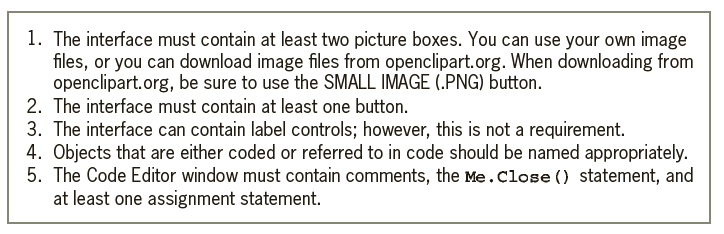
Create a Windows Forms application. Use the following names for the project and solution, respectively: OnYourOwn Project and OnYourOwn Solution. Save the application in the VB2017\Chap01 folder. Design and code an application that adheres to the guidelines listed in Figure 1-43. Open the Project
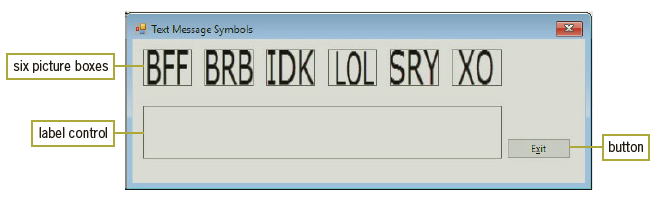
Create a Windows Forms application. Use the following names for the project and solution, respectively: Texting Project and Texting Solution. Save the application in the VB2017\Chap01 folder. a. Change the form file’s name to Main Form.vb. Change the form’s Name property to frmMain, its
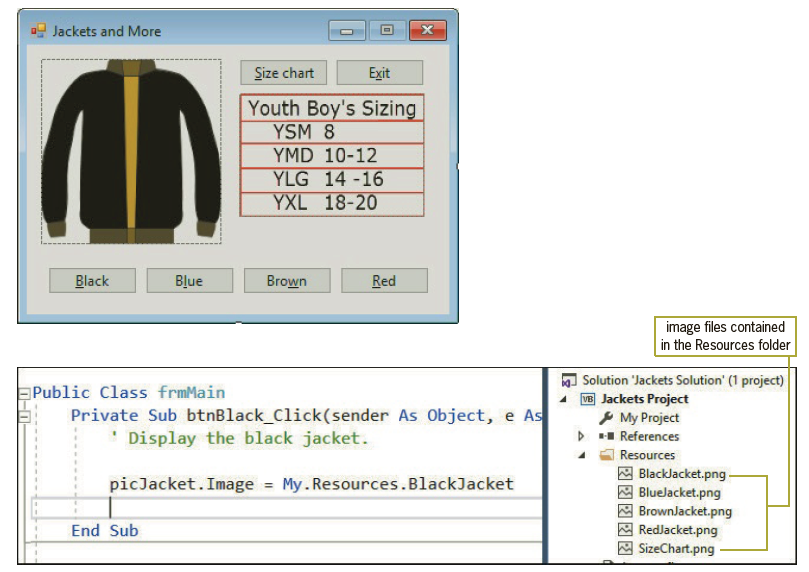
If necessary, complete Exercise 3. Use Windows to rename the Jacket Solution folder to Jackets Solution-Modified. Open the Jackets Solution.sln file contained in the VB2017\ Chap01\Jackets Solution-Modified folder. If necessary, open the designer window.a. Unlock the controls and then modify the
Showing 700 - 800
of 831
1
2
3
4
5
6
7
8
9
Step by Step Answers

 Get 50% OFF
Claim Now
Get 50% OFF
Claim Now