New Semester
Started
Get
50% OFF
Study Help!
--h --m --s
Claim Now
Question Answers
Textbooks
Find textbooks, questions and answers
Oops, something went wrong!
Change your search query and then try again
S
Books
FREE
Study Help
Expert Questions
Accounting
General Management
Mathematics
Finance
Organizational Behaviour
Law
Physics
Operating System
Management Leadership
Sociology
Programming
Marketing
Database
Computer Network
Economics
Textbooks Solutions
Accounting
Managerial Accounting
Management Leadership
Cost Accounting
Statistics
Business Law
Corporate Finance
Finance
Economics
Auditing
Tutors
Online Tutors
Find a Tutor
Hire a Tutor
Become a Tutor
AI Tutor
AI Study Planner
NEW
Sell Books
Search
Search
Sign In
Register
study help
computer science
programming microsoft visual basic
Programming With Microsoft Visual Basic 2017 8th Edition Diane Zak - Solutions
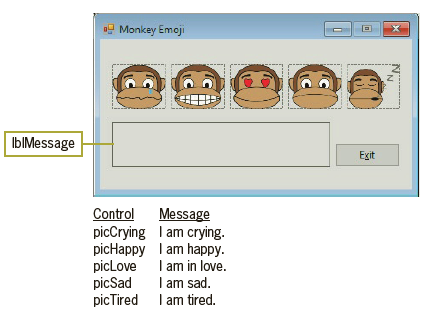
Open the Emoji Solution.sln file contained in the VB2017\Chap01\Emoji Solution folder. If necessary, open the designer window. The interface contains one label control and one button. You can use a label control to display information that you do not want the user to change during run time. You
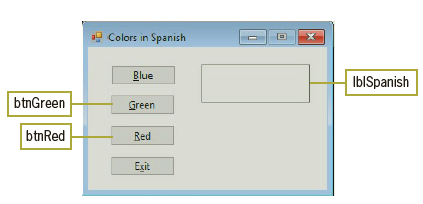
Use Windows to rename the Colors Solution folder to Colors Solution-Modified. Open the Colors Solution.sln file contained in the VB2017\Chap01\Colors Solution-Modified folder. If necessary, open the designer window. Locate the btnBlue_Click procedure in the Code Editor window. In the line above the
Open the Colors Solution.sln file contained in the VB2017\Chap01\Colors Solution folder. If necessary, open the designer window. The interface contains one label control and two buttons. You can use a label control to display information that you do not want the user to change during run time. You
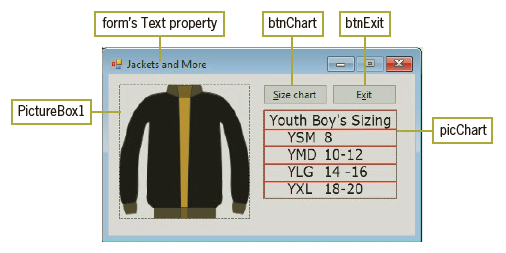
Create a Windows Forms application. Use the following names for the project and solution, respectively: Jackets Project and Jackets Solution. Save the application in the VB2017\Chap01 folder.a. Change the form file’s name to Main Form.vb.b. Change the form’s Name property to frmMain.c. Change
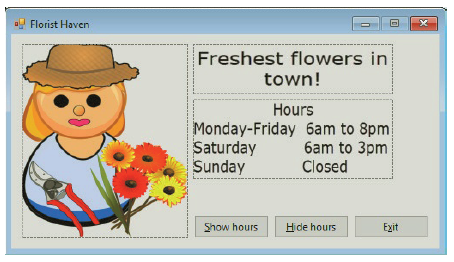
If necessary, complete Exercise 1. Use Windows to rename the Florist Solution folder to Florist Solution-Modified. Open the Florist Solution.sln file contained in the VB2017\ Chap01\Florist Solution-Modified folder. If necessary, open the designer window.a. Change the name of the picture box that
Create a Windows Forms application. Use the following names for the project and solution, respectively: Florist Project and Florist Solution. Save the application in the VB2017\Chap01 folder.a. Change the form file’s name to Main Form.vb.b. Change the form’s Name property to frmMain.c. Change
How do you verify the name of the startup form?
Define the term “syntax.”
What does the dot member access operator indicate in the text System.Windows .Forms.Label?
Explain the difference between a form file and a form.
Explain the difference between a form’s Text property and its Name property.
When you start a windows forms application in the ide, the computer saves the application’s executable (.exe) file in the _____________________ folder.a. Projectb. Project’s binc. Project’s bin\debugd. Project’s debug\bin
Which statement terminates an application that contains only one form?a. Me.Close()b. Me.Done()c. Me.Finish()d. Me.Stop()
When two or more controls are selected, how can you tell which one is the reference control?a. The reference control has white sizing handles.b. The reference control has black sizing handles.c. The reference control displays the number 1 in the left corner.d. You can’t tell. You just need to
Which of the following can be accomplished using the format menu?A. Aligning the borders of two or more controlsB. Centering one or more controls horizontally on the formC. Making two or more controls the same sizeD. All of the above.
What is the three-character extension appended to solution filenames in Visual Basic?a. .prgb. .slnc. .srcd. .vbs
Which option on the File menu closes the current solution?a. Closeb. Close Allc. Close Solutiond. Exit Solution
When a form has been modified since the last time it was saved, what appears on its tab in the designer window? a. An ampersand (&) b. An asterisk (*) c. A percent sign (%) d. A plus sign (1)
The text displayed on a button’s face is stored in which property?a. Captionb. Labelc. Named. Text
Which property is used to give a button control a more meaningful name?a. Applicationb. Captionc. Named. Text
Which property is used to disable the Maximize button on a form’s title bar?a. ButtonMaximizeb. Maximizec. MaximizeBoxd. MaximizeButton
Which property determines the initial position of a form when the application is started?a. InitialLocationb. Locationc. StartLocationd. StartPosition
Which property is used to give a form file a more meaningful name?a. Fileb. File Namec. Form Named. Name
Which property controls the text displayed in a form’s title bar?a. Captionb. Textc. Titled. TitleBar
Which of the following is an invalid name for an object?a. picMy.Dogb. btnCalcSalesTaxc. lbl2017d. All of the above are invalid names.
Which window lists the projects and files included in a solution?a. Objectb. Projectc. Propertiesd. Solution Explorer
Which window is used to set the characteristics that control an object’s appearance and behavior?a. Characteristicsb. Objectc. Propertiesd. Toolbox
Each tool in the toolbox represents a class from which an object can be instantiated. a. True b. False
You create your application’s user interface in the _____________________ window in the IDE.a. Designerb. Formc. GUId. Interface
When using an analogy involving a blueprint and a tree house, the _____________________ is the class, and the _____________________ is an object created from it. a. Blueprint, tree house b. Tree house, blueprint
A(n) _____________________ is an environment that contains all of the tools and features you need to create, run, and test your programs.a. GUIb. IDEc. UDEd. User interface
Showing 800 - 900
of 831
1
2
3
4
5
6
7
8
9
Step by Step Answers

 Get 50% OFF
Claim Now
Get 50% OFF
Claim Now


![a Florist Haven Main Form.vb + X Main Form.vb [Design] W Florist Project *s frmMain Florist Project Display store inform](https://dsd5zvtm8ll6.cloudfront.net/si.question.images/images/question_images/1547/7/1/8/1045c404dd84650c1547700736662.jpg)


