New Semester
Started
Get
50% OFF
Study Help!
--h --m --s
Claim Now
Question Answers
Textbooks
Find textbooks, questions and answers
Oops, something went wrong!
Change your search query and then try again
S
Books
FREE
Study Help
Expert Questions
Accounting
General Management
Mathematics
Finance
Organizational Behaviour
Law
Physics
Operating System
Management Leadership
Sociology
Programming
Marketing
Database
Computer Network
Economics
Textbooks Solutions
Accounting
Managerial Accounting
Management Leadership
Cost Accounting
Statistics
Business Law
Corporate Finance
Finance
Economics
Auditing
Tutors
Online Tutors
Find a Tutor
Hire a Tutor
Become a Tutor
AI Tutor
AI Study Planner
NEW
Sell Books
Search
Search
Sign In
Register
study help
computer science
programming microsoft visual basic
Programming With Microsoft Visual Basic 2017 8th Edition Diane Zak - Solutions
In this exercise, you modify the Gross Pay application from this chapter’s Focus lesson. Use Windows to make a copy of the Gross Solution folder. Rename the copy Gross Solution-Functions. Open the Gross Solution.sln file contained in the Gross Solution-Functions folder. Change the two independent
In this exercise, you modify the Gross Pay application from this chapter’s Focus lesson. Use Windows to make a copy of the Gross Solution folder. Rename the copy Modified Gross Solution. Open the Gross Solution.sln file contained in the Modified Gross Solution folder. Change the names of the two
In this exercise, you modify the History Grade application from this chapter’s Focus lesson. Use Windows to make a copy of the History Solution folder. Rename the copy History Solution-Functions. Open the History Solution.sln file contained in the History Solution-Functions folder. Modify the
Explain the difference between invoking a Sub procedure and invoking a function.
Explain the difference between passing a variable by value and passing it by reference.
Explain the difference between a Sub procedure and a Function procedure.
If a message is for informational purposes only and does not require the user to make a decision, the message box should display which of the following?a. An ok button and the information iconb. An ok button and the exclamation iconc. A yes button and the stop icond. A no button and the stop icon
Which constant displays the Exclamation icon in a message box?a. MessageBox.Exclamationb. MessageBox.IconExclamationc. MessageBoxIcon.Exclamationd. MessageBox.WarningIcon
Which of the following statements prevents a form from being closed?a. e.Cancel = Falseb. e.Cancel = Truec. e.Close = Falsed. e.sender.Close = False
Which event is triggered when the computer processes the me.close() statement entered in the btnexit_click procedure?a. The form’s closing eventb. The form’s formclosing eventc. The btnexit control’s closing eventd. The btnexit control’s formclosing event
Which of the following rounds the contents of the dblSales variable to two decimal places?a. dblSales = Math.Round(dblSales, 2)b. dblSales = Math.Round(2, dblSales)c. dblSales = Round.Math(dblSales, 2)d. dblSales = Round.Math(2, dblSales)
Which of a form’s events is triggered when you click the Close button on its title bar?a. FormCloseb. FormClosingc. FormExitd. None of the above.
Which event occurs when the user either types a value in the text portion of a combo box or selects a different item in the list portion?a. ChangedItemb. ChangedValuec. SelectedItemChangedd. TextChanged
The item that appears in the text portion of a combo box is stored in which property?a. SelectedTextb. SelectedValuec. Textd. TextItem
Which of the following selects the Cat item, which appears third in the cboAnimal control?a. cboAnimal.SelectedIndex = 2b. cboAnimal.SelectedItem = "Cat"c. cboAnimal.Text = "Cat"d. All of the above.
The items in a combo box belong to which collection?a. Itemsb. Listc. ListBoxd. Values
Which property is used to specify a combo box’s style?a. ComboBoxStyleb. DropDownStylec. DropStyled. Style
Which of the following statements invokes the GetDiscount function, passing it the contents of two Decimal variables named decSales and decRate? The statementshould assign the function’s return value to the decDiscount variable. a. decDiscount = GetDiscount(ByVal decSales, ByVal decRate)b.
The memory locations listed in a procedure header’s parameterList have procedure scope and are removed from the computer’s main memory when the procedure ends.a. True b. False
A Sub procedure named GetEndInv is passed four Integer variables from its calling statement. The first three variables store the following three values: beginninginventory, number sold, and number purchased. The procedure should use these values to calculate the ending inventory, and then store the
Which of the following is false?a. When you pass a variable by reference, the receiving procedure can change its contents.b. To pass a variable by reference, you include the ByRef keyword before the variable’s name in the calling statement.c. When you pass a variable by value, the receiving
If a statement passes a variable’s address, the variable is said to be passed _____________________. A. By address b. By content c. By reference d. By value
Which of the following is a valid header for a procedure that is passed the number 15?a. Private Function GetTax(ByVal intRate As Integer) As Decimalb. Private Function GetTax(ByAdd intRate As Integer) As Decimalc. Private Sub CalcTax(ByVal intRate As Integer)d. Both a and c.
Which of the following is a valid header for a procedure that receives the address of a Decimal variable followed by an integer?a. Private Sub GetFee(ByVal decX As Decimal, ByAdd intY As Integer)b. Private Sub GetFee(decX As Decimal, intY As Integer)c. Private Sub GetFee(ByRef decX As Decimal,
Which of the following instructs a function to return the value stored in the dblBonus variable?a. Return dblBonusb. Return ByVal dblBonusc. Send dblBonusd. SendBack dblBonus
Which of the following is false?a. The order of the arguments listed in the calling statement should agree with the order of the parameters listed in the receiving procedure’s header.b. The data type of each argument in the calling statement should match the data type of its corresponding
Which of the following is a valid header for a procedure that receives an integer followed by a number with a decimal place?a. Private Sub GetFee(intBase As Value, decRate As Value)b. Private Sub GetFee(ByRef intBase As Integer, ByRef decRate As Decimal)c. Private Sub GetFee(ByVal intBase As
Which of the following is a valid header for a procedure that receives a copy of the value stored in a String variable?a. Private Sub DisplayName(ByCopy strName As String)b. Private Sub DisplayName ByVal(strName As String)c. Private Sub DisplayName(ByVal strName As String)d. None of the above.
Which of the following statements invokes the GetArea Sub procedure, passing it two variables by value?a. GetArea(dblLength, dblWidth) As Doubleb. GetArea(ByVal dblLength, ByVal dblWidth)c. GetArea ByVal(dblLength, dblWidth)d. GetArea(dblLength, dblWidth)
Which of the following indicates whether a variable is being passed by value or By reference?A. The calling statementB. The receiving procedure’s headerC. The statements entered within the receiving procedureD. All of the above.
What are the items that appear within parentheses in a procedure header called?A. ArgumentsB. ParametersC. PassersD. None of the above.
What are the items that appear within parentheses in a calling statement called?A. ArgumentsB. ParametersC. PassersD. None of the above.
Which of the following is false?a. A function returns only one value to the statement that invoked it.b. A Sub procedure can accept only one item of data passed to it.c. The parameterList in a procedure header is optional.d. None of the above.
Open the FixIt Solution.sln file contained in the VB2017\Chap05\FixIt Solution folder. Open the Code Editor window and review the existing code. Start and then test the application. Correct any errors in the code.
Create a Windows Forms application. Use the following names for the project and solution, respectively: Salary Project and Salary Solution. Save the application in the VB2017\Chap05 folder. At the beginning of every year, you receive a raise on your previous year’s salary. Create an application
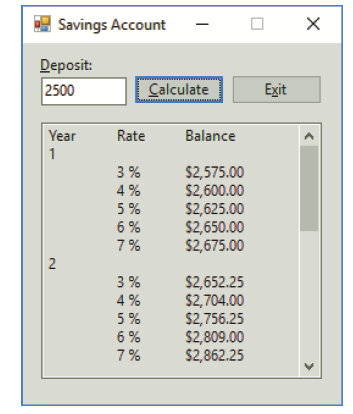
In this exercise, you modify the Savings Account application from this chapter’s Apply lesson. Use Windows to make a copy of the Savings Solution folder. Rename the copy Savings Solution-Advanced. Open the Savings Solution.sln file contained in the Savings Solution-Advanced folder. The
In this exercise, you learn how to use the Items collection’s Insert, Remove, and RemoveAt methods. Open the Items Collection Solution.sln file contained in the VB2017\Chap05\Items Collection Solution folder. a. The Items collection’s Insert method allows you to add an item at a desired
In this exercise, you learn how to create a list box that allows the user to select more than one item at a time. Open the Multi Solution.sln file contained in the VB2017\Chap05\Multi Solution folder. The interface contains a list box named lstNames. The list box’s Sorted and SelectionMode
Open the Fibonacci Solution.sln file contained in the VB2017\Chap05\Fibonacci Solution folder. The application should display the first 10 Fibonacci numbers: 1, 1, 2, 3, 5, 8, 13, 21, 34, and 55. Notice that beginning with the third number in the series, each Fibonacci number is the sum of the
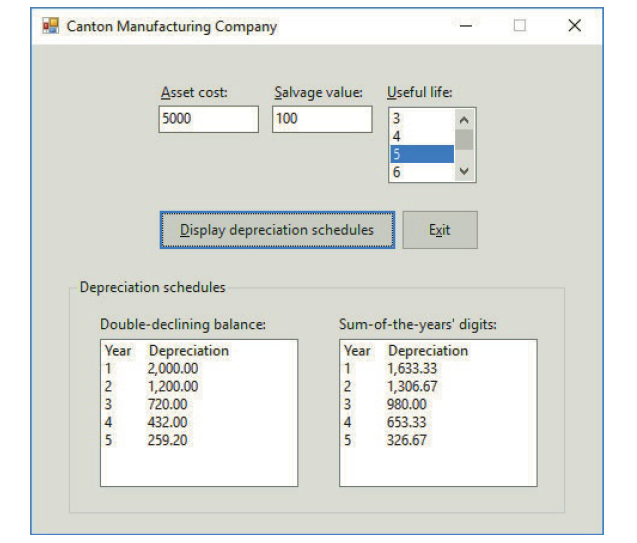
The accountant at Canton Manufacturing Company wants you to create an application that calculates an asset’s annual depreciation using the double-declining balance and sum-of-the-years’ digits methods. The accountant will enter the asset’s cost, useful life (in years), and salvage value
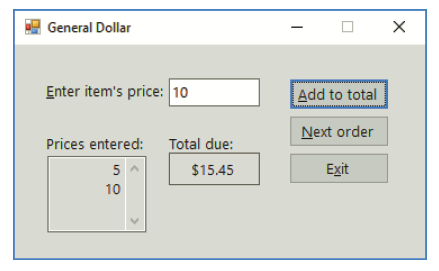
Create a Windows Forms application. Use the following names for the project and solution, respectively: General Project and General Solution. Save the application in the VB2017\Chap05 folder. A sample run of the application is shown in Figure 5-50. The interface allows the user to enter an item’s
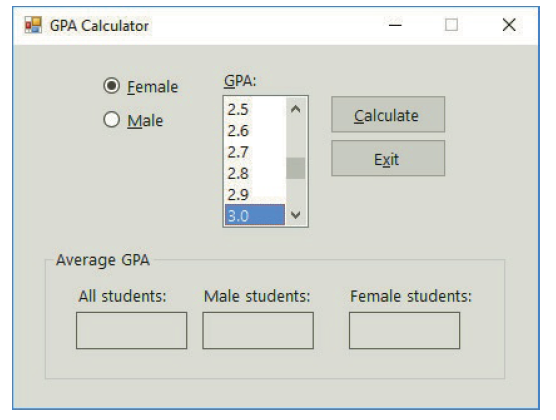
In this exercise, you create an application that allows the user to enter the gender (either F or M) and GPA for any number of students. The application should calculate the average GPA for all students, the average GPA for male students, and the average GPA for female students. Create a Windows
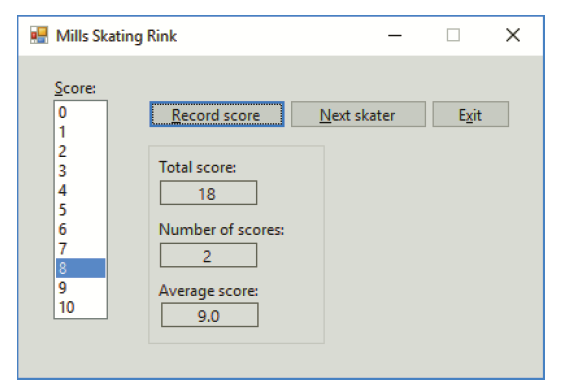
Create a Windows Forms application. Use the following names for the project and solution, respectively: Mills Project and Mills Solution. Save the application in the VB2017\Chap05 folder. Mills Skating Rink holds a weekly ice-skating competition. Competing skaters must perform a two-minute program
In this exercise, you modify the Monthly Payment application from this chapter’s Apply lesson. Use Windows to make a copy of the Payment Solution folder. Rename the copy Modified Payment Solution. Open the Payment Solution.sln file contained in the Modified Payment Solution folder. Modify the
In this exercise, you create an application for Discount Warehouse. Create a Windows Forms application. Use the following names for the project and solution, respectively: Discount Project and Discount Solution. Save the application in the VB2017\Chap05 folder. The interface should allow the user
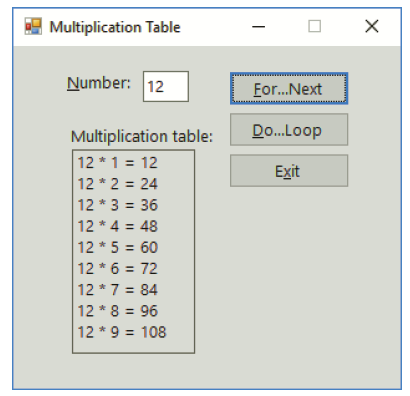
Open the Multiplication Solution.sln file contained in the VB2017\Chap05\Multiplication Solution folder. Code the application to display a multiplication table similar to the one shown in Figure 5-47. Use the For…Next statement in the btnForNext_Click procedure, and use the Do…Loop statement in
In this exercise, you modify the Numbers application from Exercise 6. Use Windows to make a copy of the Numbers Solution folder. Rename the copy Modified Numbers Solution. Open the Numbers Solution.sln file contained in the Modified Numbers Solution folder.a. Open the Code Editor window. Modify the
Open the Numbers Solution.sln file contained in the VB2017\Chap05\Numbers Solution folder. The application allows the user to display a list of numbers in a list box. The user will enter the start and end values for these numbers in the two text boxes. a. Open the Code Editor window. Locate
In this exercise, you modify one of the Projected Sales applications from this chapter’s Apply lesson. Use Windows to make a copy of the Projected Sales Solution-ForNext folder. Rename the copy Projected Sales Solution-DoLoop. Open the Projected Sales Solution.sln file contained in the Projected
In this exercise, you modify one of the Projected Sales applications from this chapter’s Apply lesson. Use Windows to make a copy of the Projected Sales Solution folder. Rename the copy Modified Projected Sales Solution. Open the Projected Sales Solution.sln file contained in the Modified
In this exercise, you modify the Savings Account application from this chapter’s Apply lesson. Use Windows to make a copy of the Savings Solution folder. Rename the copy Modified Savings Solution. Open the Savings Solution.sln file contained in the Modified Savings Solution folder. In the
Create a Windows Form application. Use the following names for the project and solution, respectively: State Capital Project and State Capital Solution. Save the application in the VB2017\Chap05 folder. Add any five state names to a list box. When the user clicks a name in the list box, the list
In this exercise, you modify the Monthly Payment application from this chapter’s Apply lesson. Use Windows to make a copy of the Payment Solution folder. Rename the copy Payment Solution-DoLoop. Open the Payment.sln file contained in the Payment Solution-DoLoop folder. Change the For…Next
If a list box’s Sorted property is set to True, how will the numbers 4, 35, 3, 1, and 12 be displayed in the list box?a. 4, 35, 3, 1, 12b. 1, 3, 4, 12, 35c. 1, 12, 3, 35, 4d. 35, 12, 4, 3, 1
If a list box’s Sorted property is set to False, how will the numbers 4, 35, 3, 1, and 12 be displayed in the list box?a. 4, 35, 3, 1, 12b. 1, 3, 4, 12, 35c. 1, 12, 3, 35, 4d. 35, 12, 4, 3, 1
To make the btnCalc control the default button, you need to set the _____________________ property.a. btnCalc’s AcceptButtonb. btnCalc’s DefaultButtonc. form’s AcceptButtond. form’s DefaultButton
Which of the following calculates the monthly payment (expressed as a positive number) for a loan of $10,000 for 2 years with a 3.5% annual interest rate?a. –Financial.Pmt(0.035, 2, 10000)b. –Financial.Pmt(0.035 / 12, 2 * 12, 10000)c. –Financial.Pmt(2 * 12, 0.035 / 12, 10000)d.
What will the following code display in the lblSum control?Dim intSum As IntegerDim intY As IntegerDo While intY < 3For intX As Integer = 1 To 4intSum += intXNext intXintY += 1LooplblSum.Text = intSum.ToStringa. 5b. 8c. 15d. 30
What will the following code display in the lblAsterisks control?For intX As Integer = 1 To 2For intY As Integer = 1 To 3lblAsterisks.Text = lblAsterisks.Text & "*"Next intYlblAsterisks.Text = lblAsterisks.Text & ControlChars.NewLineNext intXa. *** ***b. ***
Which event occurs when the user selects a different item in a list box?a. SelectionChangedb. SelectedItemChangedc. SelectedValueChangedd. None of the above.
Which of the following statements selects the fourth item in the lstNames control?a. lstNames.SelectIndex = 3b. lstNames.SelectIndex = 4c. lstNames.SelectedIndex = 3d. lstNames.SelectedItem = 4
Which of the following properties stores the index of the item selected in a list box?a. Indexb. SelectedIndexc. Selectiond. SelectionIndex
The items in a list box belong to which collection?a. Itemsb. Listc. ListItemsd. Values
Which of the following methods is used to add items to a list box?a. Addb. AddListc. Itemd. ItemAdd
The loop controlled by the correct For clause from Review Question 13 will end when the intX variable contains the number _____________________.a. 100b. 111c. 101d. 110
Which of the following For clauses indicates that the loop instructions should be processed as long as the intX variable’s value is less than 100?a. For intX As Integer = 10 To 100b. For intX As Integer = 10 To 99c. For intX As Integer = 10 To 101d. None of the above.
Which of the following statements is equivalent to the statement dblTotal = dblTotal + dblSales?a. dblTotal += dblSalesb. dblSales += dblTotalc. dblTotal =+ dblSalesd. dblSales =+ dblTotal
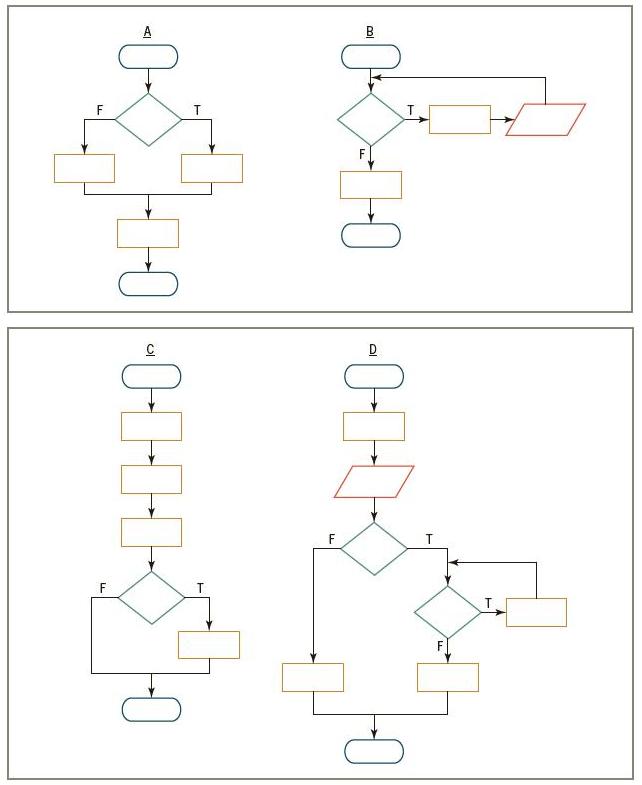
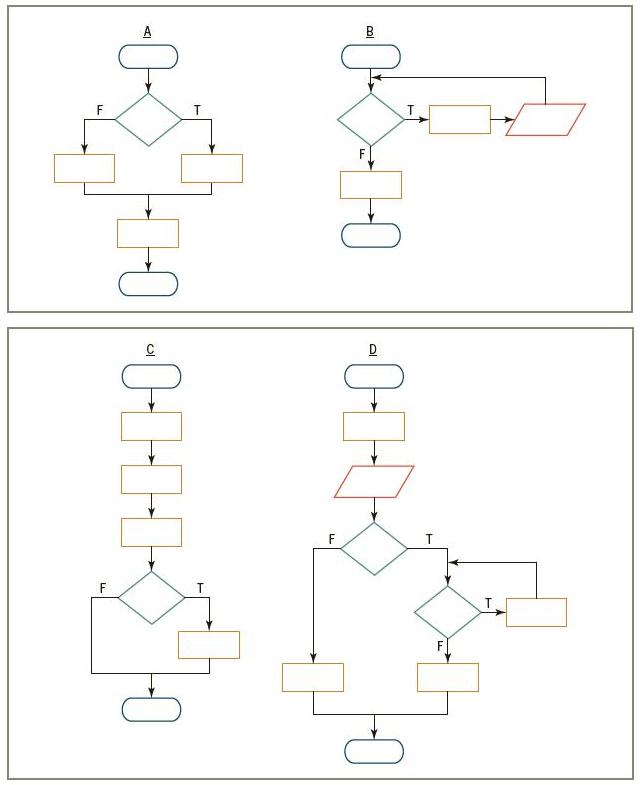
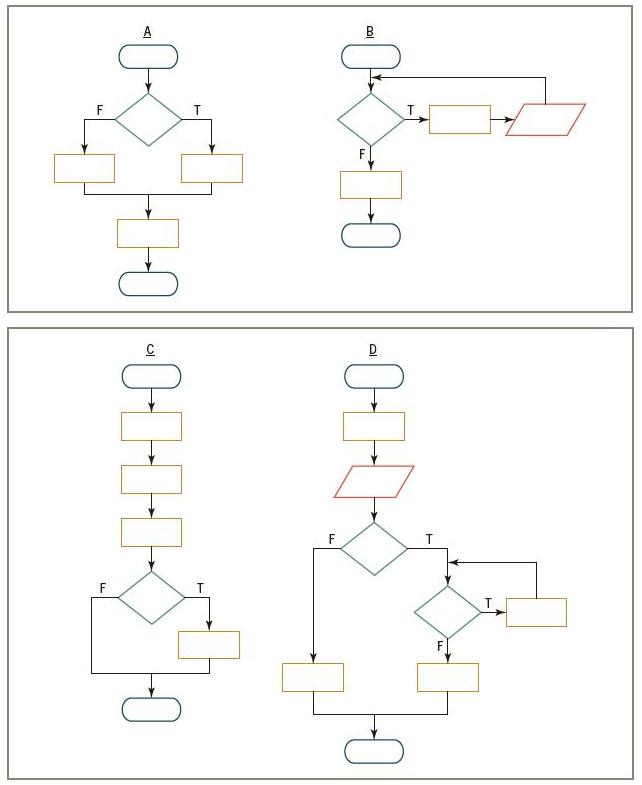
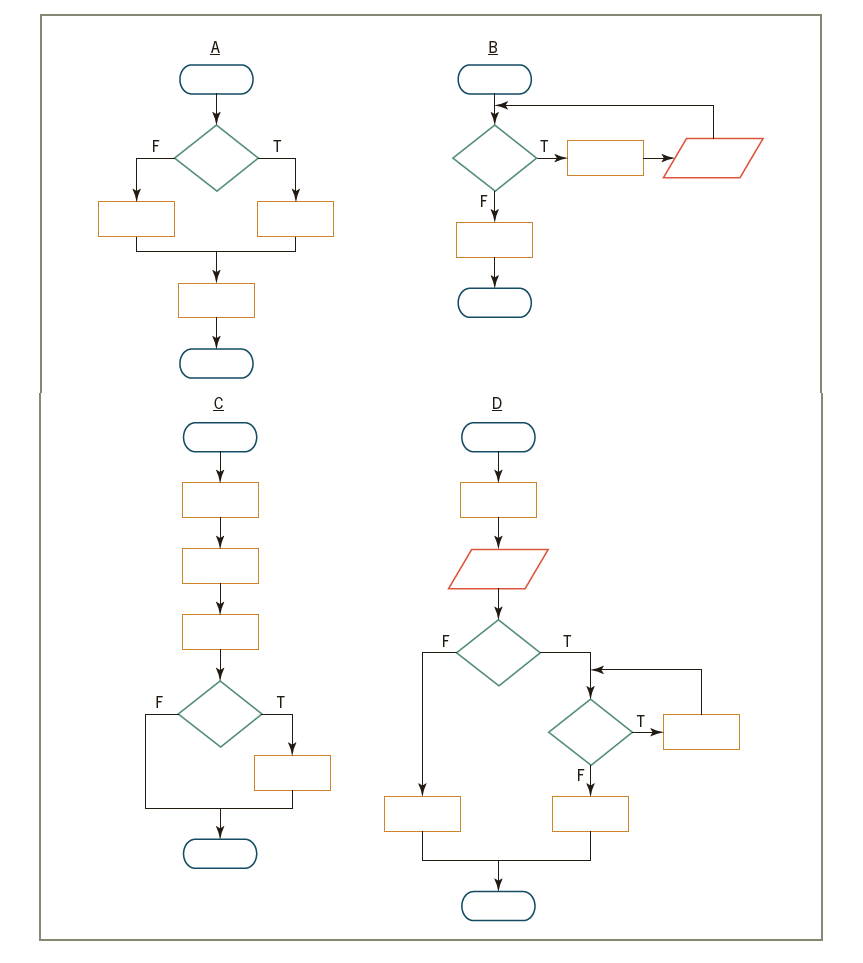
In addition to the sequence structure, which of the following control structures is used in flowchart D in Figure 5-46?a. Selectionb. Repetitionc. Both a and b. A T. -O-T- LL
In addition to the sequence structure, which of the following control structures is used in flowchart C in Figure 5-46?a. Selectionb. Repetitionc. Both a and b. A T. -O-T- LL
In addition to the sequence structure, which of the following control structures is used in flowchart B in Figure 5-46?a. Selectionb. Repetitionc. Both a and b. A T. -O-T- LL
In addition to the sequence structure, which of the following control structures is used in flowchart A in Figure 5-46?a. Selectionb. Repetitionc. Both a and b. -0- 0-0-E-C-E-H
The computer will stop processing the loop in Review Question 6 when the intCount variable contains the number _____________________.a. 11b. 12c. 13d. 14
How many times will the string literal “Hi” appear in the lblMsg control?For intCount As Integer = 6 To 13 Step 2lblMsg.Text = lblMsg.Text &"Hi" & ControlChars.NewLineNext intCountA. ThreeB. FourC. FiveD. Eight
How many times will the string literal “Hi” appear in the lblMsg control?Dim intCount As IntegerDolblMsg.Text = lblMsg.Text &"Hi" & ControlChars.NewLineintCount += 1Loop While intCount > 4A. ZeroB. OneC. FourD. Five
How many times will the string literal “Hi” appear in the lblMsg control? Dim intCount As IntegerDo While intCount > 4lblMsg.Text = lblMsg.Text &"Hi" & ControlChars.NewLineintCount += 1Loopa. Zerob. Onec. Fourd. Five
The instructions in a _____________________ loop might not be processed at all, whereas the instructions in a _____________________ loop are always processed atleast once.a. Posttest, pretest b. Pretest, posttest
Which of the following statements can be used to code a loop whose instructions you want processed 10 times?a. Do…Loopb. For…Nextc. All of the above.
Which of the following clauses will stop the loop when the value in the intPopulation variable is less than the number 5000?a. Do While intPopulation >= 5000b. Do Until intPopulation < 5000c. Loop While intPopulation >= 5000d. All of the above.
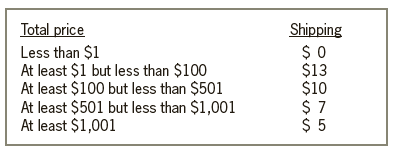
The purpose of this exercise is to demonstrate the importance of testing an application thoroughly. Open the FixIt Solution.sln file contained in the VB2017\Chap04\FixIt Solution folder. The application displays a shipping charge that is based on the total price entered by the user, as shown in
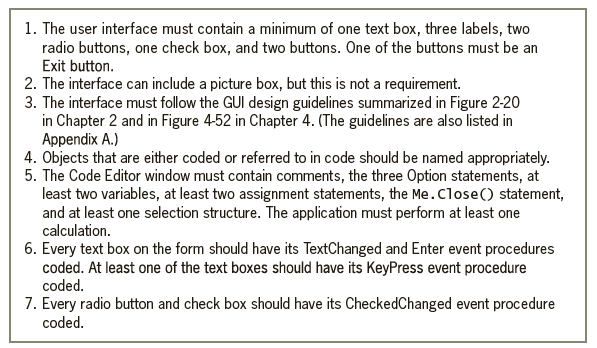
Create a Windows Forms application. Use the following names for the project and solution, respectively: OnYourOwn Project and OnYourOwn Solution. Save the application in the VB2017\Chap04 folder. Plan and design an application of your choice. The only requirement is that you must follow the minimum
In this exercise, you modify the Sales application from Exercise 14 in Chapter 3. Use Windows to copy the Sales Solution folder from the VB2017\Chap03 folder to the VB2017\Chap04 folder. Open the Sales Solution.sln file contained in the VB2017\Chap04\Sales Solution folder. Start the application and
In this exercise, you modify the Grade application from Exercise 13 in Chapter 3. Use Windows to copy the Grade Solution folder from the VB2017\Chap03 folder to the VB2017\Chap04 folder. Open the Grade Solution.sln file contained in the VB2017\Chap04\Grade Solution folder. Start the application and
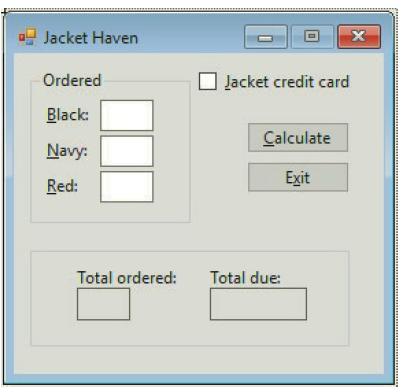
Create a Windows Forms application. Use the following names for the project and solution, respectively: Jacket Haven Project and Jacket Haven Solution. Save the application in the VB2017\Chap04 folder. Change the form file’s name to Main Form.vb. Change the form’s name to frmMain. Create the
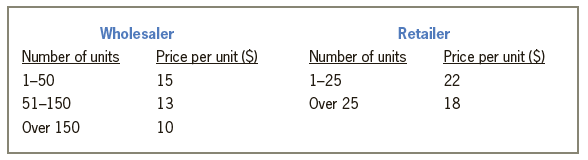
In this exercise, you create an application for Genatone Inc. The application displays the price of an order based on the number of units ordered and the customer’s status (either wholesaler or retailer). The price per unit is shown in Figure 4-61. Create a Windows Forms application. Use the
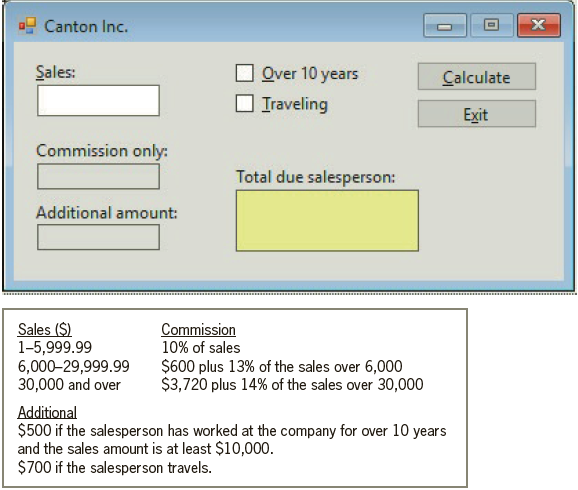
Each salesperson at Canton Inc. receives a commission based on the amount of his or her sales. The commission rates and additional payment amounts are shown in Figure 4-60. Create a Windows Forms application. Use the following names for the project and solution, respectively: Canton Project and
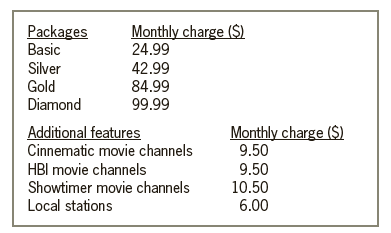
Williams Cable Company wants an application that displays a customer’s monthly cable bill, which is based on the information shown in Figure 4-59. Create a Windows Forms application. Use the following names for the project and solution, respectively: Williams Project and Williams Solution. Save
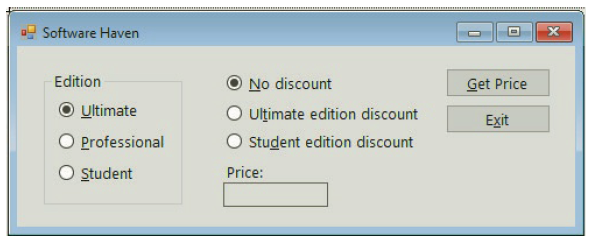
Software Haven sells a software package that is available in three editions. The application should display the price of the edition a customer wants to purchase. The retail prices for the Ultimate, Professional, and Student editions are $899.99, $599.99, and $99.99, respectively. Some customers
In this exercise, you modify the application from Exercise 7. The modified application will display the number of rectangular tables needed to seat the bridal party as well as the number of round tables required for the guests. Each rectangular table can accommodate a maximum of 10 people. As in
Open the Wedding Solution.sln file contained in the VB2017\Chap04\Wedding Solution folder. The application should display the number of round tables needed to seat only the guests at a wedding reception. (In other words, the bridal party does not need to be included in this calculation.) Each round
Patti Garcia owns two cars, referred to as Car 1 and Car 2. She wants to drive one of the cars to her vacation destination, but she’s not sure which one (if any) would cost her the least amount in gas. Create a Windows Forms application. Use the following names for the project and solution,
Lorenzo’s is having a BoGoHo (Buy One, Get One Half Off) sale. The store manager wants an application that allows the salesclerk to enter the prices of two items. The half off should always be applied to the item that has the lowest price. The application should calculate and display the total
In this exercise, you modify the application created in Exercise 2. Use Windows to make a copy of the Hales Solution folder. Rename the copy Hales Solution-Select Case. Open the Hales Solution.sln file contained in the Hales Solution-Select Case folder. Modify the Display cost button’s Click
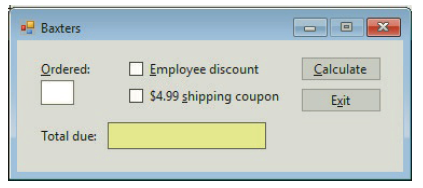
Create a Windows Forms application. Use the following names for the project and solution, respectively: Baxters Project and Baxters Solution. Save the application in the VB2017\Chap04 folder. Change the form file’s name to Main Form.vb. Change the form’s name to frmMain. Create the interface
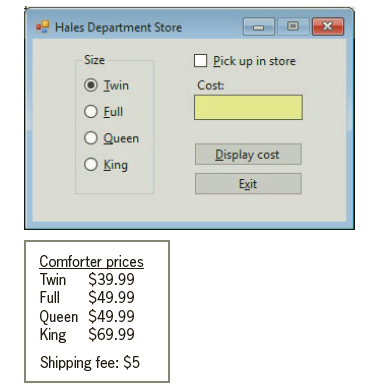
Create a Windows Forms application. Use the following names for the project and solution, respectively: Hales Project and Hales Solution. Save the application in the VB2017\Chap04 folder. Change the form file’s name to Main Form.vb. Change the form’s name to frmMain. Create the interface shown
Create a Windows Forms application. Use the following names for the project and solution, respectively: States Capitals Project and States Capitals Solution. Save the application in the VB2017\Chap04 folder. Change the form file’s name to Main Form.vb. Change the form’s name to frmMain. Add
An expression can contain arithmetic, comparison, and logical operators. Indicate the order of precedence for the three types of operators by placing a number (1, 2, or 3) on the line to the left of the operator type._____________________ Arithmetic_____________________ Logical_____________________
The six logical operators are listed below. Indicate their order of precedence by placing a number (1, 2, and so on) on the line to the left of the operator. If two or more operators have the same precedence, assign the same number to each._____________________ Xor _____________________
Which of the following statements is equivalent to the statement dblTotal = dblRate * dblTotal?a. dblTotal =* dblRateb. dblTotal *= dblRatec. dblRate *= dblTotald. dblRate =* dblTotal
Which of the following If clauses determines whether the user pressed the % key?a. If ControlChars.PercentSign = True Thenb. If e.KeyChar = "%" Thenc. If e.KeyChar = Chars.PercentSign Thend. If e.KeyChar.ControlChars = "%" Then
Which of the following If clauses determines whether the user pressed the Backspace key?a. If e.KeyChar = ControlChars.Back Thenb. If e.KeyChar = Backspace Thenc. If e.KeyChar = ControlChars.Backspace Thend. If ControlChars.BackSpace = True Then
Showing 600 - 700
of 831
1
2
3
4
5
6
7
8
9
Step by Step Answers

 Get 50% OFF
Claim Now
Get 50% OFF
Claim Now