







Question: Open the Validate Number Solution.sln file contained in the VB2017Chap07Validate Number Solution folder. The interface provides a text box for entering a 9-digit number. The
Open the Validate Number Solution.sln file contained in the VB2017\Chap07\Validate Number Solution folder. The interface provides a text box for entering a 9-digit number. The btnValidate_Click procedure should use the algorithm and example shown in Figure 7-56 to validate the user?s entry. The procedure should display a message indicating whether the entry is or is not valid. Code the procedure. Include any other code that will professionalize the interface. Save the solution and then start and test the application.
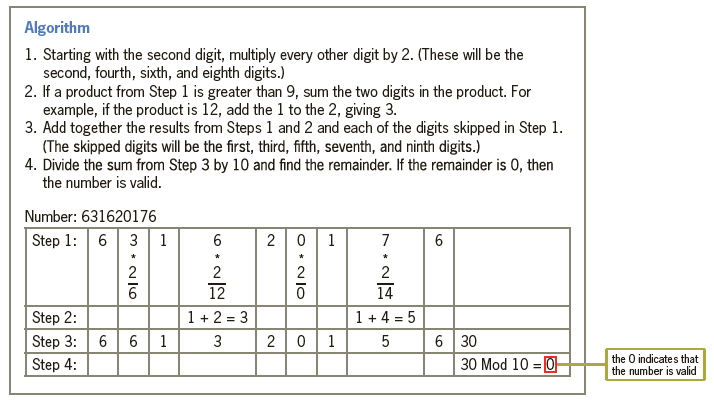
Algorithm 1. Starting with the second digit, multiply every other digit by 2. (These will be the second, fourth, sixth, and eighth digits.) 2. If a product from Step 1 is greater than 9, sum the two digits in the product. For example, if the product is 12, add the 1 to the 2, giving 3. 3. Add together the results from Steps 1 and 2 and each of the digits skipped in Step 1. (The skipped digits will be the first, third, fifth, seventh, and ninth digits.) 4. Divide the sum from Step 3 by 10 and find the remainder. If the remainder is 0, then the number is valid. Number: 631620176 Step 1: 6 3 1 2 0 1 7 6 2 2 12 14 1 + 4 = 5 Step 2: Step 3: Step 4: 1 + 2 = 3 6 30 30 Mod 10 = 0 6 6 1 3 0 1 5 the O indicates that the number is valid O NIO 2.
Step by Step Solution
3.42 Rating (161 Votes )
There are 3 Steps involved in it
Microsoft Visual Studio Solution File Format Version 1200 Visual Studio 15 VisualStudioVersi... View full answer

Get step-by-step solutions from verified subject matter experts
Document Format (2 attachments)

1814_60b8c12285ccb_823598.pdf
180 KBs PDF File

1814_60b8c12285ccb_823598.docx
120 KBs Word File
 Study Help