



Question: 3 In cell H9, insert the YEARFRAC function to calculate the years between the hire date and the last day of the year contained in
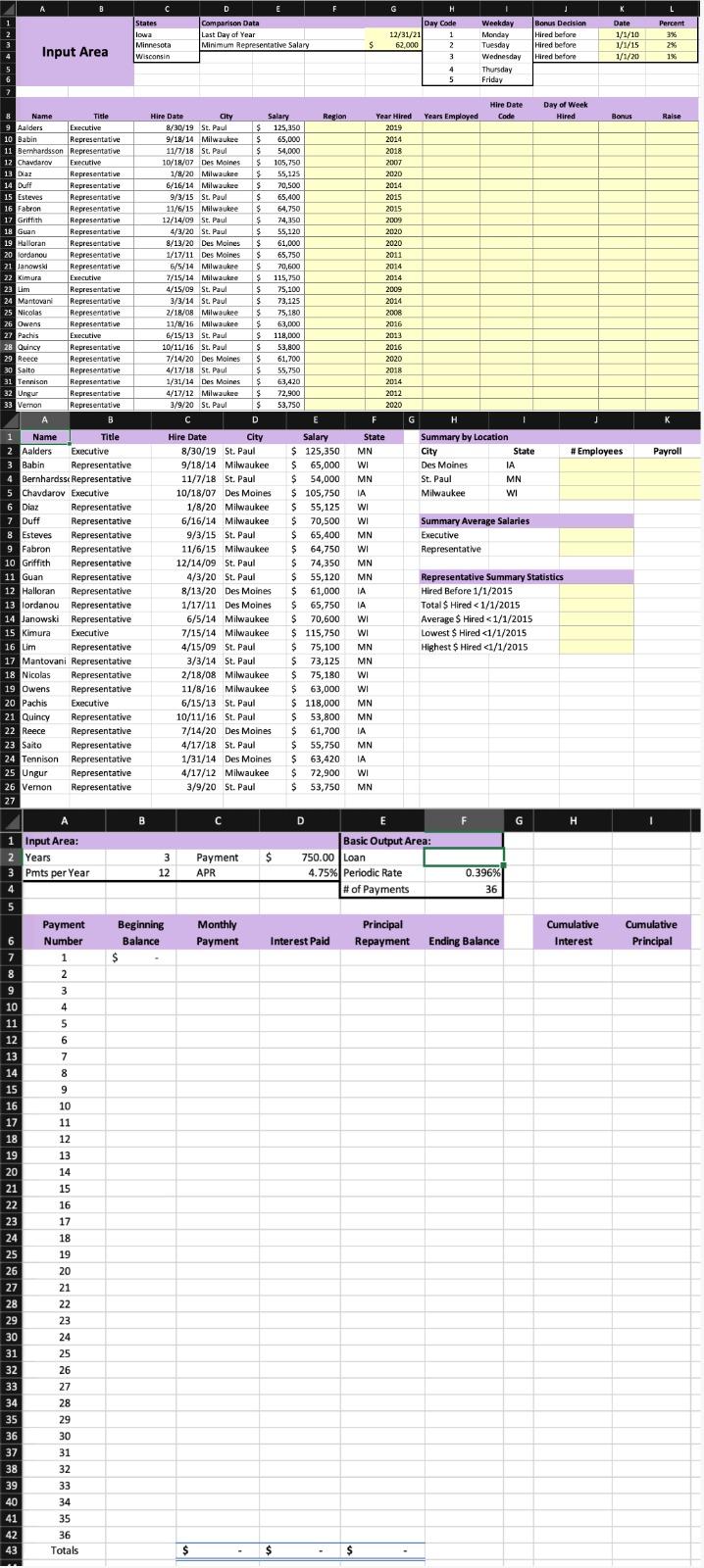
| 3 | In cell H9, insert the YEARFRAC function to calculate the years between the hire date and the last day of the year contained in cell G2. Use a mixed reference to cell G2. Copy the function from cell H9 to the range H10:H33. |
| 4 | You want to determine what day of the week each employee was hired. In cell I9, insert the WEEKDAY function to display the day of the week the first employee was hired. Use 2 as the return_type. Copy the function from cell I9 to the range I10:I33. |
| 5 | The value returned in cell I9 is a whole number. You want to display the weekday equivalent. In cell J9, insert a VLOOKUP function to look up the value stored in cell I9, compare it to the array in the range H2:I6, and return the day of the week. Use mixed references to the table array. Copy the function from cell J9 to the range J10:J33. |
| 6 | Column D contains the city each employee works in. You want to display the state. In cell F9, insert the SWITCH function to switch the city stored in cell D9 with the respective state contained in the range C2:C4. Switch Des Moines for Iowa, St. Paul for Minnesota, and Milwaukee for Wisconsin. Use mixed references to cells C2, C3, and C4. Copy the function from cell F9 to the range F10:F33. |
| 7 | Your next task is to calculate the bonus for the first employee. If the employee was hired before 1/1/2010, the employee's salary is multiplied by 3%. If the employee was hired before 1/1/2015, the employee's salary is multiplied by 2%. If the employee was hired before 1/1/2020, the employee's salary is multiplied by 1%. In cell K9, insert the IFS function to create the three logical tests to calculate the appropriate bonus. Use mixed references to cells within the range K2:L4. Copy the function from cell K9 to the range K10:K33. |
| 8 | Top management decided to ensure all representatives' salaries are at least $62,000 (cell G2). In cell L9, nest an AND function within an IF function. If the job title is Representative and the salary is less than the minimum representative salary, calculate the difference between the minimum representative salary and the actual salary. If not, return zero. Use a mixed reference to cell G3. Copy the function from cell L9 to the range L10:L33. |
| 9 | The 2-Summary worksheet contains data to insert conditional math and statistical functions to provide summary data. First, you want to count the number of employees in each state. Click the 2-Summary worksheet. In cell J3, insert the COUNTIF function to count the number of employees in Iowa, using the state abbreviation column and the state abbreviation in cell I3. Use mixed references for the range and cell to keep the row numbers the same. Copy the function from cell J3 to the range J4:J5. |
| 10 | In cell K3, insert the SUMIF function to total the salaries for employees who work in Iowa, using the state abbreviation column and the state abbreviation in cell I3. Use mixed references for the ranges and cell to keep the row numbers the same. Copy the function from cell K3 to the range K4:K5. |
| 11 | In cell J8, insert the AVERAGEIF function to calculate the average salary for executives. Use mixed references to the range and for the cell containing Executives. Copy the function to cell J9. |
| 12 | In cell J12, insert the COUNTIFS function to count the number of representatives who were hired before 1/1/2015. Use ranges for the criteria ranges and the reference to cell H9 that contains Representatives. Enter the date condition directly in the criteria box. |
| 13 | In cell J13, insert the SUMIFS function to calculate the total salaries for representatives hired before 1/1/2015. Use ranges for the criteria ranges and the reference to cell H9 that contains Representatives. Enter the date condition directly in the criteria box. Use mixed references to the ranges and cell reference so that you can copy the function in the next step. |
| 14 | Copy the function from cell J13 to the range J14:J16. Edit the function in cell J14 to calculate averages. |
| 15 | Edit the function in cell J15 to calculate the lowest salary. |
| 16 | Edit the function in cell J16 to calculate the highest salary. |
| 17 | Select the ranges I2:I5 and K2:K5 and insert a filled map. Change the chart title to Payroll by State. Cut the chart and paste it in cell M1. |
| 18 | In cell F2, insert the PV function to calculate the loan. Use cell references in the Input Area and Basic Output Area. |
| 19 | In cell C7, enter a reference to the Payment that is stored in cell D2. Use mixed reference so that the row number does not change. Copy the formula from cell C7 to the range C8:C42. |
| 20 | In cell D7, insert the IPMT function to calculate the interest for the first payment. Use mixed references for cells in the Basic Output Area and make sure the result is a positive value. Copy the function from cell D7 to the range D8:D42. |
| 21 | In cell E7, insert the PPMT function to calculate the principal portion of the first payment. Use mixed references for cells in the Basic Output Area and make sure the result is a positive value. Copy the function from cell E7 to the range E8:E42. |
| 22 | In cell F7, enter a formula to calculate the ending balance after subtracting the Principal Repayment from the Beginning Balance. Copy the formula from cell F7 to the range F8:F42. In cell B8, enter a formula that refers to the ending balance for the previous month in cell F7. Copy the relative formula to the range B9:B42. |
| 23 | In cell H7, insert the CUMIPMT function. Use mixed references for cells in the Basic Output Area and the Start_period argument. Make sure the result is a positive value. Copy the function from cell H7 to the range H8:H42. |
| 24 | In cell I7, insert the CUMPRINC function. Use mixed references for cells in the Basic Output Area and the Start_period argument. Make sure the result is a positive value. Copy the function from cell I7 to the range I8:I42. |
Step by Step Solution
There are 3 Steps involved in it

Get step-by-step solutions from verified subject matter experts