







Question: 32-bit ALU simulation Write a simulation code for the 32-bit ALU described in the attached figures. The ALU uses 32-bit ripple-carry adder, and performs six
32-bit ALU simulation
Write a simulation code for the 32-bit ALU described in the attached figures.
The ALU uses 32-bit ripple-carry adder, and performs six operations, i.e., logic AND,
logic OR, addition, subtraction, set on less than (slt), and logic NOR.
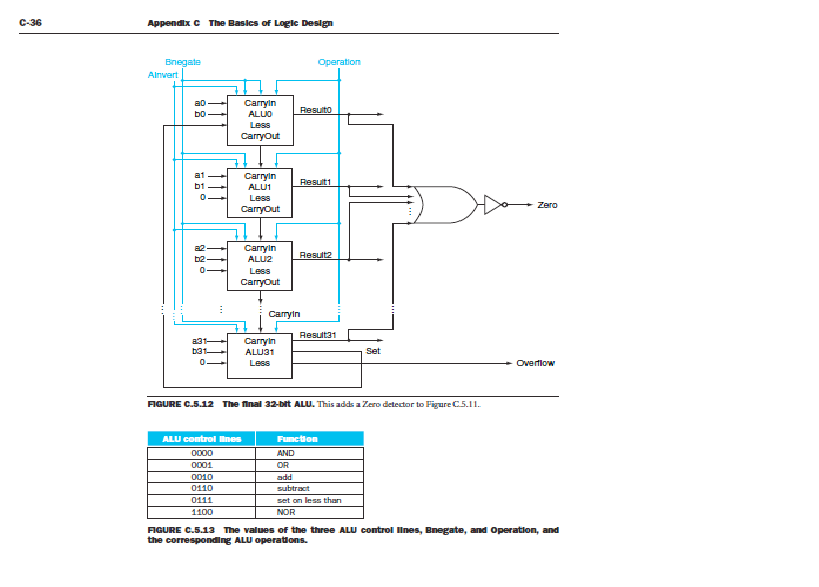
In addition to the result (32 bits wide), the ALU should also return signals for overflow
(1 bit) and zero (1 bit) as shown in Figure C.5.12.
Step 1
As the first step, write a simulation code for a basic component 1-bit ALU, which performs 1-
bit operations for the above six operations.
In the 1-bit ALU, there are five sub-components to simulate, which are AND-gate, OR-gate,
1-bit full adder, 2x1_Mux, and 4x1_MUX. //you dont have to simulate the negator.
Each sub-component should be implemented as a function with input/output parameters.
Component 1-bit ALU should also be implemented as a function with input/output parameters.
As shown in Figure C.5.12, there are 7 inputs and 2 outputs for each 1-bit ALU, except the last
one, which has two extra outputs (overflow and set signals).
You should write an extra simulation module (a function) for the last 1-bit ALU.
Test your 1-bit ALU with your own test data.
Step 2
Extend your simulation code designed in Step 1 for the 32-bit ALU. The complete structure
is depicted in Figure- C.5.12.
Data A(a0-a31) and B(b0-b31) are 32 bits each, and you can store them in two 32-bit integer vars.
You can assign values to A and B using decimal, binary, or hexadecimal format, e.g.,
int A = 0x1234abcd; //value in hexadecimal format
Manipulation of the 32-bit data in your simulator is up to you, e.g., using bit-wise operations
or array of 32 symbols (1 or 0 each), etc.
Based on the control signals (total 4 bits, as shown in Figure C.5.13) and input data (A and
B, each 32 bits), your 32-bit ALU should generate appropriate outputs.
Test data for simulation program phase1
Test your simulator with the following data sets:
int a = 0x00000003; //Hex number assignment (decimal 3)
int b = 0x00000004; //Hex number assignment (decimal 4)
int a = 0xffffffb7 //Hex number assignment (decimal -73)
int b = 0x00000046 //Hex number assignment (decimal 70)
Test for all the operations, i.e., AND, OR, ADD, SUB, SLT, and NOR.
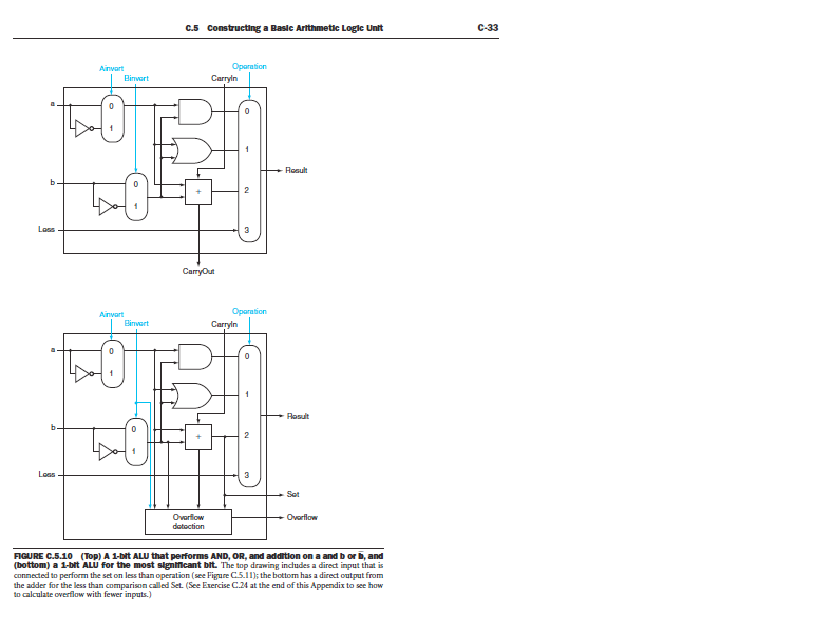
C-33 Oparation Binvert Result nega Oparation Binvart Carryln Rosult Ovarlow RIGURE C.5.10 (Top) A 1-bit ALU that performs AND, OR, amd addition on a and b or b, and conmected to perforn the set on less than operation (see Figrure C5.1the bottorn has a direct output from the adder for the less than comparisonad Set. (See ExenciseC24 atthe end of this Appendix to see how to calculate overflow with fewer inputs.) C-33 Oparation Binvert Result nega Oparation Binvart Carryln Rosult Ovarlow RIGURE C.5.10 (Top) A 1-bit ALU that performs AND, OR, amd addition on a and b or b, and conmected to perforn the set on less than operation (see Figrure C5.1the bottorn has a direct output from the adder for the less than comparisonad Set. (See ExenciseC24 atthe end of this Appendix to see how to calculate overflow with fewer inputs.)
Step by Step Solution
There are 3 Steps involved in it

Get step-by-step solutions from verified subject matter experts
 Study Help