







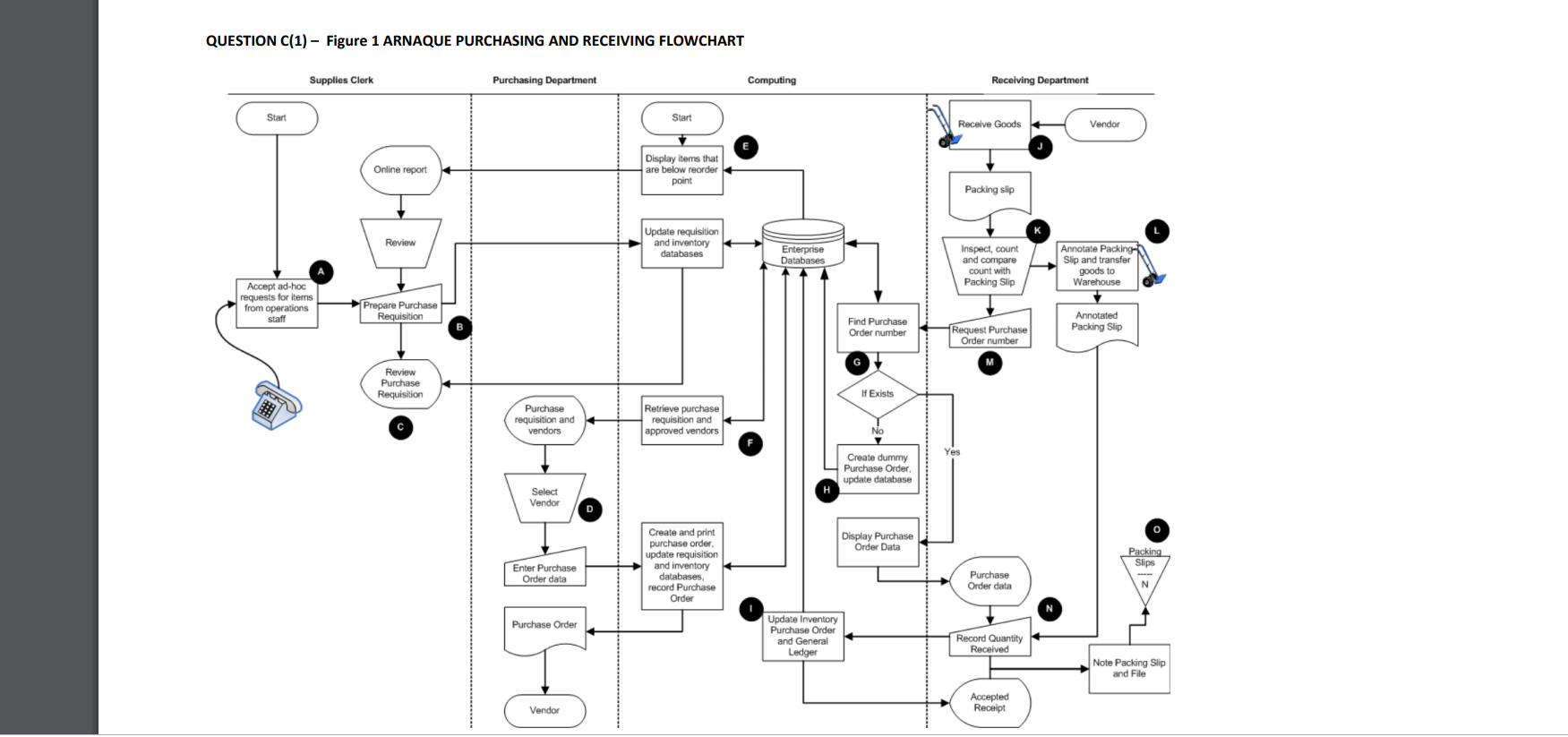
Question: A flowchart on the page 6 is the systems/document flowchart for a Purchasing and Receiving system. The flowchart is annotated with 15 points labelled A
A flowchart on the page 6 is the systems/document flowchart for a Purchasing and Receiving system. The flowchart is annotated with 15 points labelled A to O, that represent either a control plan that satisfies one or more control objectives of the system OR a point where a control plan to satisfy one or more control objectives of the system are missing
Whilst a Control Matrix Template is provided on page 7, to assist those students who wish to use it in the preparation of their answer to part C, DO NOT include the template as part of your answer.
Required:
C 1. Identify five of the 15 annotated points provided that satisfy one or more control objectives of the system.
(1 MARK suggested time approx. 4 minutes)
C 2. For each of the 5 identified control plans indicate what control objectives of the system are satisfied.
(1 MARK suggested time approx. 4 minutes)
C 3. Identify five of the 15 annotated points provided that indicate MISSING control plans for this system.
(1 MARK suggested time approx. 4 minutes)
C 4. For each of the 5 identified MISSING control plans indicate what control objective is not being satisfied and speculate on a control plan that should/could be implemented for each MISSING element.
QUESTION C(1) - Figure 1 ARNAQUE PURCHASING AND RECEIVING FLOWCHART Supplies Clerk Purchasing Department Computing Receiving Department Start Start Receive Goods Vendor Display items that Online report are below reorder point Packing slip Update requisition Review and inventory databases Enterprise Inspect, count Annotate Packing Databases and compare Slip and transfer count with goods to Accept ad-hoc Packing Slip Warehouse requests for items from operations Prepare Purchase staff Requisition Find Purchase Annotated Order number Request Purchase Packing Slip Order number G Review Purchase Requisition If Exists Purchase Retrieve purchase requisition and requisition and vendors approved vendors Create dummy Purchase Order. update database Select Vendor Create and print Display Purchase o purchase order, update requisition Order Data Packing Enter Purchase and inventory Slips Order data databases, Purchase record Purchase Order data Order Purchase Order Update Inventory Purchase Order and General Record Quantity Ledger Received Note Packing Slip and File Accepted Vendor Receipt
Step by Step Solution
There are 3 Steps involved in it

Get step-by-step solutions from verified subject matter experts
 Study Help