







Question: Can someone do this Excel Problem and explain these steps and formulas? roblem Solve 2 Assignment Instructions 10 In cell D6, reference the named range
Can someone do this Excel Problem and explain these steps and formulas? 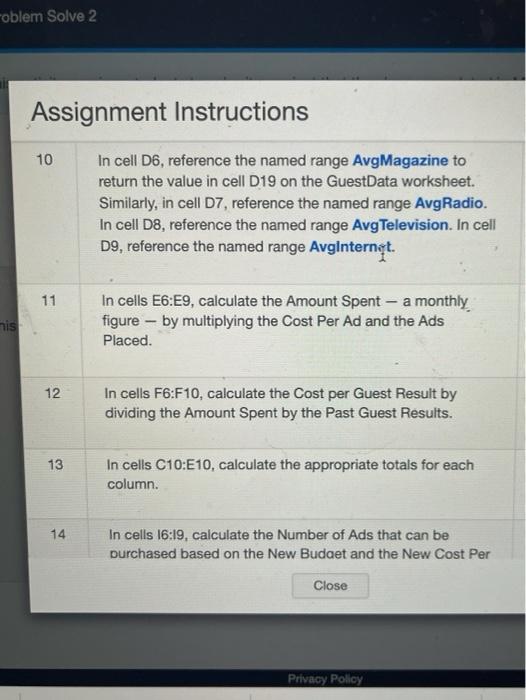
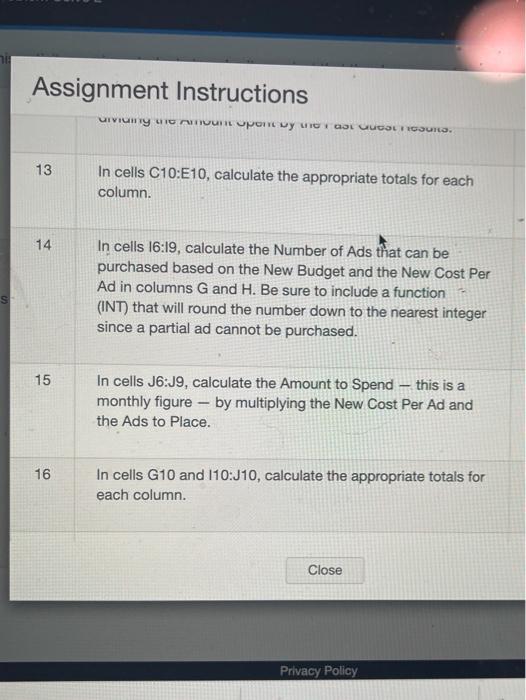
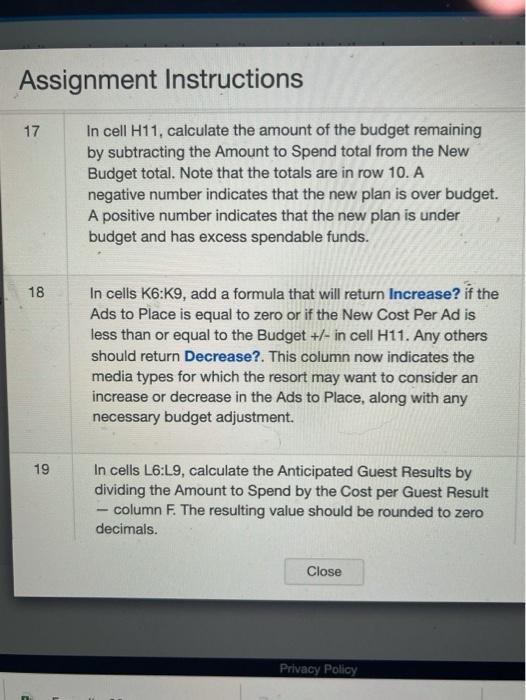
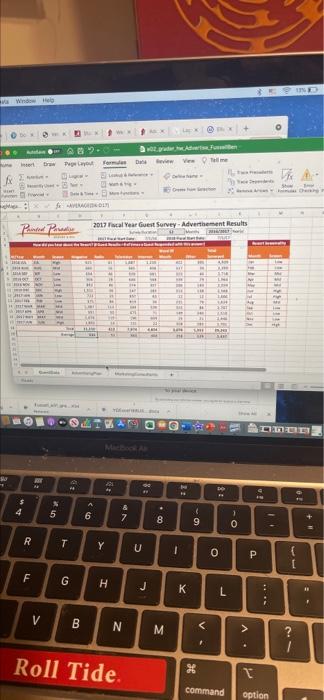
roblem Solve 2 Assignment Instructions 10 In cell D6, reference the named range AvgMagazine to return the value in cell D19 on the GuestData worksheet. Similarly, in cell D7, reference the named range Avg Radio. In cell D8, reference the named range Avg Television. In cell D9, reference the named range AvgInternet. 11 nis In cells E6:E9, calculate the amount Spent - a monthly figure - by multiplying the Cost Per Ad and the Ads Placed. 12 In cells F6:F10, calculate the cost per Guest Result by dividing the Amount Spent by the Past Guest Results. 13 In cells C10:E10, calculate the appropriate totals for each column. 14 In cells 16:19, calculate the Number of Ads that can be purchased based on the New Budaet and the New Cost Per Close Privacy Policy Assignment Instructions UIVITY LICULUPORT LA GUGOLOSURS. 13 In cells C10:E10, calculate the appropriate totals for each column. 14 In cells 16:19, calculate the Number of Ads that can be purchased based on the New Budget and the New Cost Per Ad in columns G and H. Be sure to include a function (INT) that will round the number down to the nearest integer since a partial ad cannot be purchased. 15 In cells J6:19, calculate the Amount to Spend - this is a monthly figure - by multiplying the New Cost Per Ad and the Ads to Place. 16 In cells G10 and 110:J10, calculate the appropriate totals for each column Close Privacy Policy Assignment Instructions 17 In cell H11, calculate the amount of the budget remaining by subtracting the Amount to Spend total from the New Budget total. Note that the totals are in row 10.A negative number indicates that the new plan is over budget. A positive number indicates that the new plan is under budget and has excess spendable funds. 18 In cells K6:59, add a formula that will return Increase? if the Ads to place is equal to zero or if the New Cost Per Ad is less than or equal to the Budget +/- in cell H11. Any others should return Decrease?. This column now indicates the media types for which the resort may want to consider an increase or decrease in the Ads to Place, along with any necessary budget adjustment. 19 In cells L6:L9, calculate the Anticipated Guest Results by dividing the Amount to Spend by the Cost per Guest Result - column F. The resulting value should be rounded to zero decimals. Close Privacy Policy *EU CM Window + O An AB Per om 2017 cal Year Guest Survey - Adverthement Results Printed Paradise + - L. - LE 11 - 11 15 w - - wa G 18 11 DO Te $ A 4 5 & 7 0 9 . ep 3 + 8 9 O . R T Y U I O P ) F G H H J J K K 1 : V CO B N M > > ? Roll Tide C command option roblem Solve 2 Assignment Instructions 10 In cell D6, reference the named range AvgMagazine to return the value in cell D19 on the GuestData worksheet. Similarly, in cell D7, reference the named range Avg Radio. In cell D8, reference the named range Avg Television. In cell D9, reference the named range AvgInternet. 11 nis In cells E6:E9, calculate the amount Spent - a monthly figure - by multiplying the Cost Per Ad and the Ads Placed. 12 In cells F6:F10, calculate the cost per Guest Result by dividing the Amount Spent by the Past Guest Results. 13 In cells C10:E10, calculate the appropriate totals for each column. 14 In cells 16:19, calculate the Number of Ads that can be purchased based on the New Budaet and the New Cost Per Close Privacy Policy Assignment Instructions UIVITY LICULUPORT LA GUGOLOSURS. 13 In cells C10:E10, calculate the appropriate totals for each column. 14 In cells 16:19, calculate the Number of Ads that can be purchased based on the New Budget and the New Cost Per Ad in columns G and H. Be sure to include a function (INT) that will round the number down to the nearest integer since a partial ad cannot be purchased. 15 In cells J6:19, calculate the Amount to Spend - this is a monthly figure - by multiplying the New Cost Per Ad and the Ads to Place. 16 In cells G10 and 110:J10, calculate the appropriate totals for each column Close Privacy Policy Assignment Instructions 17 In cell H11, calculate the amount of the budget remaining by subtracting the Amount to Spend total from the New Budget total. Note that the totals are in row 10.A negative number indicates that the new plan is over budget. A positive number indicates that the new plan is under budget and has excess spendable funds. 18 In cells K6:59, add a formula that will return Increase? if the Ads to place is equal to zero or if the New Cost Per Ad is less than or equal to the Budget +/- in cell H11. Any others should return Decrease?. This column now indicates the media types for which the resort may want to consider an increase or decrease in the Ads to Place, along with any necessary budget adjustment. 19 In cells L6:L9, calculate the Anticipated Guest Results by dividing the Amount to Spend by the Cost per Guest Result - column F. The resulting value should be rounded to zero decimals. Close Privacy Policy *EU CM Window + O An AB Per om 2017 cal Year Guest Survey - Adverthement Results Printed Paradise + - L. - LE 11 - 11 15 w - - wa G 18 11 DO Te $ A 4 5 & 7 0 9 . ep 3 + 8 9 O . R T Y U I O P ) F G H H J J K K 1 : V CO B N M > > ? Roll Tide C command option Step by Step Solution
There are 3 Steps involved in it
1 Expert Approved Answer
Step: 1 Unlock

Question Has Been Solved by an Expert!
Get step-by-step solutions from verified subject matter experts
Step: 2 Unlock
Step: 3 Unlock
 Study Help