







Question: Chapter: 7 * Data Structures and Algorithms Using Java ** NO JOPTION PANE & NO DATABASES * ONLY USE JAVA CODE** A database is to
Chapter: 7 * Data Structures and Algorithms Using Java** NO JOPTION PANE & NO DATABASES * ONLY USE JAVA CODE**
A database is to be developed to keep track of student information at your college. Their names, identification numbers, and grade point averages will be included. The data set will be accessed in the key field mode, with the student's name being the key field. Code a class named Listing that defines the nodes. The class must comply with the guidelines that permit student information nodes to be stored in the FULLY ENCAPSULATED BinaryTree structure discussed in this chapter. As such, your class should include all the methods in the class shown in Figure 2.16 and include a getKey method. Test it with a progressively developed driver program that demonstrates the functionality of all of its methods.
Code an application program that keeps track of student information at your college. Include their names, identification numbers, and grade point averages in a fully encapsulated, homogenous linked-based binary search tree. When launched, the user will be presented with the following menu:
Enter: 1 to insert a new student's information,
2 to fetch and output a student's information,
3 to delete a student's information,
4 to update a student's information,
5 to output all the student information in DESCENDING order, and
6 to exit the program
Figure 2.16
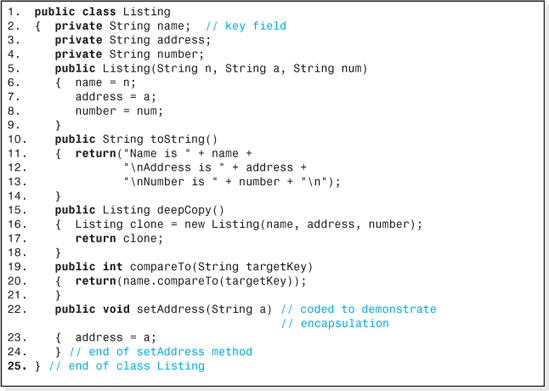
1 public class Listing 2. private String name; / key field private String address; private String number; public Listing(String n, String a, String num) 6 addressa; numbernum; 8 9 10 11. 12 13 14 15 16, public String tostring(O return ("Name is+name+ "VnAddress is . + address + "InNumber is +numbern") public Listing deepCopy () { Listing clone= new Listing (name, address, number); return clone; public int compareTo(String targetKey) return (name.compareTo (targetKey)) 20 public void setAddress (String a) / coded to demonstrate /I encapsulation 23. address a; 24 25. > /I end of class Listing I end of setAddress method
Step by Step Solution
There are 3 Steps involved in it

Get step-by-step solutions from verified subject matter experts
 Study Help