







Question: Cisco Configure basic settings for each switch. a. Configure device name as shown in the topology. b. Configure IP address as listed in Addressing Table.
Cisco Configure basic settings for each switch.
a. Configure device name as shown in the topology.
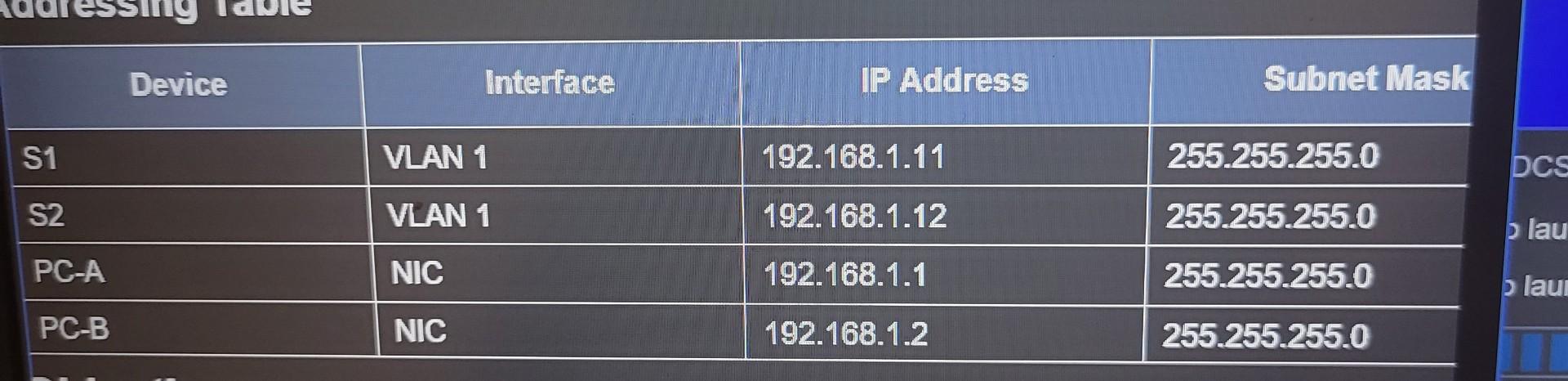
b. Configure IP address as listed in Addressing Table.
c. Assign cisco as the console and vty passwords
Be sure to type this password exactly. Do NOT use any other password.
d. Assign class as the encrypted privileged EXEC password.
Be sure to type this password exactly. Do NOT use any other password. Use only the encrypted version of the command (enable secret) and NOT the unencrypted version of the command (enable password).
\begin{tabular}{|l|l|l|l} \hline \multicolumn{1}{|c|}{ Device } & \multicolumn{1}{c|}{ Interface } & \multicolumn{1}{c|}{ IP Address } & Subnet Mask \\ \hline S1 & VLAN 1 & 192.168.1.11 & 255.255.255.0 \\ \hline S2 & VLAN 1 & 192.168.1.12 & 255.255.255.0 \\ \hline PC-A & NIC & 192.168.1.1 & 255.255.255.0 \\ \hline PC-B & NIC & 192.168.1.2 & 255.255.255.0 \\ \hline \end{tabular}
Step by Step Solution
There are 3 Steps involved in it

Get step-by-step solutions from verified subject matter experts
 Study Help