







Question: Complete the steps below using cell references to given data or previous calculations. In some cases, a simple cell reference is all you need. To
Complete the steps below using cell references to given data or previous calculations. In some cases, a simple
cell reference is all you need. To copypaste a formula across a row or down a column, an absolute cell
reference or a mixed cell reference may be preferred. If a specific Ercel function is to be used, the directions
will specify the use of that function. Do not type in numerical data into a cell or function. Instead, make a
reference to the cell in which the data is found. Make your computations only in the blue cells highlighted
below. In all cases, unless otherwise directed, use the earliest appearance of the data in your formulas,
usually the Giren Data section.
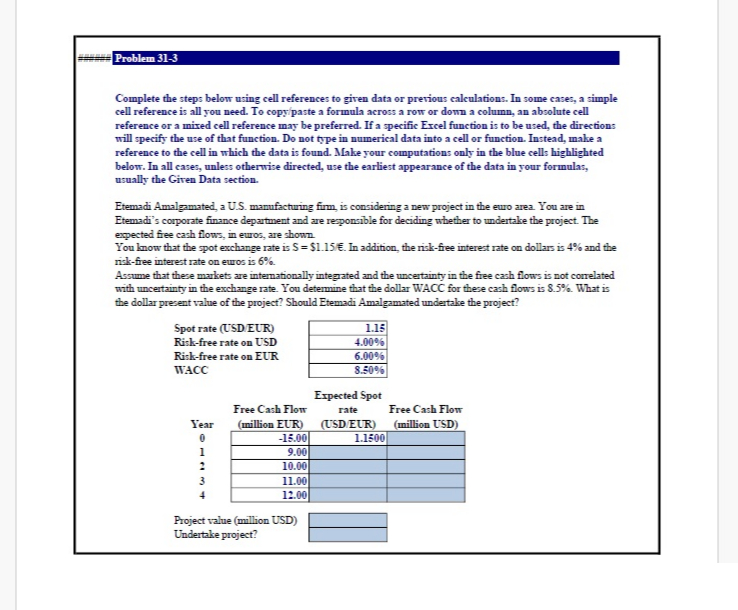
Etemadi Amalgamated, a US manufacturing firm, is considering a new project in the euro area. You are in
Etemadi's corporate finance department and are responsible for deciding whether to undertake the project. The
expected free cash flows, in euros, are shown.
You know that the spot exchange rate is $ f In addition, the riskfiee interest rate on dollars is and the
riskfree interest rate on euros is
Assume that these markets are internationally integrated and the uncertainty in the free cash flows is not conrelated
with uncertainty in the exchange rate. You determine that the dollar WACC for these cash flows is What is
the dollar present value of the project? Should Etemadi Amalgamated undertake the project?
Project value million USD
Undertake project? Requirements
Start Excel completed.
First, calculate the expected spot rate for the next few years by using the formula:
In cell by using cell references, calculate the expected spot rate for year pt Copy cell and
paste it onto cells E:E pt
In cell by using cell references, calculate the free cash flow in USD for year pt Copy cell
and paste it onto cells F:F pt
In cell by using cell references and the function NPV calculate the project value pt
In cell E select from the dropdown whether Etemadi Amalgamated should undertake the project pt
Save the workbook. Close the workbook and then exit Excel. Submit the workbook as directed.
Step by Step Solution
There are 3 Steps involved in it
1 Expert Approved Answer
Step: 1 Unlock

Question Has Been Solved by an Expert!
Get step-by-step solutions from verified subject matter experts
Step: 2 Unlock
Step: 3 Unlock
 Study Help