







Question: Create a Point class with the following requirements: Attributes: o __x: x-coordinate of the point o __y: y-coordinate of the point Two readonly Properties: o
-
Create a Point class with the following requirements:
-
Attributes:
o __x: x-coordinate of the point
o __y: y-coordinate of the point
-
Two readonly Properties:
o x: x-coordinate of the point
o y: y-coordinate of the point
-
A constructor:
o This takes two required arguments: x and y coordinates
-
One Method:
o translate(dx,dy): method moves the point by dx in x-direction and by dy in y- direction (it updates the __x and __y attributes by adding dx and dy to them respectively)
-
-
Create a Rectangle class with the following requirements:
Three static attributes:
o DEFAULT_WIDTH (initialized to 1) o DEFAULT_HEIGHT (initialized to 1) o rectangleCount (initialized to 0, represents the count of rectangles
instantiated so far)
Attributes: o __topLeft: an instance of Point class that denotes the top-left corner of the
rectangle. o __width: width of the rectangle (cannot be negative or 0) o __height: height of the rectangle (cannot be negative or 0)
Three properties: o topLeft: Getter should return the __topLeft attribute and the setter should
update the __topLeft attribute. o width: The getter method should return the __width attribute. Knowing that
__width cannot be negative or 0, the setter should check if client tries to set an
invalid value, if so, the setter should print a meaningful message, and not update the __width attribute. If the new value is valid, the setter should update the __width attribute.
o height: The getter method should return the __height attribute. Knowing that __height cannot be negative or 0, the setter should check if client tries to set an invalid value, if so, the setter should print a meaningful message, and not update the __height attribute. If the new value is valid, setter should update the __height attribute.
Three readonly properties: o bottomRight: Returns a Point object representing the bottom right corner of
the Rectangle. This will be calculated using the topLeft, width and height
property values. o area: returns the area of the rectangle calculated using the width and height
property values. o perimeter: returns the perimeter of the rectangle calculated using the width
and height property values.
-
A constructor:
o This takes three required arguments: An object of Point class representing the top-left corner of the
rectangle. the width of the rectangle the height of the rectangle
Width and height arguments cannot be negative or 0. If either of them is invalid, the constructor should print a meaningful message. In case of error, the constructor should set the value of the attribute to the corresponding static attribute (either DEFAULT_WIDTH or DEFAULT_HEIGHT respectively.)
The constructor should increment the static attribute rectangleCount (which keeps track of the number of rectangles created) by 1.
-
One Method: o translate(dx,dy): method just calls the translate method of the top left point,
effectively moving the rectangle by dx in x-direction and by dy in y-direction.
Gven code:
from rectangle import Rectangle, Point
##Variable to enable/disable assert checks
# Set this to False, if you don't want the checkRectangle and checkValue to be called.
checkAll = True
def printRectangle(rect):
''' Function to print all the properties of a Rectangle object'''
print(f'Top: {rect.topLeft.y}, Left: {rect.topLeft.x}, Width: {rect.width}, Height: {rect.height}, ' +
f'Bottom: {rect.bottomRight.y}, Right: {rect.bottomRight.x}, Area: {rect.area}, Perimeter: {rect.perimeter}')
def checkRectangle(rect, expected):
''' Function to check all the properties of a Rectangle object against the list of values
provided in the second parameter (expected)'''
if (checkAll):
actual = [rect.topLeft.y, rect.topLeft.x, rect.width, rect.height,
rect.bottomRight.y,rect.bottomRight.x, rect.area, rect.perimeter]
for a, b in zip(actual, expected):
assert(a == b)
def checkValue(x, y):
if (checkAll):
assert(x == y)
def main():
starline = "*"*50
dashline = "-"*50
print(starline+" Testing Rectangle and Point classes.")
print(starline)
############################################################################
#data used to create 4 rectangles
# [left,top,width,height]
rawData = [[1,2,3,4],[5,6,7,8],[9,10,0,12],[13,14,15,-4]]
#Create 4 Rectangle objects using rawData
rectangles = []
for k, d in enumerate(rawData):
print(f"Creating Rectangle {k}")
r = Rectangle(Point(d[0],d[1]),d[2],d[3])
rectangles.append(r)
############################################################################
print(starline)
print("Checking rectangle count, should be 4.")
print("Rectangle count: ", Rectangle.rectangleCount)
checkValue(Rectangle.rectangleCount, 4)
print(starline)
############################################################################
#Process Rectangles one by one and print the properties before and after
############################################################################
print("Rectangles[0] before processing.")
printRectangle(rectangles[0])
checkRectangle(rectangles[0], [2,1,3,4,6,4,12,14])
print(dashline)
#Change the width and height of rectagnles[0]
rectangles[0].width *= 2
rectangles[0].height *= 2
print("Rectangles[0] after doubling width and height.")
printRectangle(rectangles[0]) # Should show width and height doubled
checkRectangle(rectangles[0],[2,1,6,8,10,7,48,28])
print(starline)
############################################################################
#Translate rectangles[1]
print("Rectangles[1] before processing.")
printRectangle(rectangles[1])
checkRectangle(rectangles[1], [6,5,7,8,14,12,56,30])
print(dashline)
rectangles[1].translate(10,10)
print("Rectangles[1] after translating by (10,10).")
printRectangle(rectangles[1])# Should show rectangle top-left is moved
checkRectangle(rectangles[1], [16,15,7,8,24,22,56,30])
print(starline)
############################################################################
print("Rectangles[2] before processing.")
printRectangle(rectangles[2])
checkRectangle(rectangles[2],[10,9,1,12,22,10,12,26])
print(dashline)
#Attempt to set the width of rectagnles[2] to -2
rectangles[2].width = -2
print("Rectangles[2] after attempting to set width to -2.")
printRectangle(rectangles[2])# Should show error message and width should be unchanged
checkRectangle(rectangles[2],[10,9,1,12,22,10,12,26])
print(starline)
############################################################################
# Reset width and height of Rectangle[3] to 15 and 16
print("Rectangles[3] before processing.")
printRectangle(rectangles[3])
checkRectangle(rectangles[3], [14,13,15,1,15,28,15,32])
print(dashline)
rectangles[3].width = 15
rectangles[3].height = 16
print("Rectangles[3] after resetting width and height to 15 and 16.")
printRectangle(rectangles[3])# Should show width of 15 and height of 16
checkRectangle(rectangles[3],[14,13,15,16,30,28,240,62])
print(starline)
############################################################################
print("Thanks for your patience! Goodbye")
############################################################################
if (__name__ == "__main__"):
main()
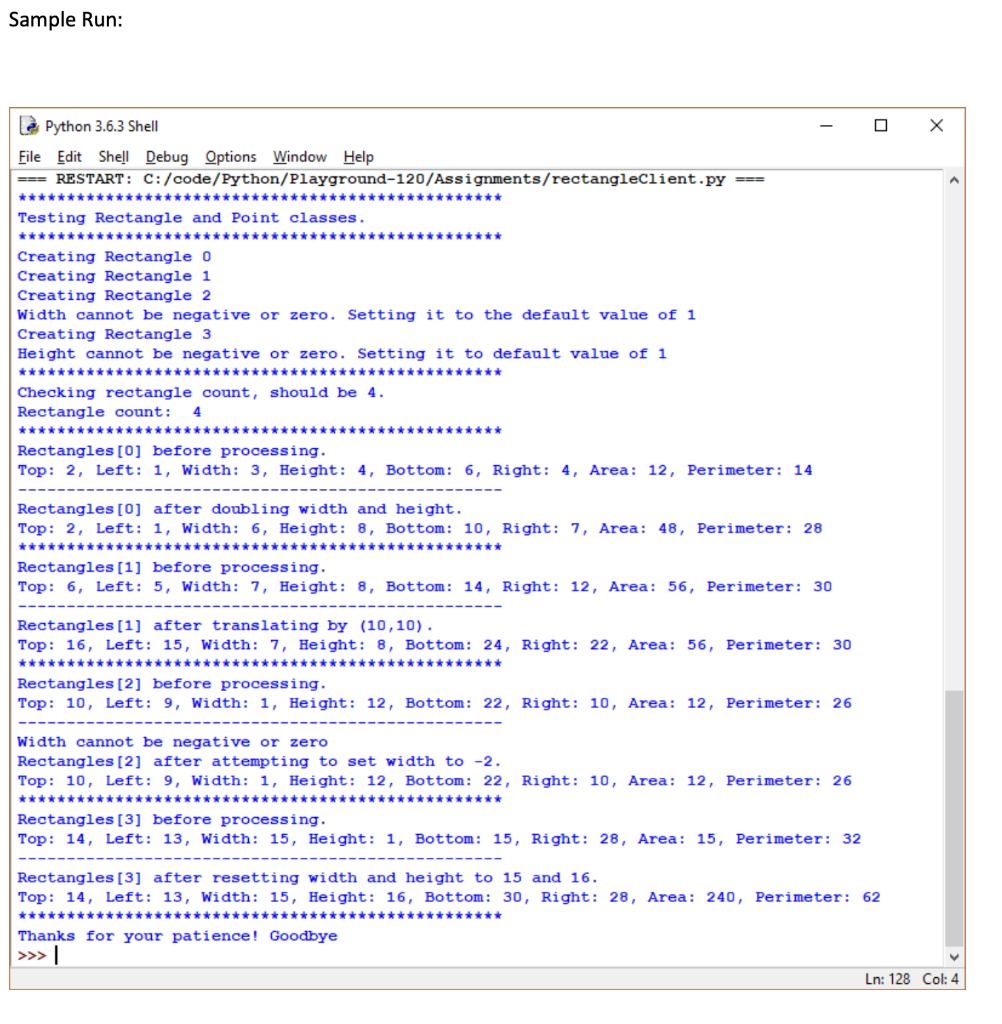
Sample Run: - X l Python 3.6.3 Shell File Edit Shell Debug Options Window Help === RESTART: C:/code/Python/Playground-120/Assignments/rectangleClient.py === **** Testing Rectangle and Point classes. ***** Creating Rectangle O Creating Rectangle 1 Creating Rectangle 2 Width cannot be negative or zero. Setting it to the default value of 1 Creating Rectangle 3 Height cannot be negative or zero. Setting it to default value of 1 ******************* ***** Checking rectangle count, should be 4. Rectangle count: 4 ******** ******** Rectangles [0] before processing. Top: 2, Left: 1, Width: 3, Height: 4, Bottom: 6, Right: 4, Area: 12, Perimeter: 14 Rectangles [0] after doubling width and height. Top: 2, Left: 1, Width: 6, Height: 8, Bottom: 10, Right: 7, Area: 48, Perimeter: 28 Rectangles [1] before processing. Top: 6, Left: 5, Width: 7, Height: 8, Bottom: 14, Right: 12, Area: 56, Perimeter: 30 Rectangles[1] after translating by (10,10). Top: 16, Left: 15, Width: 7, Height: 8, Bottom: 24, Right: 22, Area: 56, Perimeter: 30 Rectangles [2] before processing. Top: 10, Left: 9, Width: 1, Height: 12, Bottom: 22, Right: 10, Area: 12, Perimeter: 26 Width cannot be negative or zero Rectangles [2] after attempting to set width to -2. Top: 10, Left: 9, Width: 1, Height: 12, Bottom: 22, Right: 10, Area: 12, Perimeter: 26 ******* ***** Rectangles [3] before processing. Top: 14, Left: 13, Width: 15, Height: 1, Bottom: 15, Right: 28, Area: 15, Perimeter: 32 Rectangles [3] after resetting width and height to 15 and 16. Top: 14, Left: 13, Width: 15, Height: 16, Bottom: 30, Right: 28, Area: 240, Perimeter: 62 *** Thanks for your patience! Goodbye Ln: 128 Col: 4 Sample Run: - X l Python 3.6.3 Shell File Edit Shell Debug Options Window Help === RESTART: C:/code/Python/Playground-120/Assignments/rectangleClient.py === **** Testing Rectangle and Point classes. ***** Creating Rectangle O Creating Rectangle 1 Creating Rectangle 2 Width cannot be negative or zero. Setting it to the default value of 1 Creating Rectangle 3 Height cannot be negative or zero. Setting it to default value of 1 ******************* ***** Checking rectangle count, should be 4. Rectangle count: 4 ******** ******** Rectangles [0] before processing. Top: 2, Left: 1, Width: 3, Height: 4, Bottom: 6, Right: 4, Area: 12, Perimeter: 14 Rectangles [0] after doubling width and height. Top: 2, Left: 1, Width: 6, Height: 8, Bottom: 10, Right: 7, Area: 48, Perimeter: 28 Rectangles [1] before processing. Top: 6, Left: 5, Width: 7, Height: 8, Bottom: 14, Right: 12, Area: 56, Perimeter: 30 Rectangles[1] after translating by (10,10). Top: 16, Left: 15, Width: 7, Height: 8, Bottom: 24, Right: 22, Area: 56, Perimeter: 30 Rectangles [2] before processing. Top: 10, Left: 9, Width: 1, Height: 12, Bottom: 22, Right: 10, Area: 12, Perimeter: 26 Width cannot be negative or zero Rectangles [2] after attempting to set width to -2. Top: 10, Left: 9, Width: 1, Height: 12, Bottom: 22, Right: 10, Area: 12, Perimeter: 26 ******* ***** Rectangles [3] before processing. Top: 14, Left: 13, Width: 15, Height: 1, Bottom: 15, Right: 28, Area: 15, Perimeter: 32 Rectangles [3] after resetting width and height to 15 and 16. Top: 14, Left: 13, Width: 15, Height: 16, Bottom: 30, Right: 28, Area: 240, Perimeter: 62 *** Thanks for your patience! Goodbye Ln: 128 Col: 4
Step by Step Solution
There are 3 Steps involved in it

Get step-by-step solutions from verified subject matter experts
 Study Help