





Question: Create an Earned Value Management chart in Microsoft Project based on the picture Use a project start date of 3/30/2020 Use the tasks, summaries, and

Create an Earned Value Management chart in Microsoft Project based on the picture
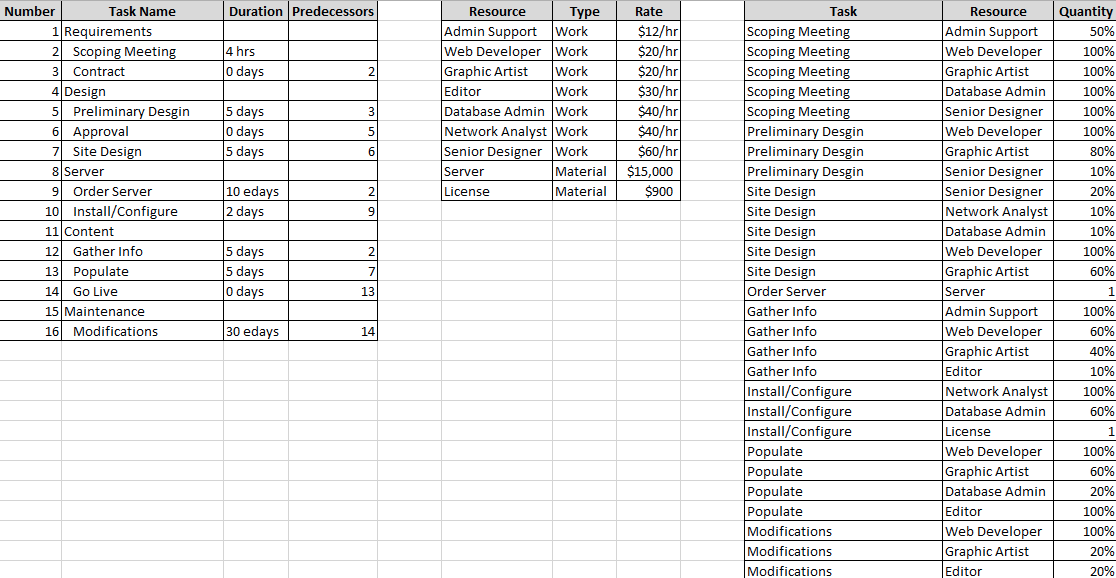
Create an Earned Value Management chart in

  • Use a project start date of 3/30/2020
  • Use the tasks, summaries, and milestones as shown
  • Create a resource sheet with the resource values as shown
  • Assign resources to the tasks as shown
  • Verify the Cost and Work values (in the Cost and Work tables)
  • Set the Project Baseline
  • Verify that the Cost and Work baseline values are copied over
  • Make some changes to a few of the duration/start/end dates along the critical path (your choice)
  • Populate the percent complete of all items with an "as of" 4/7/2020 (exact values are your choice)
  • Generate an Earned Value Report
Duration Predecessors 4 hrs o days Resource Type Admin Support Work Web Developer Work Graphic Artist Work Editor Work Database Admin Work Network Analyst Work Senior Designer Work Server Material License Material Rate $12/hr $20/hr $20/hr $30/hr $40/hr $40/hr $60/hr $15,000 $900 Quantity 50% 100% 100% 100% 100% 100% Number Task Name 1 Requirements 2 Scoping Meeting 3 Contract 4 Design 5 Preliminary Desgin 6 Approval 7 Site Design 8 Server 9 Order Server 10 Install/Configure 11 Content 12 Gather Info 13 Populate 14 Go Live 15 Maintenance 16 Modifications 5 days 0 days 5 days 80% 10 edays 2 days 10% 20% 10% 10% 100% 60% 5 days 5 days 0 days Task Scoping Meeting Scoping Meeting Scoping Meeting Scoping Meeting Scoping Meeting Preliminary Desgin Preliminary Desgin Preliminary Desgin Site Design Site Design Site Design Site Design Site Design Order Server Gather Info Gather Info Gather Info Gather Info Install/Configure Install/Configure Install/Configure Populate Populate Populate Populate Modifications Modifications Modifications Resource Admin Support Web Developer Graphic Artist Database Admin Senior Designer Web Developer Graphic Artist Senior Designer Senior Designer Network Analyst Database Admin Web Developer Graphic Artist Server Admin Support Web Developer Graphic Artist Editor Network Analyst Database Admin License Web Developer Graphic Artist Database Admin Editor Web Developer Graphic Artist Editor 30 edays 100% 60% 40% 10% 100% 60% 100% 60% 20% 100% 100% 20% 20% Duration Predecessors 4 hrs o days Resource Type Admin Support Work Web Developer Work Graphic Artist Work Editor Work Database Admin Work Network Analyst Work Senior Designer Work Server Material License Material Rate $12/hr $20/hr $20/hr $30/hr $40/hr $40/hr $60/hr $15,000 $900 Quantity 50% 100% 100% 100% 100% 100% Number Task Name 1 Requirements 2 Scoping Meeting 3 Contract 4 Design 5 Preliminary Desgin 6 Approval 7 Site Design 8 Server 9 Order Server 10 Install/Configure 11 Content 12 Gather Info 13 Populate 14 Go Live 15 Maintenance 16 Modifications 5 days 0 days 5 days 80% 10 edays 2 days 10% 20% 10% 10% 100% 60% 5 days 5 days 0 days Task Scoping Meeting Scoping Meeting Scoping Meeting Scoping Meeting Scoping Meeting Preliminary Desgin Preliminary Desgin Preliminary Desgin Site Design Site Design Site Design Site Design Site Design Order Server Gather Info Gather Info Gather Info Gather Info Install/Configure Install/Configure Install/Configure Populate Populate Populate Populate Modifications Modifications Modifications Resource Admin Support Web Developer Graphic Artist Database Admin Senior Designer Web Developer Graphic Artist Senior Designer Senior Designer Network Analyst Database Admin Web Developer Graphic Artist Server Admin Support Web Developer Graphic Artist Editor Network Analyst Database Admin License Web Developer Graphic Artist Database Admin Editor Web Developer Graphic Artist Editor 30 edays 100% 60% 40% 10% 100% 60% 100% 60% 20% 100% 100% 20% 20%

Step by Step Solution

There are 3 Steps involved in it

1 Expert Approved Answer
Step: 1 Unlock blur-text-image

Question Has Been Solved by an Expert!

Get step-by-step solutions from verified subject matter experts

Step: 2 Unlock
Step: 3 Unlock

Students Have Also Explored These Related General Management Questions!