







Question: Exercise 1) Create a new folder B07-Exercise containing an HTML page reserve.html. The HTML page contains a form as in the screenshot below. a) The
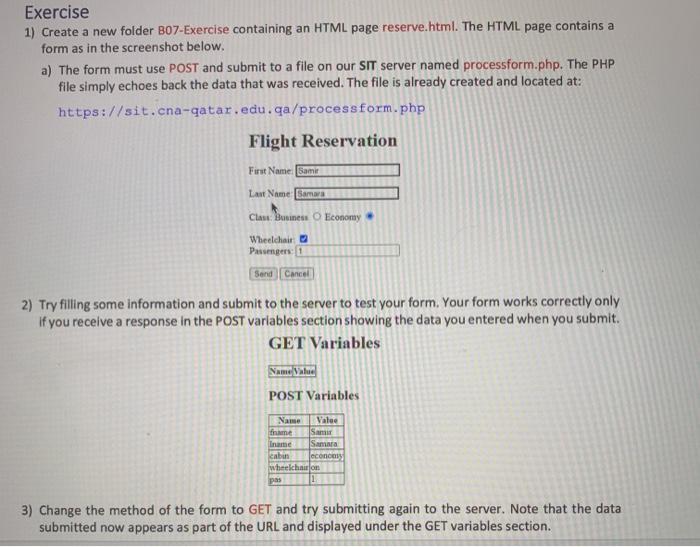
Exercise 1) Create a new folder B07-Exercise containing an HTML page reserve.html. The HTML page contains a form as in the screenshot below. a) The form must use POST and submit to a file on our SIT server named processform.php. The PHP file simply echoes back the data that was received. The file is already created and located at: https://sit.cna-qatar.edu.qa/processform.php Flight Reservation First Name: Samir Last Name Samara Claw Business Economy Wheelchair Pesumgers: Send Cancel 2) Try filling some information and submit to the server to test your form. Your form works correctly only if you receive a response in the POST variables section showing the data you entered when you submit. GET Variables Name Value POST Variables Name Valee frame Sam name Samara cabin economy wheelchaillon pas 3) Change the method of the form to GET and try submitting again to the server. Note that the data submitted now appears as part of the URL and displayed under the GET variables
Step by Step Solution
There are 3 Steps involved in it

Get step-by-step solutions from verified subject matter experts
 Study Help