Question: File Edit Selection View Go Run Terminal Help lab4.html - Visi lab4.html x B c> Users > Robert > Desktop > Lab 4 > >
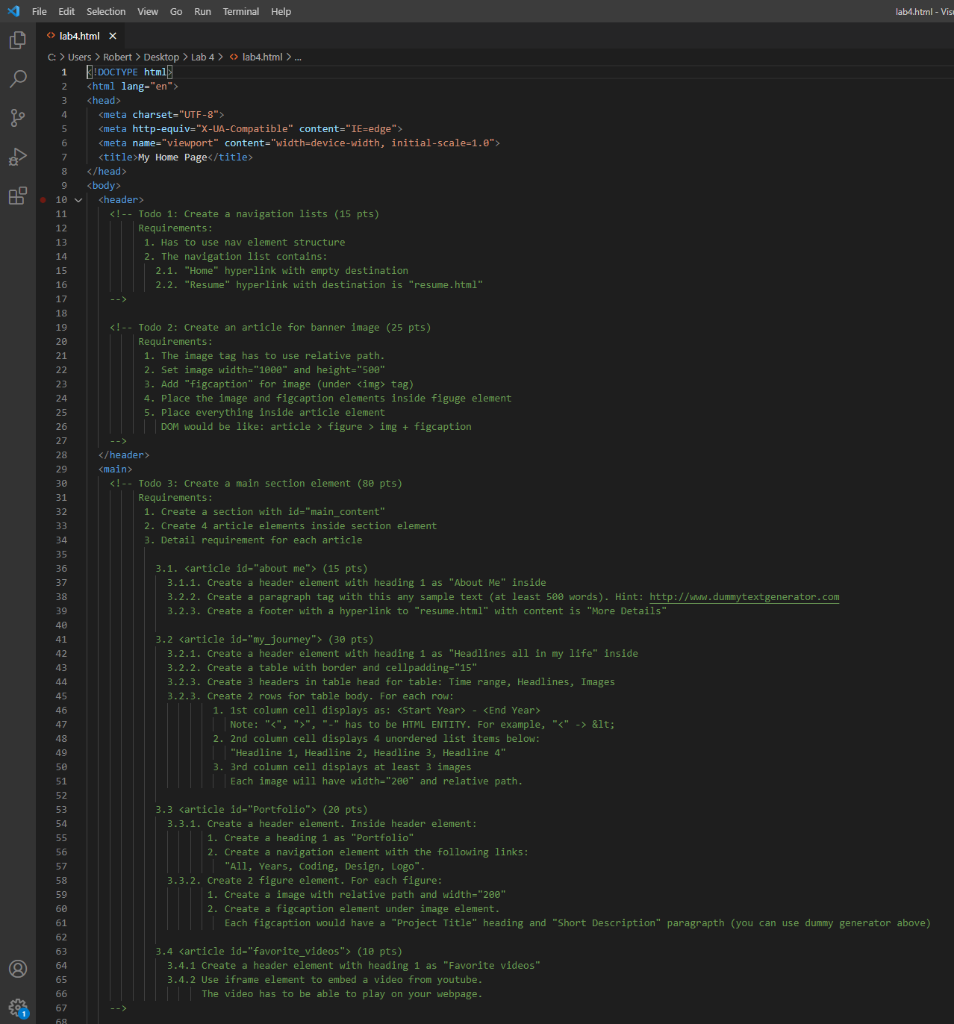
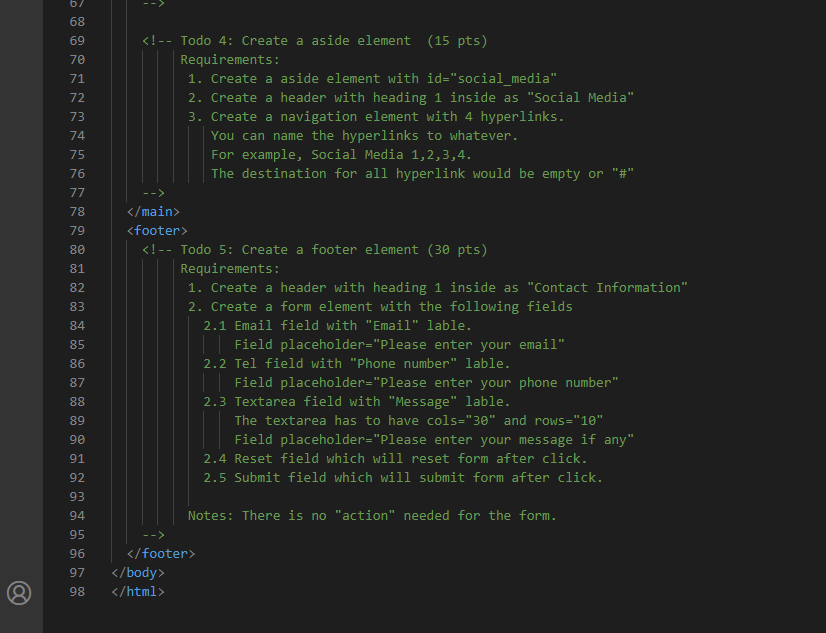
File Edit Selection View Go Run Terminal Help lab4.html - Visi lab4.html x B c> Users > Robert > Desktop > Lab 4 > > lab4.html > ... 1 E: DOCTYPE html| 2 3 5 6 7
My Home Page 8 9 10 V 11 48 41 42 43 44 45 46 3.2 (30 pts) 3.2.1. Create a header element with heading 1 as "Headlines all in my life" inside 3.2.2. Create a table with border and cellpadding="15" 3.2.3. Create 3 headers in table head for table: Time range, Headlines, Images 3.2.3. Create 2 rows for table body. For each row: 1. 1st column cell displays as: - Note: "", "." has to be HTML ENTITY. For example, " (20 pts) 3.3.1. Create a header element. Inside header element: 1. Create a heading 1 as "Portfolio" 2. Create a navigation element with the following links: "All, Years, Coding, Design, Logo". 3.3.2. Create 2 figure element. For each figure: 1. Create a image with relative path and width="200" 2. Create a figcaption element under image element. Each figcaption would have a "Project Title" heading and "Short Description" paragrapth (you can use dummy generator above) 62 63 64 65 66 67 68 3.4 (10 pts) 3.4.1 Create a header element with heading 1 as "Favorite videos" 3.4.2 Use iframe element to embed a video from youtube. The video has to be able to play on your webpage. 6/ 68 69 70 71 72 73 74 97 98 ac File Edit Selection View Go Run Terminal Help lab4.html - Visi lab4.html x B c> Users > Robert > Desktop > Lab 4 > > lab4.html > ... 1 E: DOCTYPE html| 2 3 5 6 7 My Home Page 8 9 10 V 11 48 41 42 43 44 45 46 3.2 (30 pts) 3.2.1. Create a header element with heading 1 as "Headlines all in my life" inside 3.2.2. Create a table with border and cellpadding="15" 3.2.3. Create 3 headers in table head for table: Time range, Headlines, Images 3.2.3. Create 2 rows for table body. For each row: 1. 1st column cell displays as: - Note: "", "." has to be HTML ENTITY. For example, " (20 pts) 3.3.1. Create a header element. Inside header element: 1. Create a heading 1 as "Portfolio" 2. Create a navigation element with the following links: "All, Years, Coding, Design, Logo". 3.3.2. Create 2 figure element. For each figure: 1. Create a image with relative path and width="200" 2. Create a figcaption element under image element. Each figcaption would have a "Project Title" heading and "Short Description" paragrapth (you can use dummy generator above) 62 63 64 65 66 67 68 3.4 (10 pts) 3.4.1 Create a header element with heading 1 as "Favorite videos" 3.4.2 Use iframe element to embed a video from youtube. The video has to be able to play on your webpage. 6/ 68 69 70 71 72 73 74 97 98 ac









 Study Help